TS-061 Version 05/05 Page 4 of 4
Preparing the Appliance for Use
Unpack the appliance and place it on a sturdy level surface. It is
recommended that the packaging be retained for secure movement/transport.
The appliance operates at its optimum performance in a normal room
temperature of 20º C.
The refrigerant inside the appliance must have time to settle following
transportation and a minimum stabilisation period of three hours is
recommended prior to switching on the appliance.
There are two ventilation grilles in the appliance cover, one in the lower left
hand side and one in the upper rear panel. To ensure correct appliance
operation these grilles must not be obstructed. A gap of at least 10 cm. (4
inches) must be maintained between the appliance sides, rear and top and
other appliances or walls.
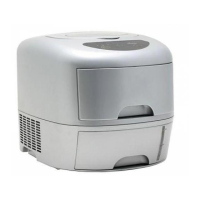
Remove the Water Tank (the lower of the two removable drawers on the
appliance front face) and pour fresh drinkable mains tap water into the tank
through the larger rectangular hole in the Water Tank lid and fill the tank up to
the MAX line of the Water Level Indicator on the front right of the water tank.
Commercially bottled still drinking water may be used if desired. Replace the
Water Tank fully home into its recess.
Ensure the Ice Cube Drawer is fully home in its recess and the Cover with
Window is closed as the freezing element gets very cold during operation.
Appliance Operation
Plug the appliance mains electricity lead in to a suitable supply and switch on
the ON/OFF Switch situated in the lower right hand side panel. The ON/OFF
Switch is illuminated and will light up. The appliance should be positioned for
easy access to the ON/OFF switch and mains plug to facilitate rapid switch off
and appliance isolation when required.
The appliance may bleep several times whilst the internal components reset
themselves. If this does happen the bleeping should last no longer than 20
seconds. If bleeping continues for a longer period withdraw both the Water
Tank and the Ice Cube Drawer slightly and re-insert them ensuring they are
fully home within their recesses. When the Water Tank is withdrawn the
WATERTANK indicator should change from green to red or red/orange, and
when re-inserted the indicator should go green. If the WATERTANK indicator
stays red or red/orange this could mean that the internal water level detector
is not operating correctly. Remove the Water Tank and check that the black
float in the transparent level indicator on the rear right hand side of the tank is
free, ie that the float is not stuck at the bottom of the detector. If the float is
stuck gently tap the indicator to free the float. Replace the Water Tank.



 To Next Page