CTG2000 / CTG3000 / CTG5000 4 09/20/19
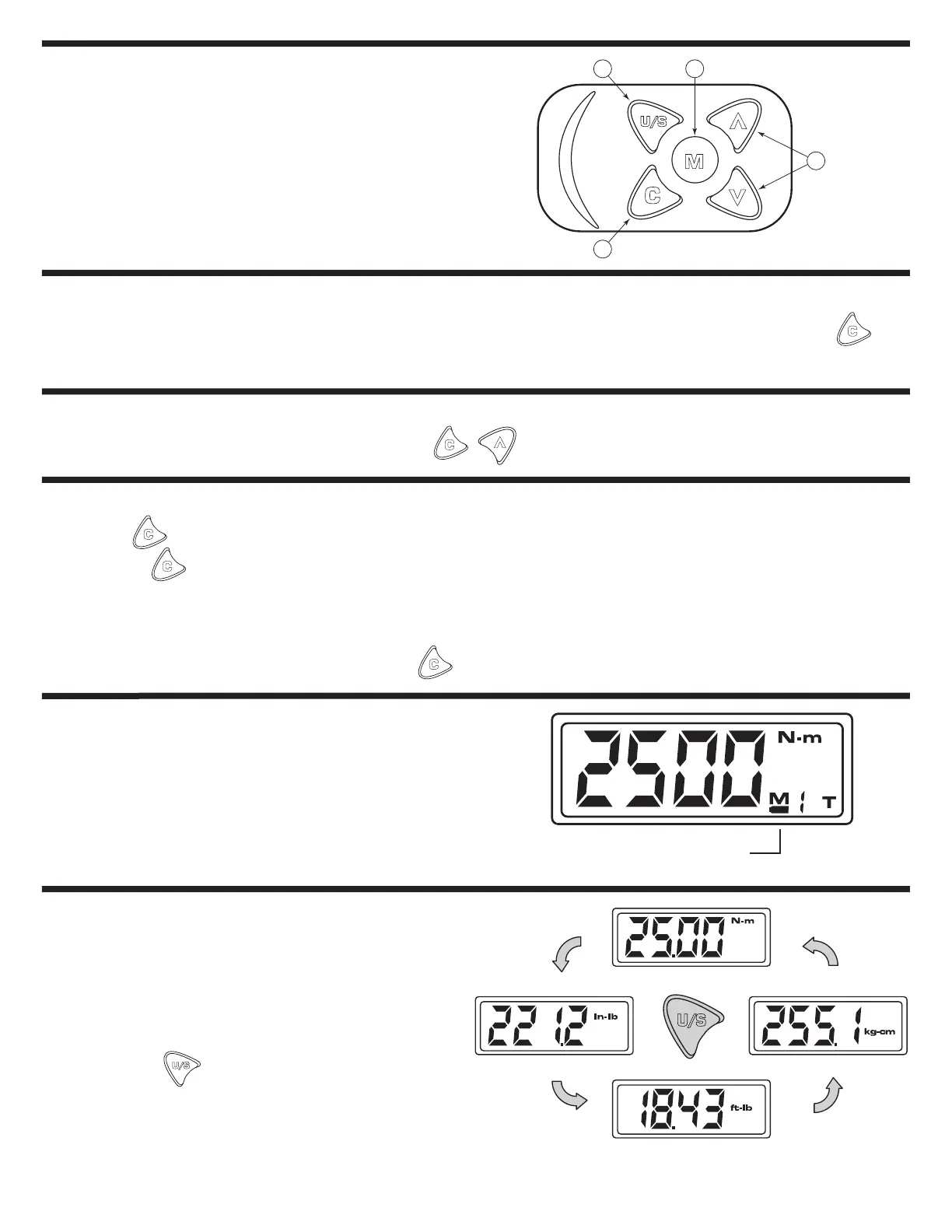
• The wrench will automatically go into "Sleep" mode after being idle for 5 minutes to save power. Press
to wake from "Sleep" mode.
• If the wrench does not function normally, Press at the same time to reset the wrench.
• Press to power on the digital torque wrench.
• Pressing can also be used to reset the torque wrench before use.
NOTE:
If an external force is being applied to the torque wrench during power-on/reset or wake up period, an initial torque
will be shown in the display. Some or all the lights will illuminate and the wrench will sound a continuous alarm tone.
To clear the display and stop the alarm press the button.
• If the battery voltage is below 2.3 volts, the wrench
will highlight the battery symbol and after a few
moments turn off.
The torque wrench displays 4 different units of measure:
1. Newton meters (N-m)
2. Inch Pounds (in-lb)
3. Foot Pounds (ft-lb)
4. Kilogram Centimeter (kg-cm)
Pressing the button allows you to cycle
sequentially though each of these units.
Note: The displays for CTG3000 3/8" Dr. and CTG5000 1/2" Dr.
models show one less decimal place in the display.
1
4
32
1. Power On/Clear
2. Unit/Setting
3. Memory (Stores up to 9 values)
4. Up/Down
SET UP
SLEEP MODE
SLEEP MODE
POWER ON / RESET
LOW BATTERY VOLTAGE PROTECTION
SELECTING UNITS OF MEASURE
Battery Indicator
CTG2000 - 1/4" Dr. Display
N-m
In-lb
Ft-lb
Kg-cm


 To Next Page