12
Defrost
Light
Conv
Bake
MAX Bake
Broil
Conv
Pizza
Broil
High
Low
Broil
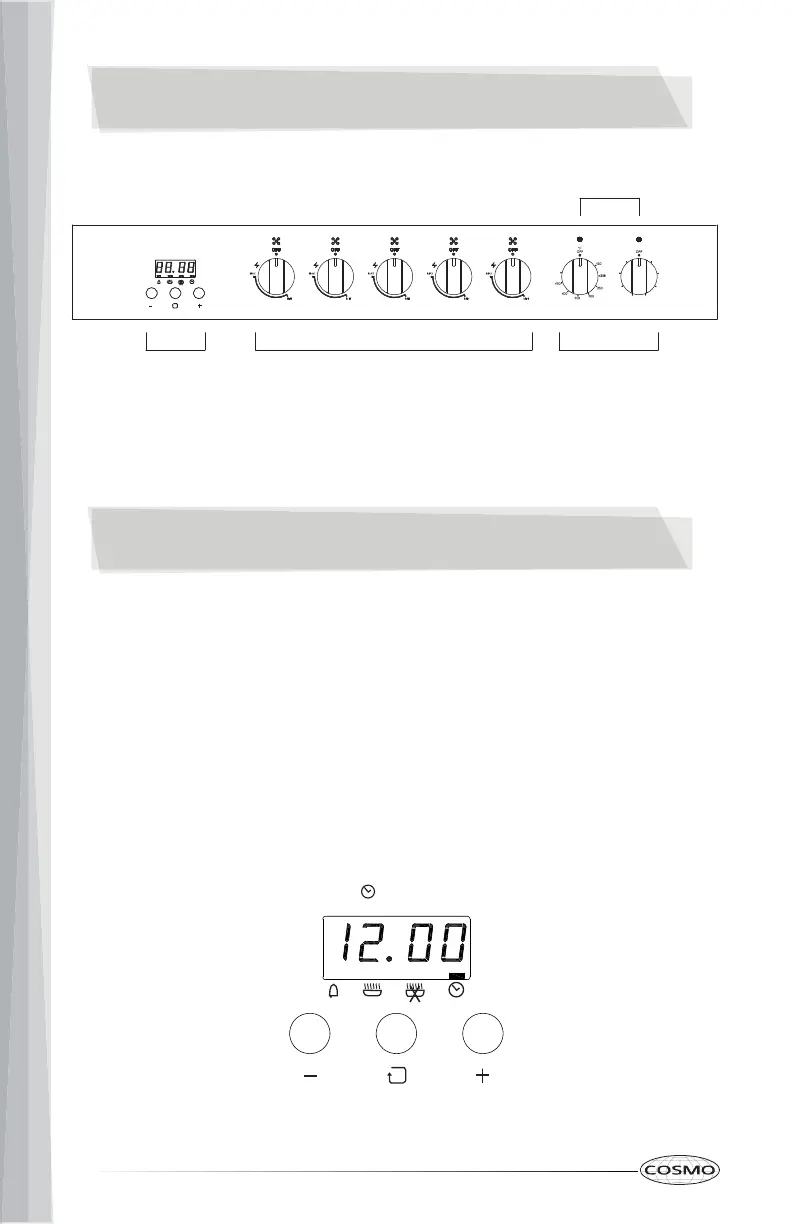
Surface Burner
Controls
Oven
Controls
LED Indicators
Clock/Timer
Controls
CONTROL PANEL
IncreaseDecrease Function
CLOCK & TIMER
SETTING THE CLOCK AND TIMER
IMPORTANT: Clock must be set in order for the timed oven functions to
work.
Your model has a digital display clock with 3 control buttons.
NOTE: In the event of a power failure, all settings including the clock time set
will be lost. When the power is returned, clock must be set again.
TO SET THE TIME OF DAY
When the power is connected or after a power outage, the screen will display
12.00 and the indicator bar above "Set Clock" will blink.


 To Next Page