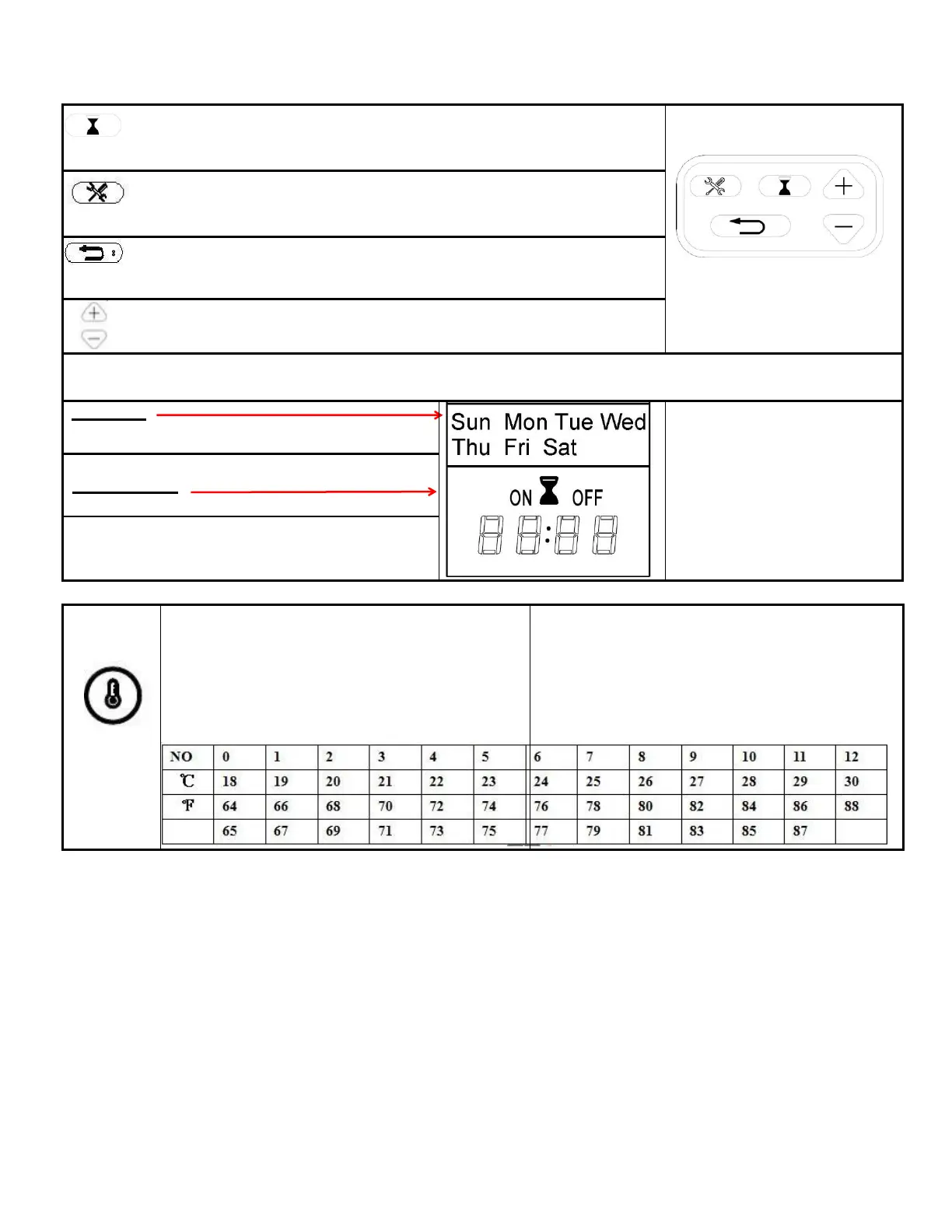
TIMER SETTINGS ON REMOTE CONTROL
: Timer: Displays current day, time, and week.
Press to enter or confirm timer settings.
Settings: Press to move to next step (use with Timer button).
Press to confirm week timer.
: Back: Press to clear timer settings. Press to return to the previous
step (use with Settings button).
:Up and Down (use with Settings button).
Weekday
Mon, Tues, Wed, Thurs, Fri, Sat, Sun
Note: The functions can only
be adjusted when the related
letters or digits are flashing.
Note:Calibrate the timer to
current time before the
weekly settings.
Current Time / Timer From 00:00 to 24:00
NOTE: 00-12:00 is AM / 13:00-24:00 is PM
TEMPERATURE button: Turns heater on and
off.
P
NOTE: Press & Hold the button for 5 seconds,
the temperature setting will switch from ℃ to ℉.
Same way from ℉ to ℃。
1. Press once: Indicator lights up.
Temperature goes to 18 ℃
2. Press again: until desired setting is
reached. Digital display shows setting
circles as below:


 To Next Page