COWON D2+
15
Basic Operations
7. Record Mode
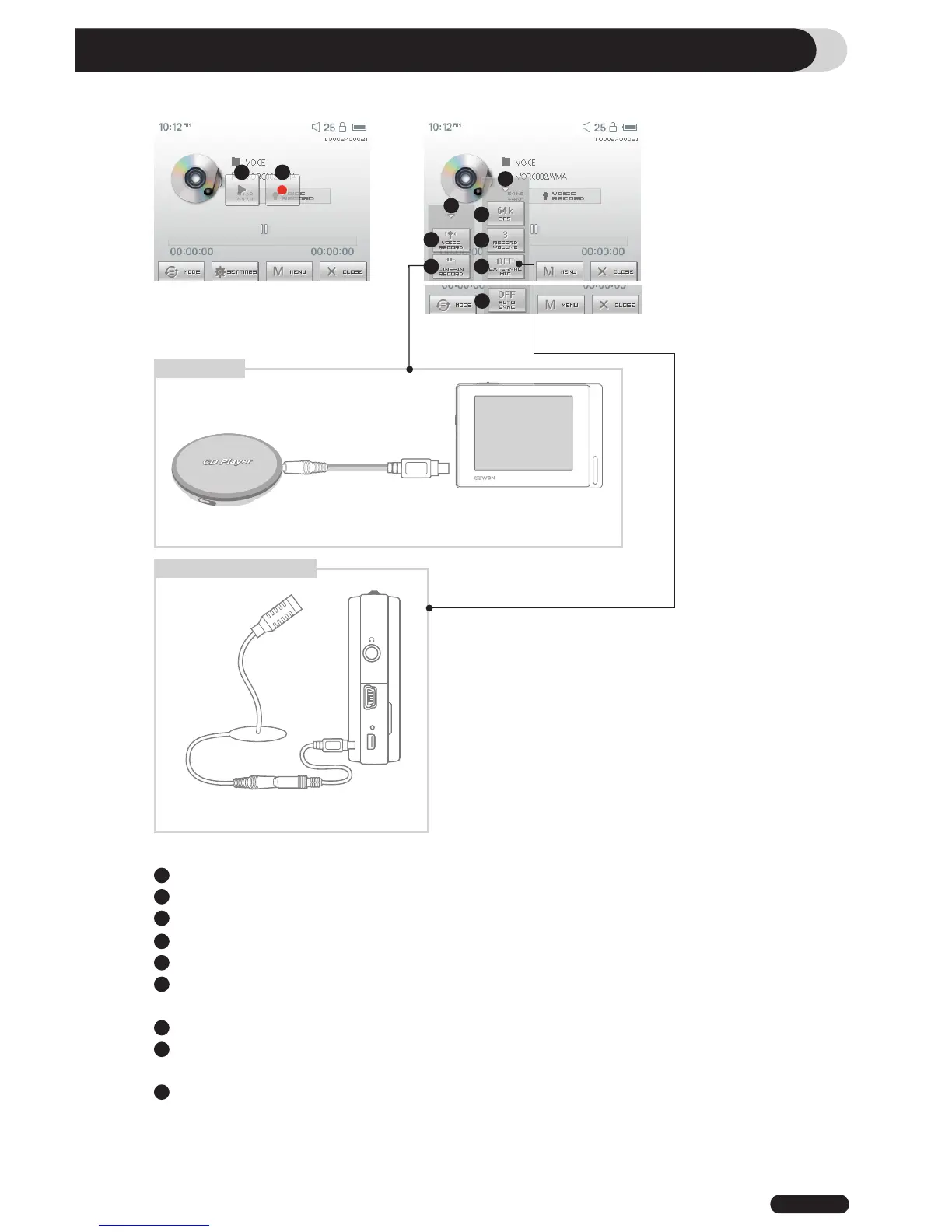
Plays back recorded files
Starts recording
Closes the setting screen
Records voice
Records through a Line-In connection
Selects the sound quality of the recording. Higher bps provides better sound quality but requires
larger file size.
Sets the volume level during recording.
Sets use of external microphone. Only stereo pin microphone should be used. (This setting can be
selected on in Voice Record mode)
Sets the duration for silent intervals before it creates a new file for recording. It automatically detects
the silent intervals in incoming sound and creates a new file when the silent interval exceeds the
specified duration. (*This setting can be selected only in Line-In Record mode)
1
2
3
4
5
6
7
8
9
1 2
3
4
5
6
7
8
9
3
Line-In record
※ Line-In Cable, Line-In Cable Converter (Optional)
Rec via external microphone
※ Line-In Cable Converter (Optional)



 To Next Page