ICON LIBRARY
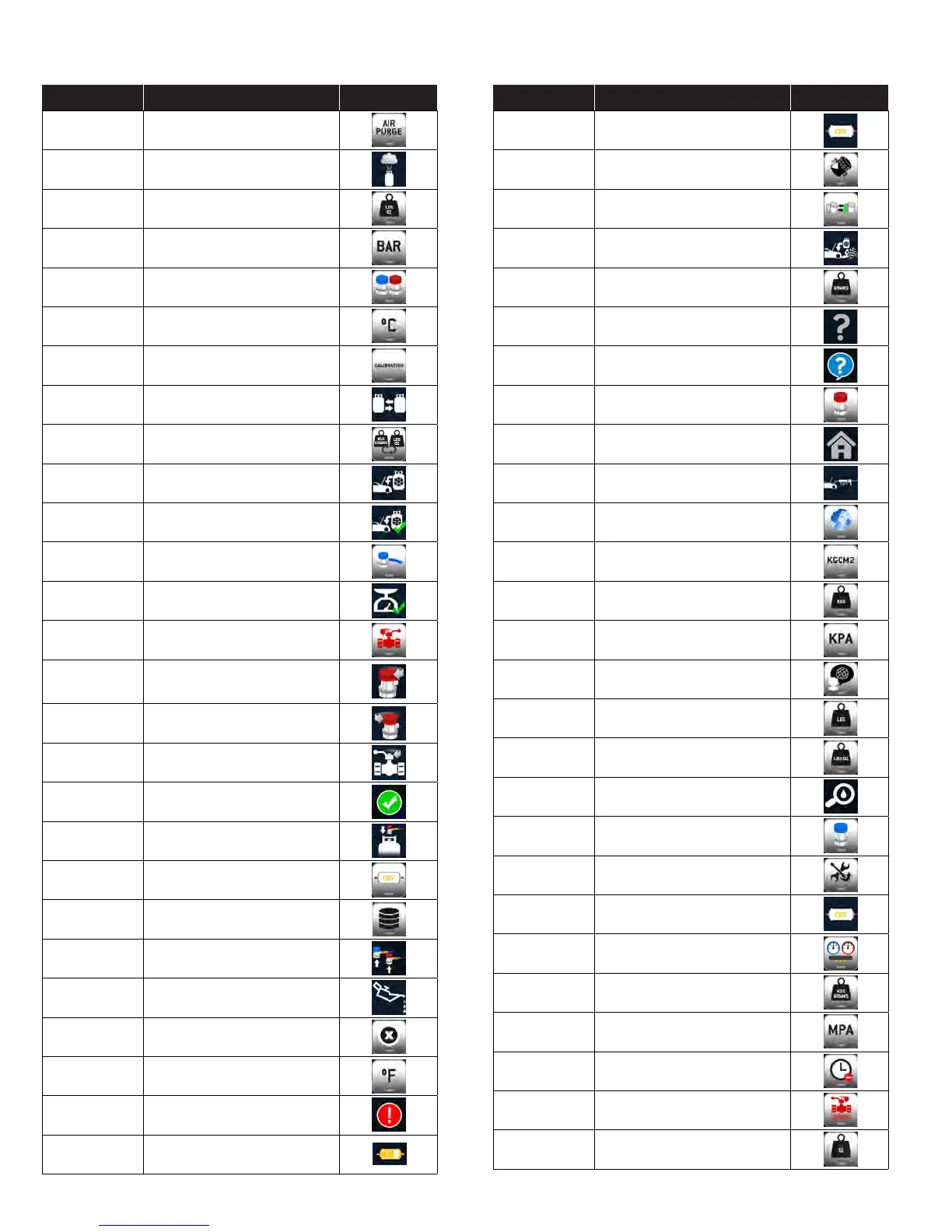
ICON NAME DESCRIPTION IMAGE
AIR PURGE
Tap to select AIR PURGE
AIR PURGE
The AIR PURGE icon indicates that the
unit is purging air from the tank
AMERICAN
Tap to select AMERICAN Units
BAR
Tap to select BAR
BOTH COUPLERS
Tap to select BOTH couplers
° C
Tap to select CELSIUS
CALIBRATION
Tap to select CALIBRATION
CHANGE TANK
The CHANGE TANK icon notifies the
user to change the tank
CHANGE UOM
Tap to change the unit of measurement
CHARGE
Tap to perform a CHARGE service
CHARGE
COMPLETE
Indicates that the CHARGE service is
COMPLETE
Charge Low Side
Press to select Low Side Charging
CHECK SCALE
COMPLETE
The SCALE CHECK COMPLETE notifies
users that a scale check is complete
Close Ball vale
Press to close ball valve
CLOSE COUPLER
The CLOSE COUPLER icon notifies
the user to close the coupler during a
recharge service
CLOSE HP
Notifies the user to CLOSE HP valve
during a CHARGE service
CLOSEVALVE
Notifies user to CLOSE VALVE
COMPLETE
Indicates that a given operation is
COMPLETE
CONNECT HP
Notifies user to connect HP port
during tank refill
CPS FILTER
CPS FILTER
DATABASE
Tap to access the vehicle DATABASE
DISCONNECT
COUPLERS
Notifies the user to DISCONNECT
COUPLERS
DRAIN OIL
The DRAIN OIL icon notifies the user
that oil is draining from the vehicle
ERROR
Displays when there is an ERROR
° F
Tap to select FARENHEIGHT
FAILED
Indicates that a given operation FAILED
FILTER
Displays the current status of the filter
life.
ICON NAME DESCRIPTION IMAGE
FILTER CHANGE
Displays when a filter change is
required
FILTER CHANGE
Tap to CHANGE FILTER
FILTER CHANGE
Tap to CHANGE FILTER
FULL CYCLE
COMPLETE
Indicates that the FULL CYCLE service
is COMPLETE
GRAMS
Tap to select GRAMS as UOM
HELP
Tap to launch the HELP Menu
HELP
Provides Firmware version
HIGH COUPLER
Tap to select the HIGH SIDE coupler
only
HOME
Tap to launch the HOME screen
INJECTION
Notifies the user to INJECT oil and/or
dye at this point in the service
INTERNATIONAL
TAP to select INTERNATIONAL UOM’s
KGCM2
Tap to select KGCM2
KGS
Tap to select KGS as UOM
KPA
Tap to select KPA
LANGUAGE
Tap to select LANGUAGE
LBS
Tap to select LBS as UOM
LBS:OZ
Tap to select LBS:OZ as UOM
LEAKCHECK
Indicates that a LEAK CHECK is being
performed
LOW COUPLER
Tap to select the LOW SIDE coupler
only
MAINTENANCE
Tap to launch the MAINTENANCE
menu
MAINTENANCE
FILTER CHANGE
Tap to CHANGE FILTER
MANIFOLD
Tap to launch the MANIFOLD function
METRIC
Tap to select METRIC UOM’s
MPA
Tap to select MPA
NOT NOW
Tap to postpone suggested operation
Open Ball Valve
Press to Open Ball Valve
OZ
Tap to select OZ as UOM


 To Next Page