CRADLEPOINT COR | USER MANUAL Firmware ver. 5.0.0
© 2013 CRADLEPOINT, INC. PLEASE VISIT HTTP://KNOWLEDGEBASE.CRADLEPOINT.COM/ FOR MORE HELP AND RESOURCES PAGE 154
7.4.1 Data Usage Rules
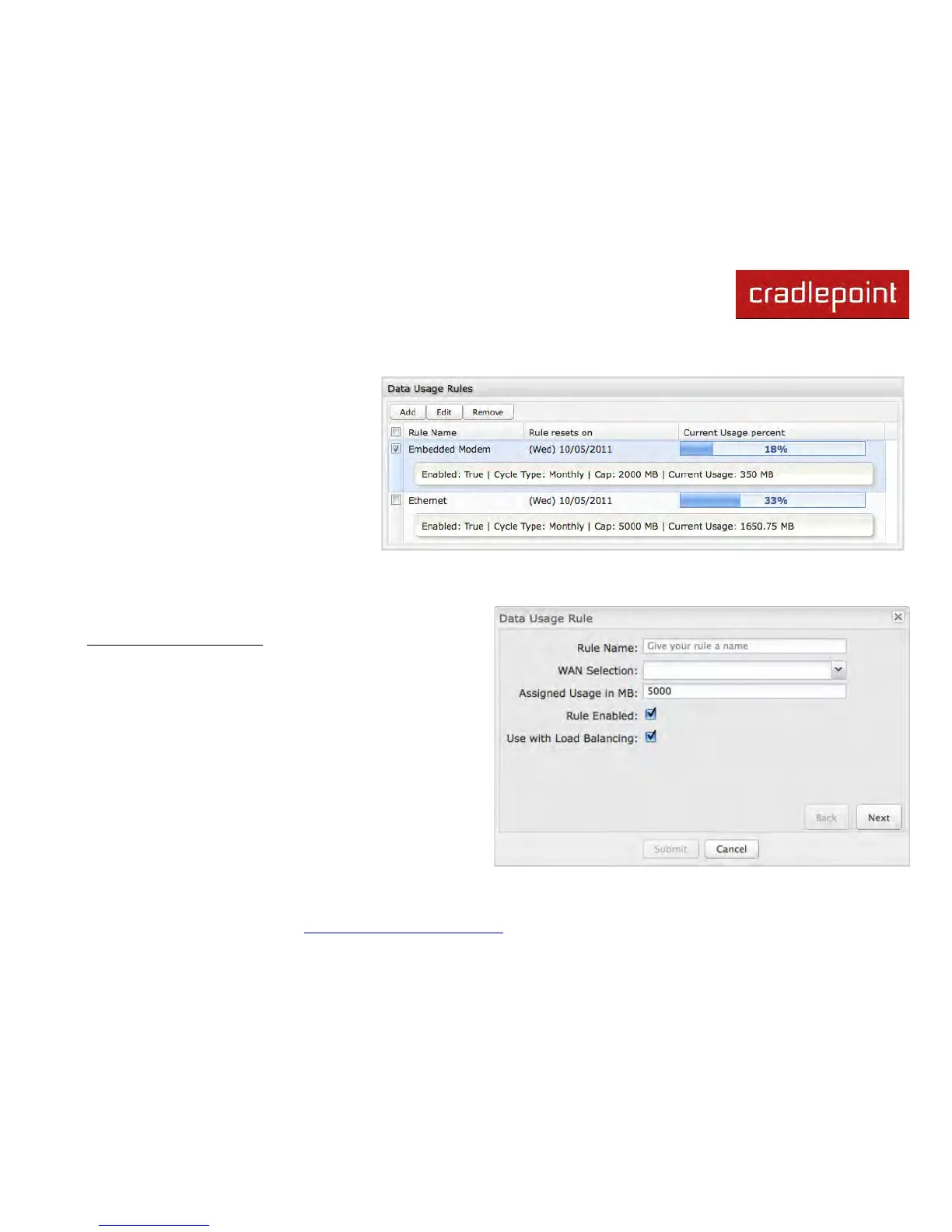
The Date Usage Rule display shows basic
information for each rule you have created
(including rules created with a template).
The following information is displayed:
• Rule Name
• Enabled: True/False
• Date for Rule Reset
• Cycle Type: Daily, Weekly, or
Monthly
• Cap: Amount in MB.
• Current Usage: Shown as an amount in MB, as a percentage of the cap, and in a bar graph.
Click Add to configure a new Data Usage Rule.
Data Usage Rule – page 1
Rule Name: Give your rule a name for later recognition.
WAN Selection: Select from the dropdown list of currently
attached WAN devices.
Assigned Usage in MB: Enter a cap amount in megabytes.
1024 megabytes equals 1 gigabyte.
Rule Enabled: (Default: Enabled.) Click to disable.
Use with Load Balancing: When checked, the Load
Balancing feature is allowed to use the thresholds and
metrics of this rule when making balance decisions. This
causes Load Balancing to spread the data usage between
interfaces according to the assigned usage rather than












 To Next Page