CRADLEPOINT COR | USER MANUAL Firmware ver. 5.0.0
© 2013 CRADLEPOINT, INC. PLEASE VISIT HTTP://KNOWLEDGEBASE.CRADLEPOINT.COM/ FOR MORE HELP AND RESOURCES PAGE 161
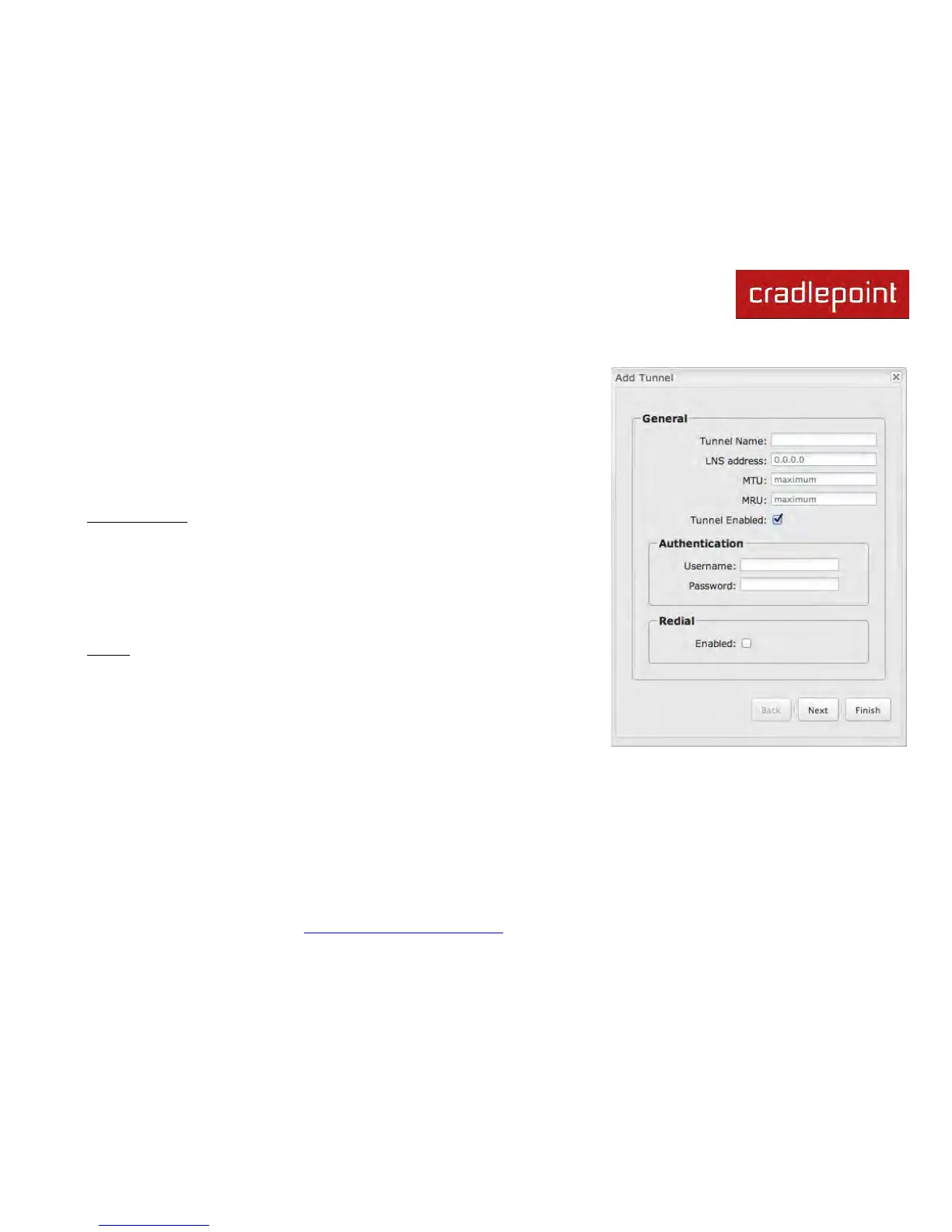
7.6.1 General
• Tunnel Name – Enter a name to uniquely identify this tunnel.
•
LNS address – Enter the IP Address of the LNS (tunnel server) peer.
•
MTU – Set the maximum transmission unit (MTU) of the L2TP tunnel.
•
MRU – Set the maximum receive unit (MRU) to request from the tunnel
peer.
•
Tunnel Enabled – Click to enable/disable this tunnel. Default: Enabled.
Authentication – More authentication options and overrides are available in the
next section.
• Username – Username for user-specific authorization. Leave blank to
disable.
•
Password – Shared secret (or password) used to authenticate the
associated Local and Remote names.
Redial
• Enabled – Reconnect if disconnected.












 To Next Page