CRADLEPOINT COR | USER MANUAL Firmware ver. 5.0.0
© 2013 CRADLEPOINT, INC. PLEASE VISIT HTTP://KNOWLEDGEBASE.CRADLEPOINT.COM/ FOR MORE HELP AND RESOURCES PAGE 64
6.1.2 Default Filter Settings
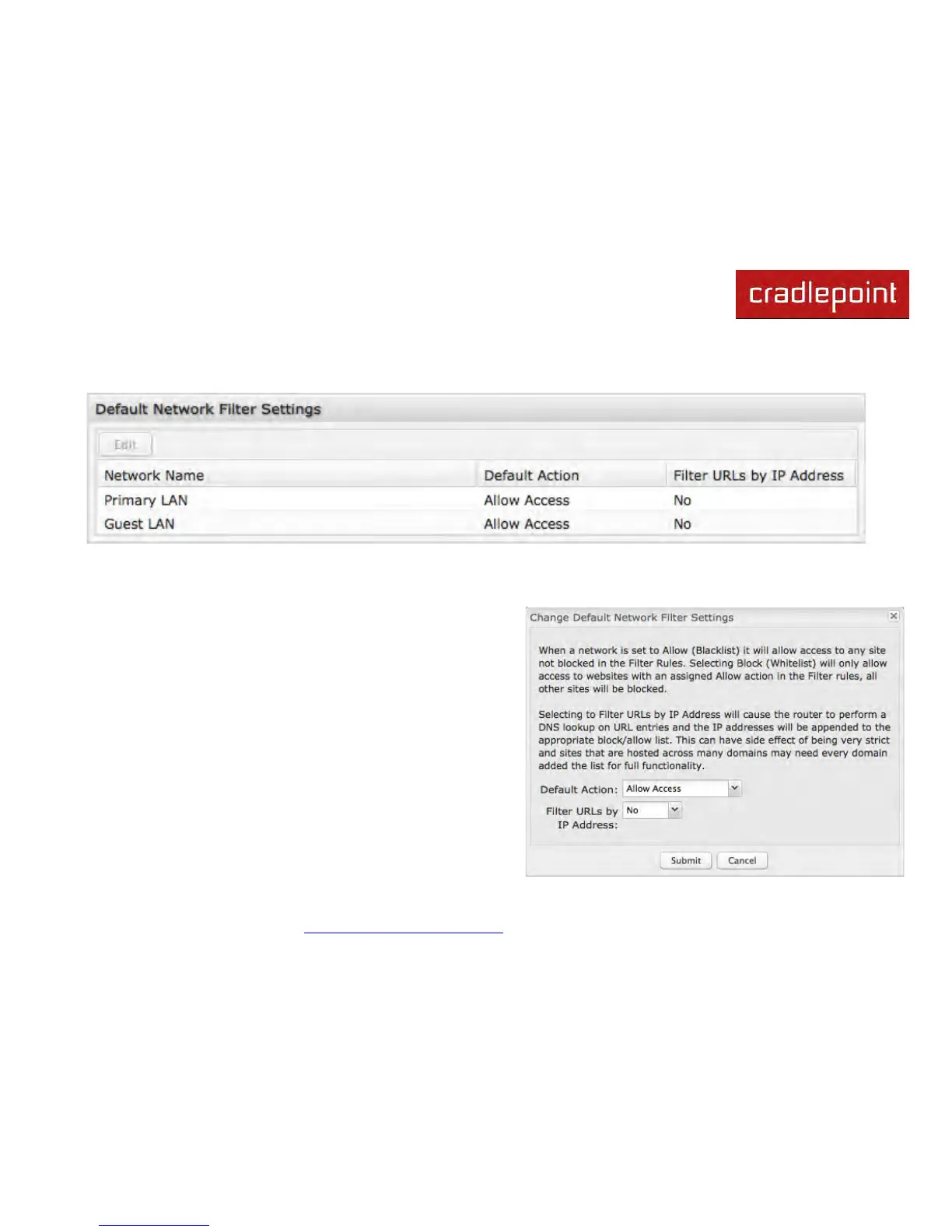
Use Default Network Filter Settings together with Network WebFilter Rules to control website access. All of your
networks are set to allow website access by default. Select a network and click Edit to change the default filter settings.
Default Action: Select from the following dropdown options:
• Allow Access (default)
• Block Access
When a network is set to Allow Access, it will allow access to
sites not specifically blocked in the WebFilter Rules.
When a network is set to Block Access, it will block access to
sites not specifically allowed in the WebFilter Rules.
Filter URLs by IP Address: (Default: No) Changing this option to
“Yes” will cause the router to perform a DNS lookup on URL
entries, and the IP addresses will be appended to the appropriate
block/allow list. This can have the side effect of being very strict;
sites that are hosted across many domains may need every
domain added to the list for full functionality.












 To Next Page