CRADLEPOINT MBR95| USER MANUAL Firmware ver. 3.6.3
NETWORK SETTINGS → FIREWALL
© 2011 CRADLEPOINT, INC. PLEASE VISIT HTTP://KNOWLEDGEBASE.CRADLEPOINT.COM/ FOR MORE HELP AND RESOURCES PAGE 61
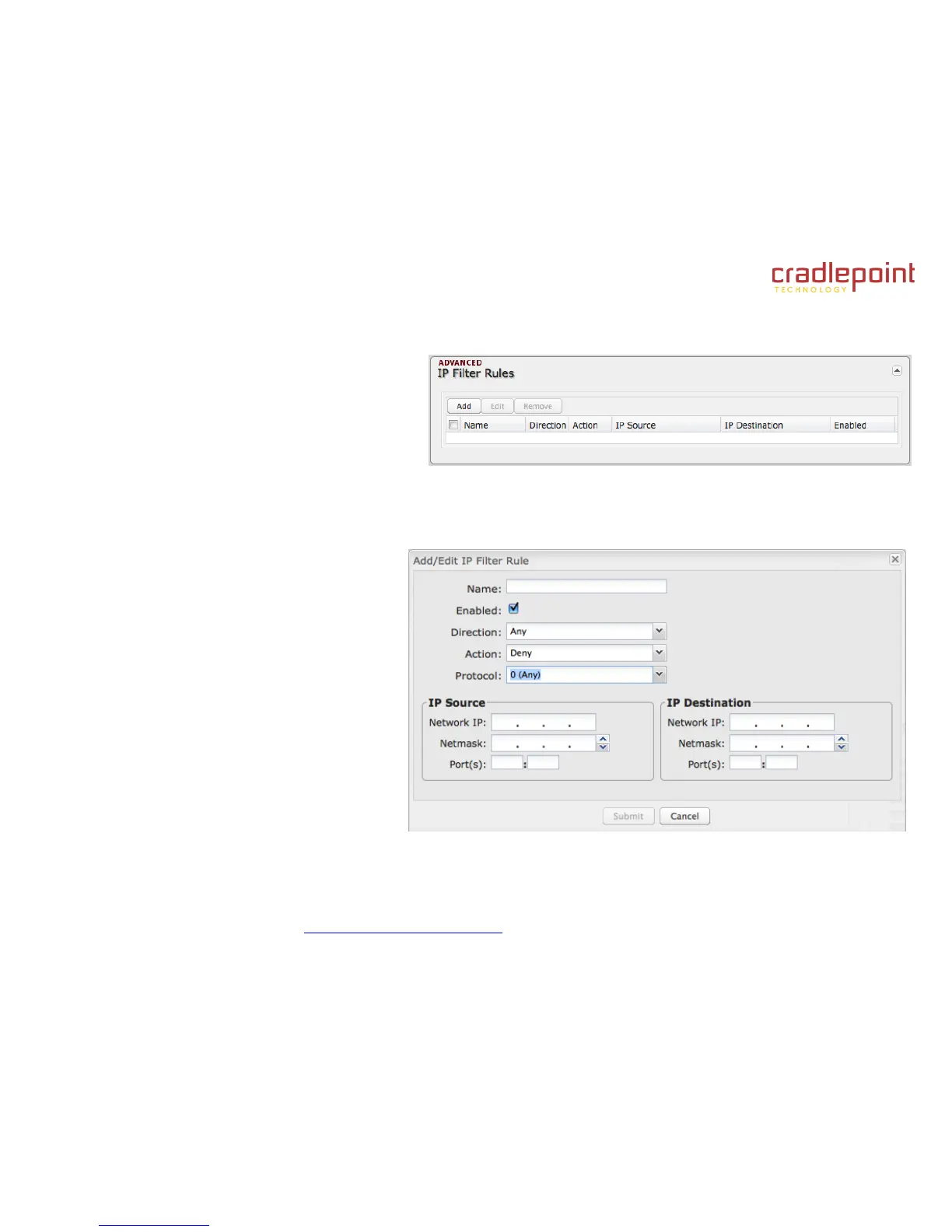
6.4.2 IP Filter Rules (Advanced)
An "Incoming" IP filter rule restricts remote access
to computers on your local network. "Outgoing"
filter rules prevent computers on your local network
from initiating communication to the address range
specified in the rule.
This feature is especially useful when combined with port forwarding and/or DMZ to restrict remote access to a specified
host or network range. For example, in order to host a server you might have opened ports with a port forwarding rule that
could expose your LAN to cyber attacks. With an incoming IP filter rule, you can restrict the access to your LAN to only
known devices.
Name: Name your rule.
Enabled: Selected by default.
Direction: “Any,” “Incoming,” or
“Outgoing”
Action: “Allow” or “Deny”
Protocol: Any, ICMP, TCP, UDP, GRE,
ESP, or SCTP.
IP Source / IP Destination
Network IP: Optional field to specify a
matching network IP address for this rule
to match against.
Netmask: Use this to define a subnet
size this rule will match against.
Port(s): Use for a single port or a range
of ports. Fill in the left side for a single
port.















 To Next Page