BATTERY INSTALLATION
I WARNING: To avoid electric shock, disconnect the test leads
from any source of voltage before removing the battery cover. I
1. Turn power off and disconnect the test leads from the meter.
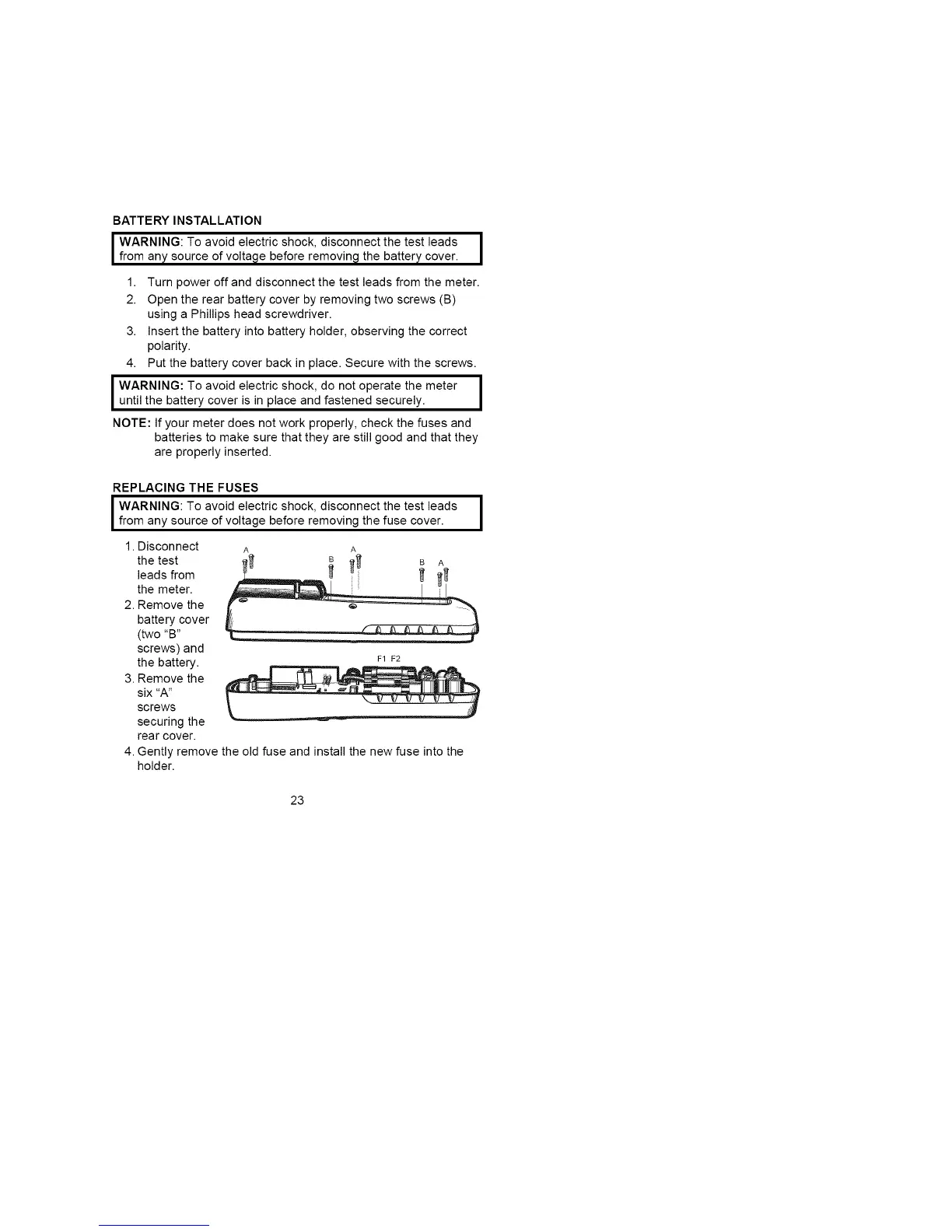
2. Open the rear battery cover by removing two screws (B)
using a Phillips head screwdriver.
3. Insert the battery into battery holder, observing the correct
polarity.
4. Put the battery cover back in place. Secure with the screws.
I WARNING: To avoid electric shock, do not operate the meter I
until the battery cover is in place and fastened securely.
!
NOTE: If your meter does not work properly, check the fuses and
batteries to make sure that they are still good and that they
are properly inserted.
REPLACING THE FUSES
I WARNING: To avoid electric shock, disconnect the test leads
from any source of voltage before removing the fuse cover.
1. Disconnect
the test
leads from
the meter.
2. Remove the
battery cover
(two "B"
screws) and
the battery. _1 F2
3. Remove the
six "A"
screws
securing the
rear cover.
4. Gently remove the old fuse and install the new fuse into the
holder.
1
23


 To Next Page