9
ENGLISH
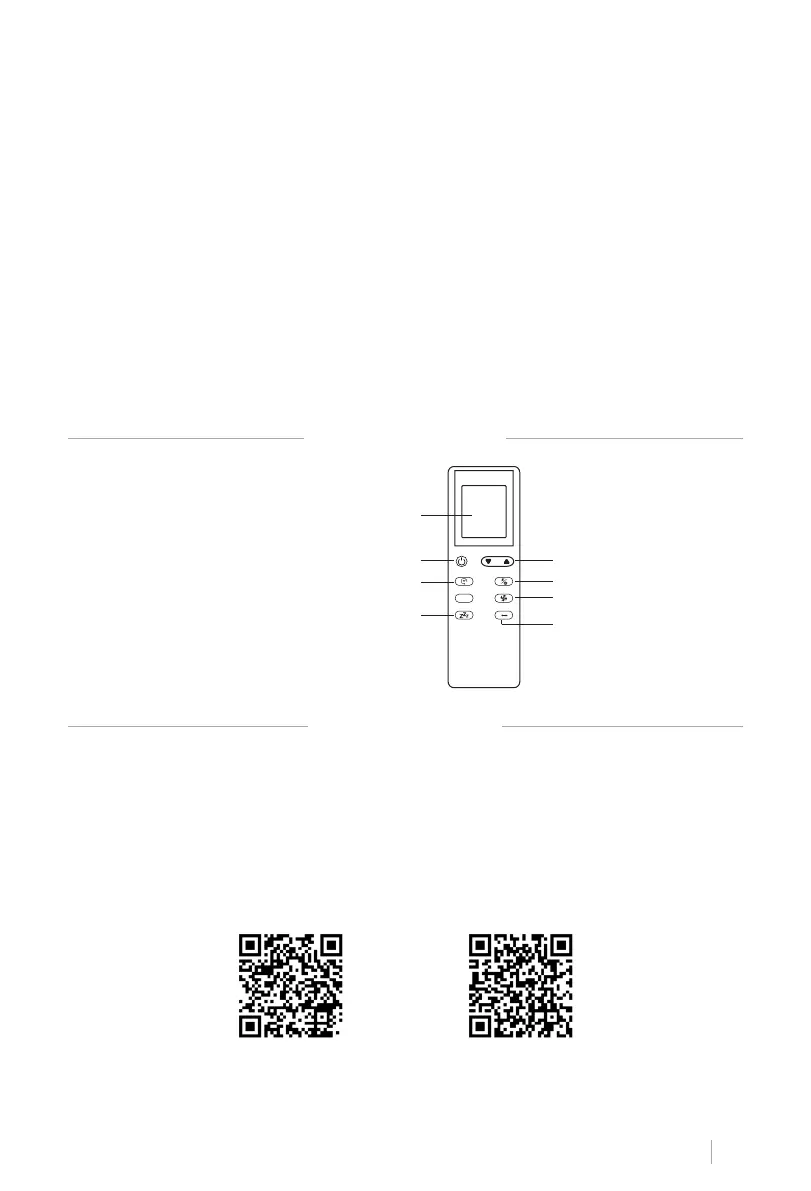
REMOTE CONTROL
APP CONNECTION
1. Screen
2. Power
3. Timer
4. Sleep mode
5. Up / Down
6. Modes
7. Fan speeds
8. Temperature unit
Then the device will get into standby status.
• Up / Down keys: To change temperature and time settings. (Temperature can’t be set while
• Power key: To turn on and off the device.
• WiFi key: To turn on and off the WiFi connection.
• Sleep mode: The unit will work on energy-saving and quiet mode.
• High /Low fan speed keys
• Fan key:
set under certain conditions, as anti-cold conditions.
• Dehumidier
speed.
• Cooling key: To start cooling the room.
• Water full light: The device will stop working when the water tank is full and needs to be
drained away.
• Timer
required time, from 1 to 24 hours.
• CREATE HOME application is available for Android and iOS (look for the app on Google
Play or App Store or scan the QR code below). Depending on the provider, there may be
costs involved in downloading the app.
• This appliance allows you to operate the appliance via your home network. A prerequisite
is a permanent WiFi (2.4 Gh) connection to your router and the free app CREATE HOME.
• We recommend disconnecting the appliance from the power supply when you are away
from home to prevent unintentional switching on while you are away.
OS iPhone OS Android
1
2
3
4
5
6
7
8
ºC ºF


 To Next Page