12
ENGLISH
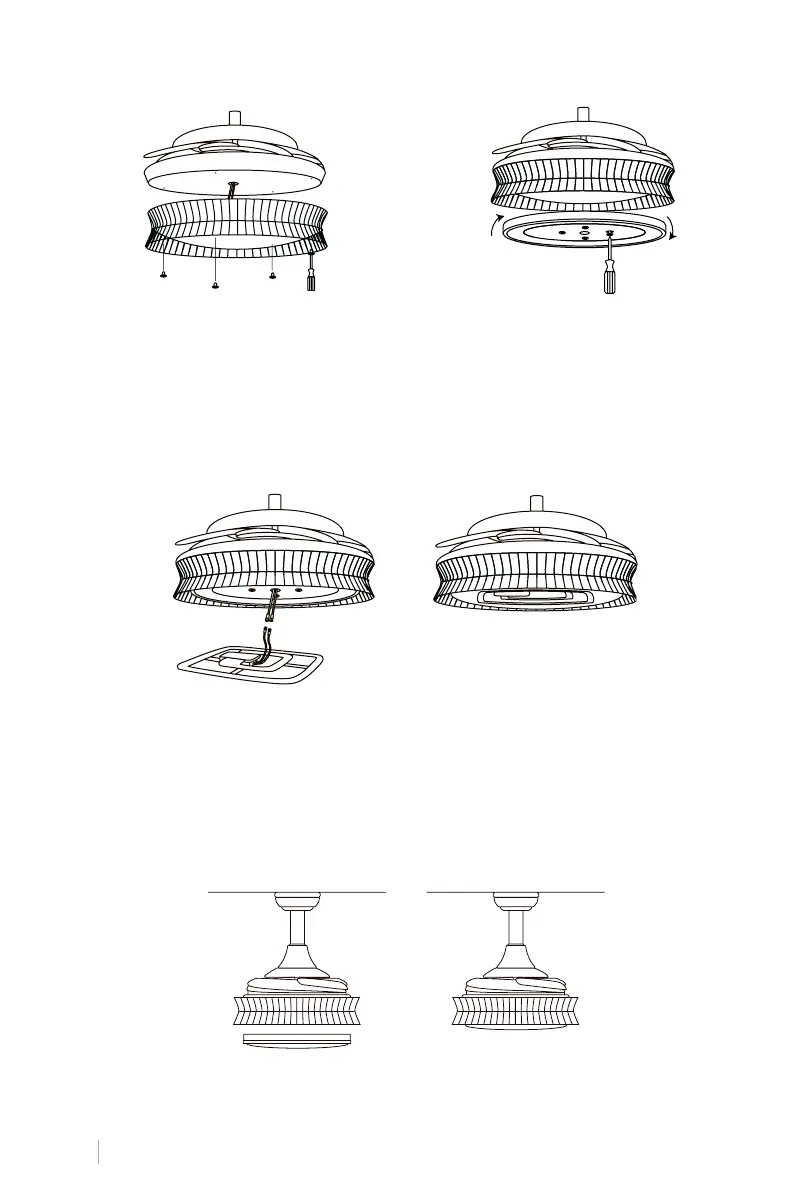
Make sure the slot on the tulip is in the same line as the slot on the fan body, then rotate the
shade slightly clockwise until it is tight and secure.
TULIP FIXING
1. Fit the trim by aligning the holes with the
holes in the engine. Use 4 screws to at-
tach it to the engine body. Make sure it is
securely fastened.
INSTALLATION OF THE TRIM AND LIGHT PLATE
2. Remove the 4 screws from the centre of
the fan body. Screw on the connection
panel by aligning the holes with the holes
in the motor. Leave the blue and white
wires coming out of the centre hole.
Connect the cables from the connection board to those from the LED panel. The LED panel
is magnetized so it attaches to the connection board by simply putting both pieces together.
Note: While installing or removing the LED board, be careful not to touch the insulating
tabs. Do not overtighten the screws or thread them too quickly as this could cause damage
to the insulating tabs.
PLACEMENT OF THE LIGHT PANEL


 To Next Page