Installing Hardware 1-5
Step 2: Install the
Sound Blaster
Audigy card
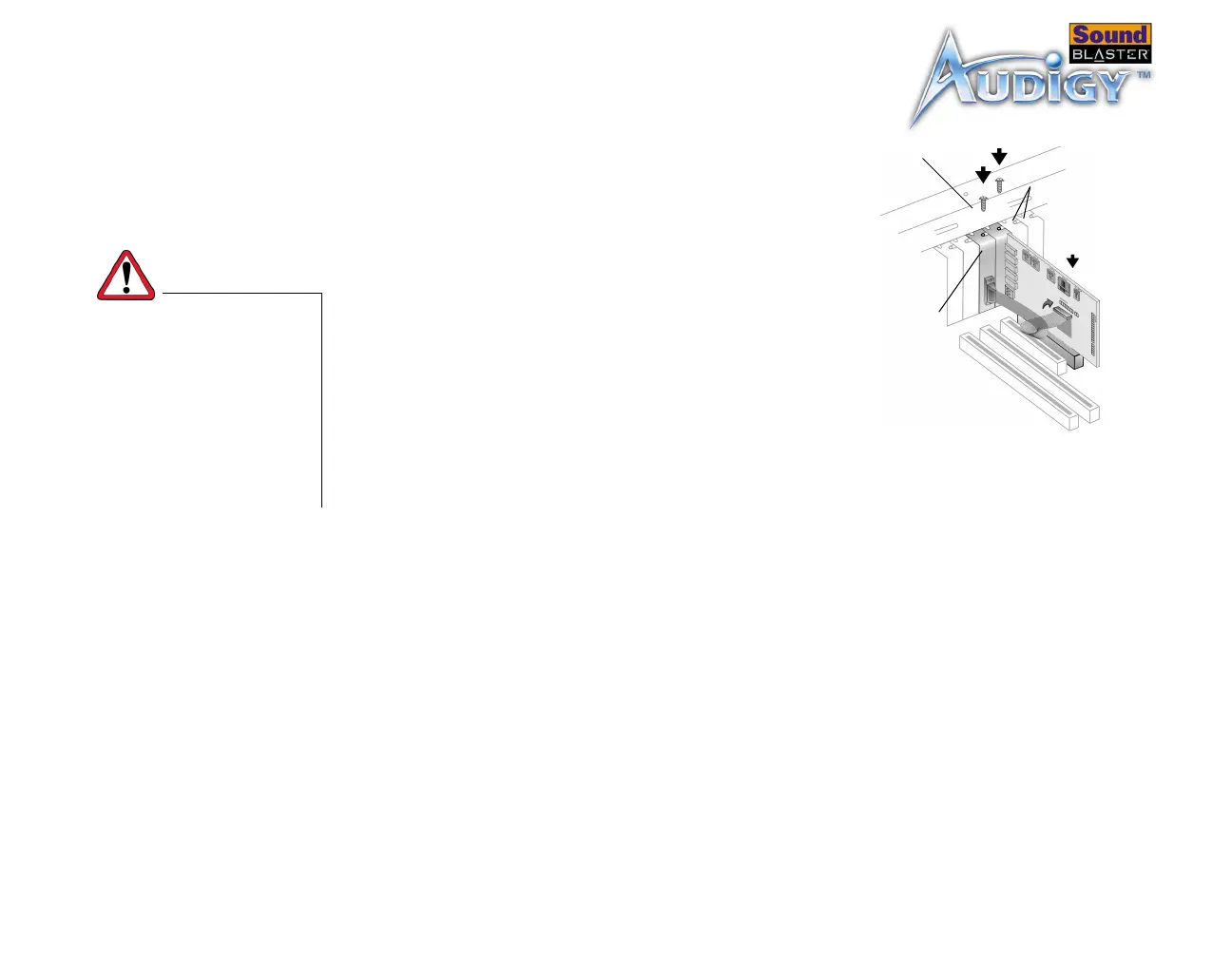
1. Align the Sound Blaster Audigy card with the
PCI slot and press the card gently but firmly
into the slot as shown in Figure 1-4.
2. Secure the card with one of the screws you had
placed aside earlier.
Step 3: Install the
Joystick/MIDI
bracket (optional)
1. If you are installing a joystick or MIDI device, secure the Joystick/MIDI bracket
to the slot next to the Sound Blaster Audigy card with the second screw.
2. Connect the Joystick/MIDI cable to the Joystick/MIDI connector on the Sound
Blaster Audigy card as shown in Figure 1-4.
Do not force the audio card
into the slot. Make sure that
the gold finger PCI connector
on the Sound Blaster Audigy
card is aligned with the PCI
bus connector on the
motherboard before you
insert the card into the PCI
expansion slot.
If it does not fit properly,
gently remove it and try
again
.
Unused
brackets
Joystick/MIDI
bracket
Figure 1-4: Securing the audio card
to the expansion slot.
Fasten the
card and
bracket with
screws.



 To Next Page