Installing Hardware 1-9
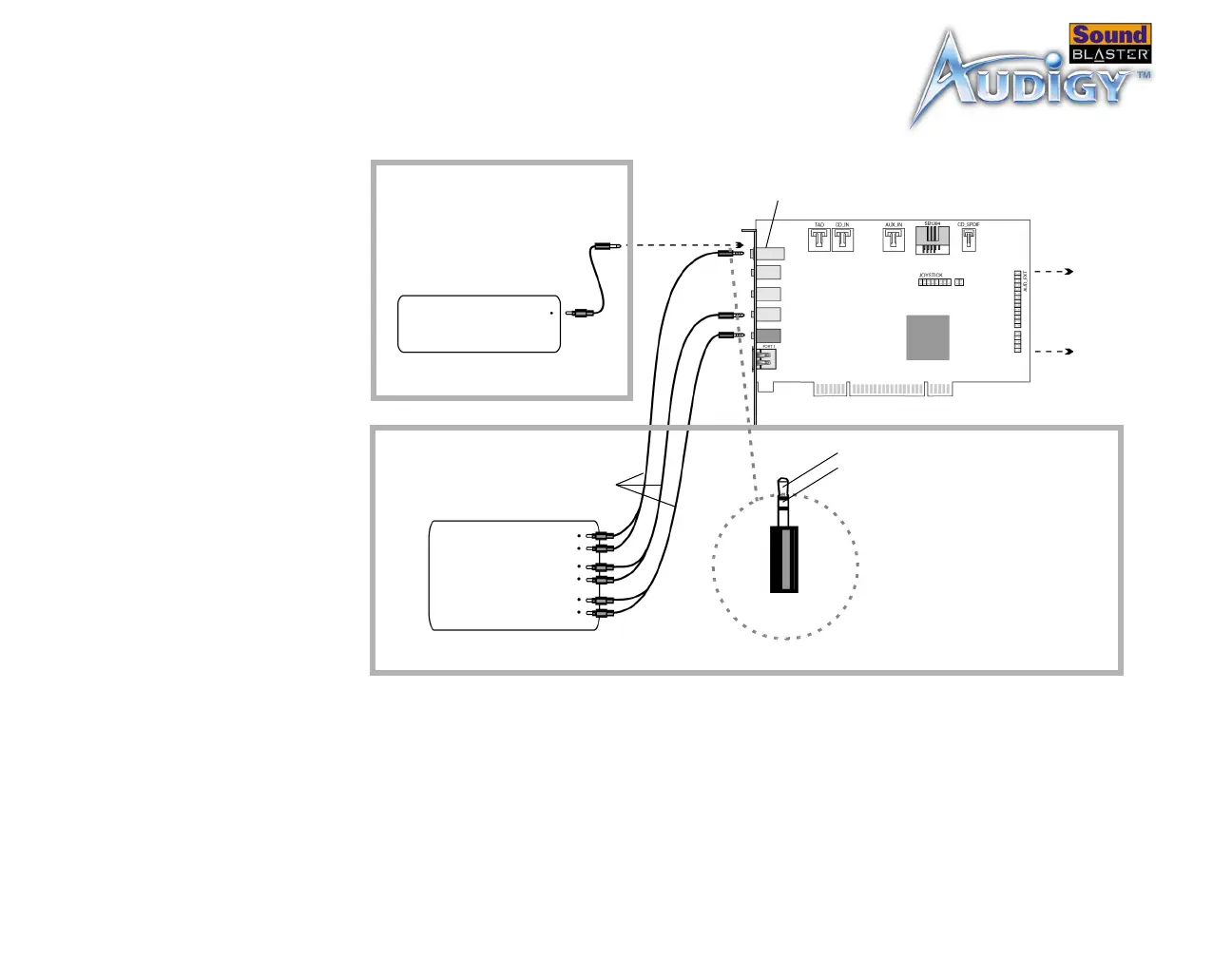
Connecting
External
Consumer
Devices
Dolby Digital Decoder/
Amplifier
Sound Blaster Audigy card
Connects to
Audigy Drive
(optional).
3.5 mm (mono)-
to-RCA cable
Analog/Digital
Out jack
Analog Front,
Rear and
Center/ Sub
Inputs
3.5mm (stereo)-
to-RCA cable
Dolby Digital (AC-3)
SPDIF In
Discrete 6-channel
Amplifier
Additional information for
advanced users:
For connection to Center and
Subwoofer channels using a 3.5mm
(stereo)-to-RCA cable, connect the
white RCA jack to the Center input
and the red RCA jack to the
Subwoofer input of the amplifier.
Tip : Left / Center channel
Ring : Right / Subwoofer channel
Rear Out
Line Out
Figure 1-8: Connecting external consumer devices to the Sound Blaster Audigy card.



 To Next Page