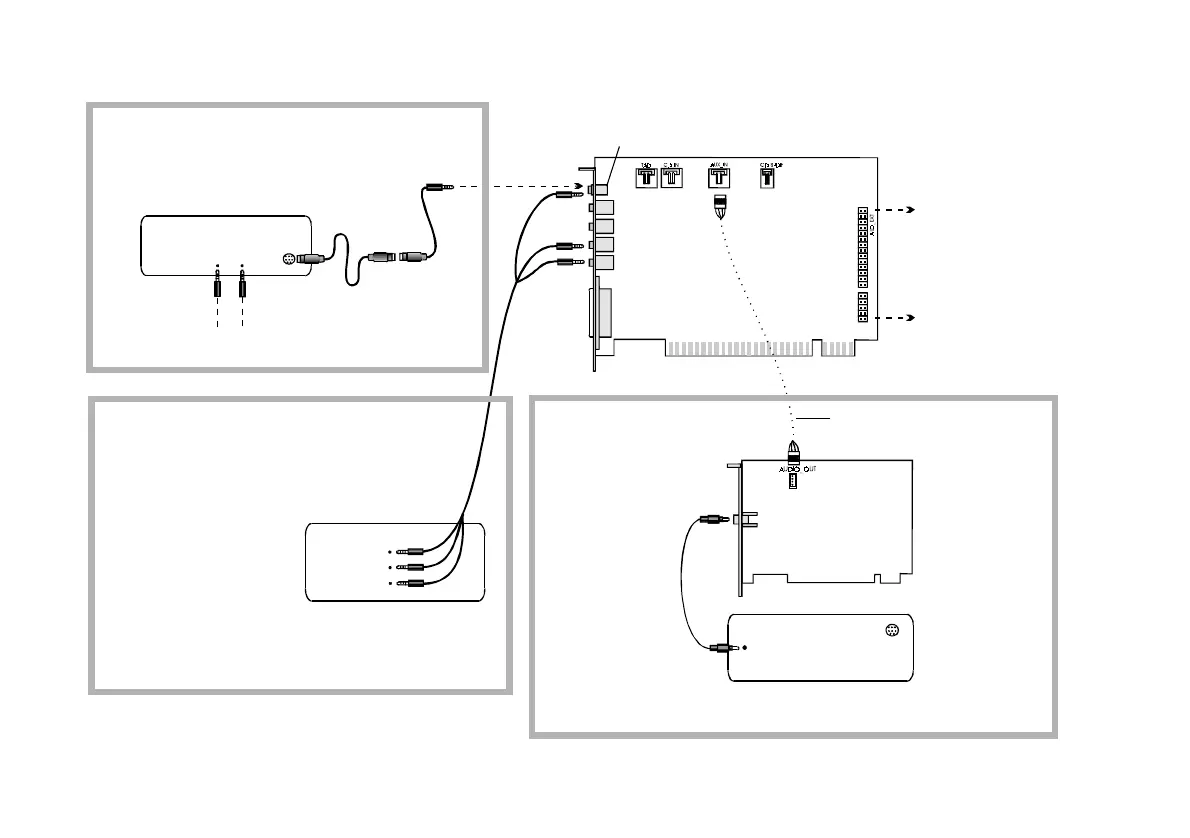
1-6 Installing Sound Blaster Live! Player 5.1
Playing Games and Music,
and Watching Movies
with 4.1 or 5.1 Digital Speaker
Systems
Sound Blaster
Live! card
Connect for downmix audio only when
a Dolby Digital (AC-3) decoder
speaker system is not available.
Digital
DIN
MPEG2 decoder card
Dolby Digital
(AC-3)
SPDIF In
Dolby Digital (AC-3)
SPDIF Out jack
Analog Line and Rear Inputs
Digital
DIN
FourPointSurround
or DeskTop Theater
Digital Speakers
Watching DVD Movies
or Playing DVD Games
with Creative PC-DVD
and DeskTop Theater 5.1
Digital Speaker System
Connects to the
Optical Digital I/O card
or Live! Drive
(see next page).
Minijack-to-DIN
cable
DeskTop Theater 5.1 Digital
Speaker System
Analog/Digital
Out jack
Figure 1-4: Connecting peripherals to the Sound Blaster Live! card.
Playing Games and Watching Movies
with an Analog 5.1 channel speaker
system*
Analog
Front, Rear
and Centre/
Sub Inputs
5.1 Channel
Analog Speaker
System*
* e.g., DTT2200 Speaker
System from Cambridge
SoundWorks
Triple stereo
audio cable
RCA cable


 To Next Page