Using Sound Blaster 3-2
Connecting
Speaker Systems
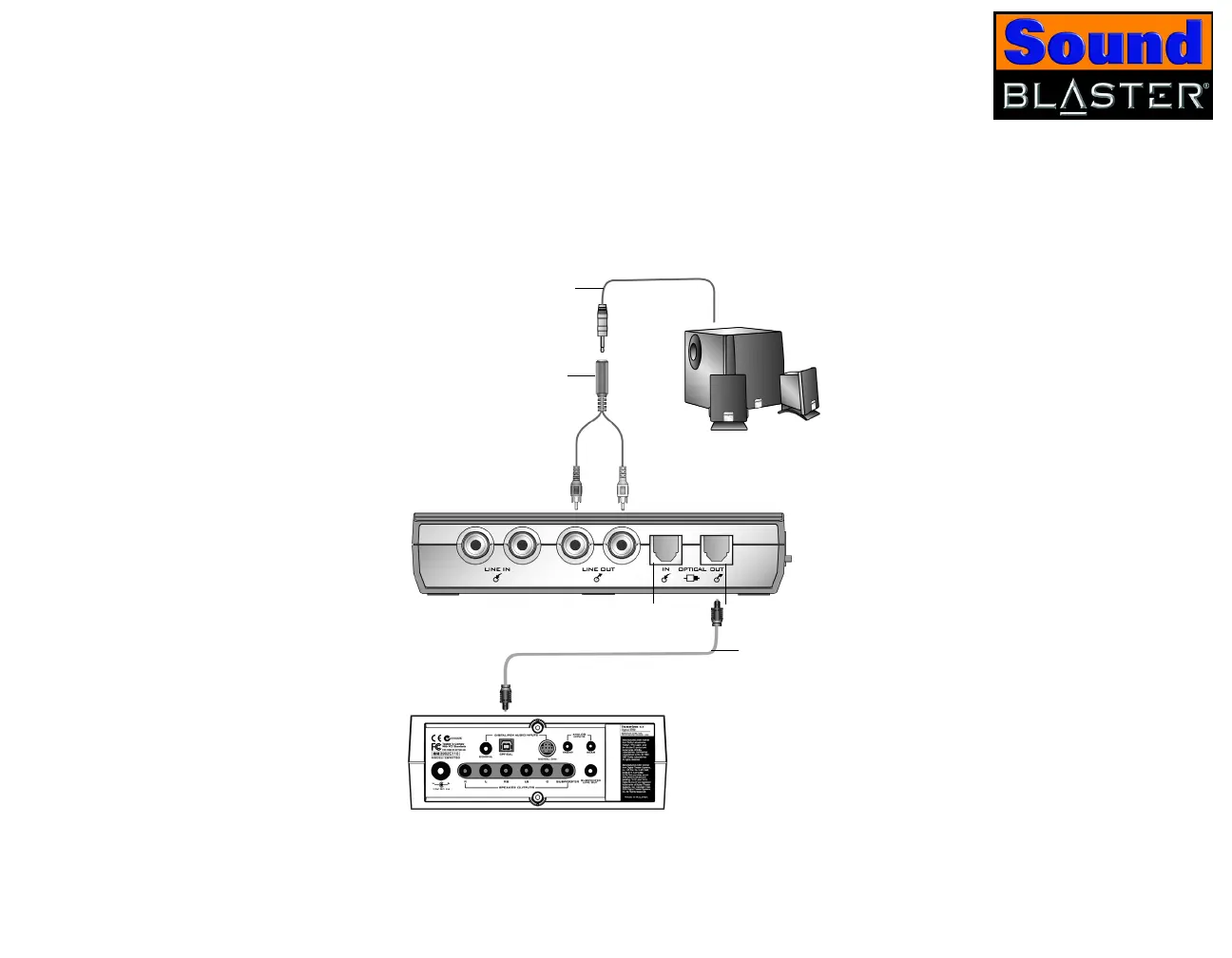
You can enjoy virtual surround sound with Dolby Digital 5.1 DVD movies using a
stereo speaker system by enabling the CMSS feature. Alternatively, you can
perform Dolby Digital 5.1 or DTS pass-through via SPDIF (Optical Out) to a 5.1
speaker system with a built-in Dolby Digital 5.1 or DTS decoder (for example,
Creative Inspire 5700 Speakers) to enjoy true surround sound experience. This is
only available in Digital Only mode.
*For example, Creative
2.1 Analog Speakers
Y-splitter cable
Analog 2.1 channel speaker
system*
Creative Inspire or Cambridge
SoundWorks 5.1 Digital
Speaker Systems
Figure 3-2: Connecting speaker systems to Sound Blaster.
Optical cable
Analog speaker cable
Optical Out jackOptical In jack













 To Next Page