LIVING SPACE HUMIDITY
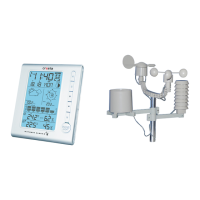
The weather station uses saved data to determine the humidity in the living space and shows
this with the respective symbols.
Comfortable Dry Humid
ICE ALERT
• When the outdoor temperature is lower than +1°C, there is an ICE ALERT symbol showing in
the display. It means the weather may start to be icy.
LOW BATTERY CONDITION DISPLAY
The weather station displays the LOW BATTERY CONDITION symbol to remind you that either
the batteries of the base station or the outdoor sensor need to be exchanged. We advise you
to change ALL batteries if one of the components show the LOW BATTERY CONDITION icon.
There is a fair chance the other component will show the same icon shortly after you have
changed on the the components batteries. The complete battery exchange guarantees a
smooth operation of your weatherstation.
• The Weather station LOW BATTERY CONDITION icon is displayed next to the HOUSE Icon
with text „IN“.
• The Outdoor sensor LOW BATTERY CONDITION icon is displayed next to the HOUSE icon
with text „OUT“.
RF CONNECTION TO THE OUTDOOR SENSOR
• Press and hold the key “SEARCH“ for 3 seconds to search for the outdoor sensor. The RF
signal symbol at the outside area will flash when it is trying to connec . The RF reception is
weaker in rooms with concrete walls e.g. in the basement and in office buildings. The
distance will be shortened if you have interference. For extreme cases, please put the
main unit near a window
RECEPTION OF THE RADIO CONTROLLED TIME SIGNAL
• The DCF77 radio signal search starts automatically about 3 minutes after the battery
exchange. The “RADIO TOWER” signal is flashing.
• Press“▲ “ and “▼ “ for more than 3 seconds to enter or quit the Radio controlled signal
reception


 To Next Page