Product Manual — Doc. 8745H TSS-70 Series • 77
IPv6 Settings
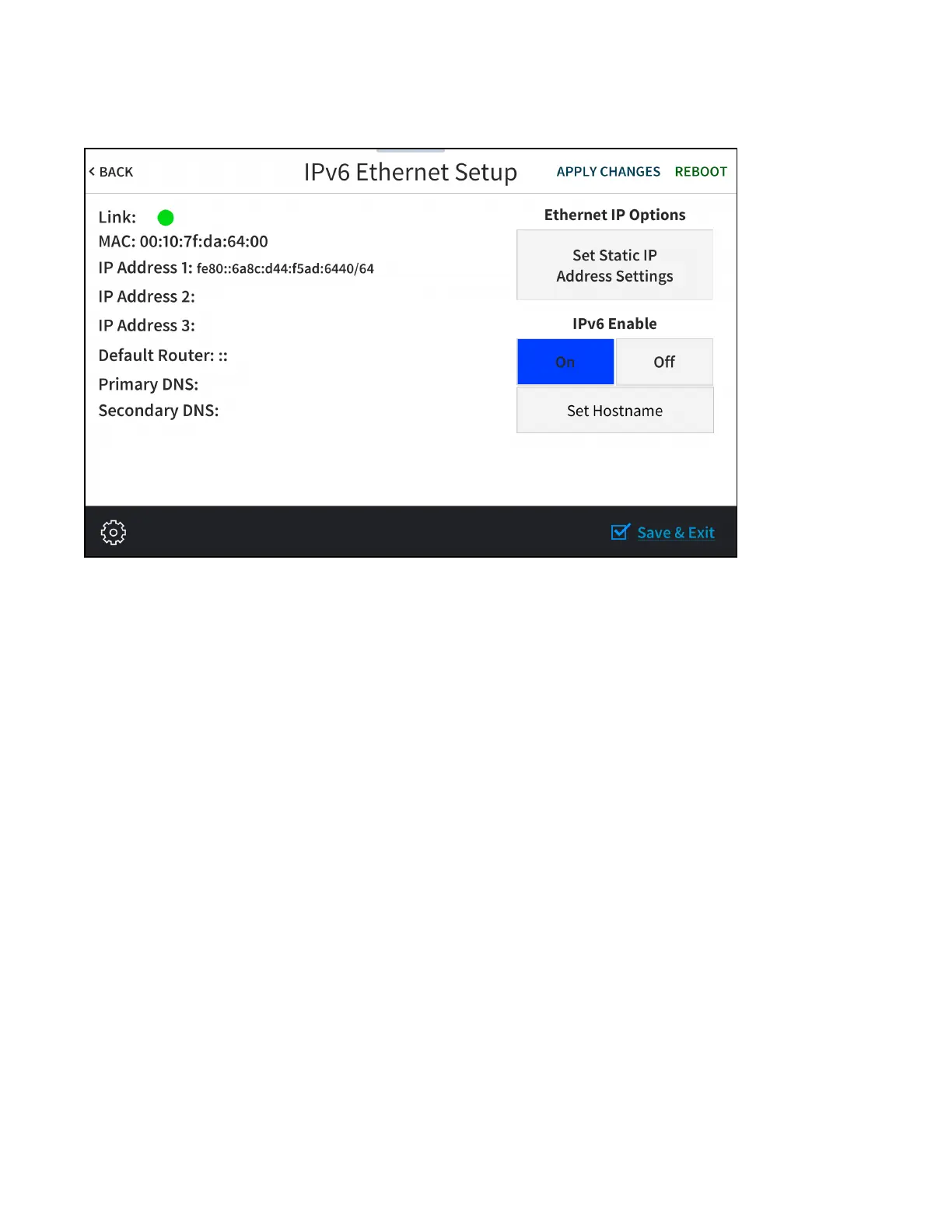
Tap IPv6 Settings on the Select Network Protocol screen to display the IPv6 Ethernet Settings screen.
Use the IPv6 Ethernet Setup screen to view the touch screen IPv6 MAC and IP addresses, default router
address, and primary and secondary DNS addresses. A Link indicator is provided to indicate the status
of the IPv6 Ethernet connection. (Green indicates that the Ethernet connection is active.)
The following buttons are provided for configuring IPv6 Ethernet settings:
l
Tap On or Off under IPv6 Enable to turn IPv6 addressing on or off.
l
Tap Set Static IP Address Settings to enter static IPv6 addresses manually.
l
Tap Set Hostname to enter a new touch screen host name using an on-screen keyboard.
l
Tap APPLY CHANGES to apply any new IPv6 Ethernet settings to the touch screen and to stay in
setup mode.
l
Tap REBOOT to exit setup mode and restart the touch screen.



 To Next Page