Product Manual — Doc. 8745H TSS-70 Series • 95
Wi-Fi Test
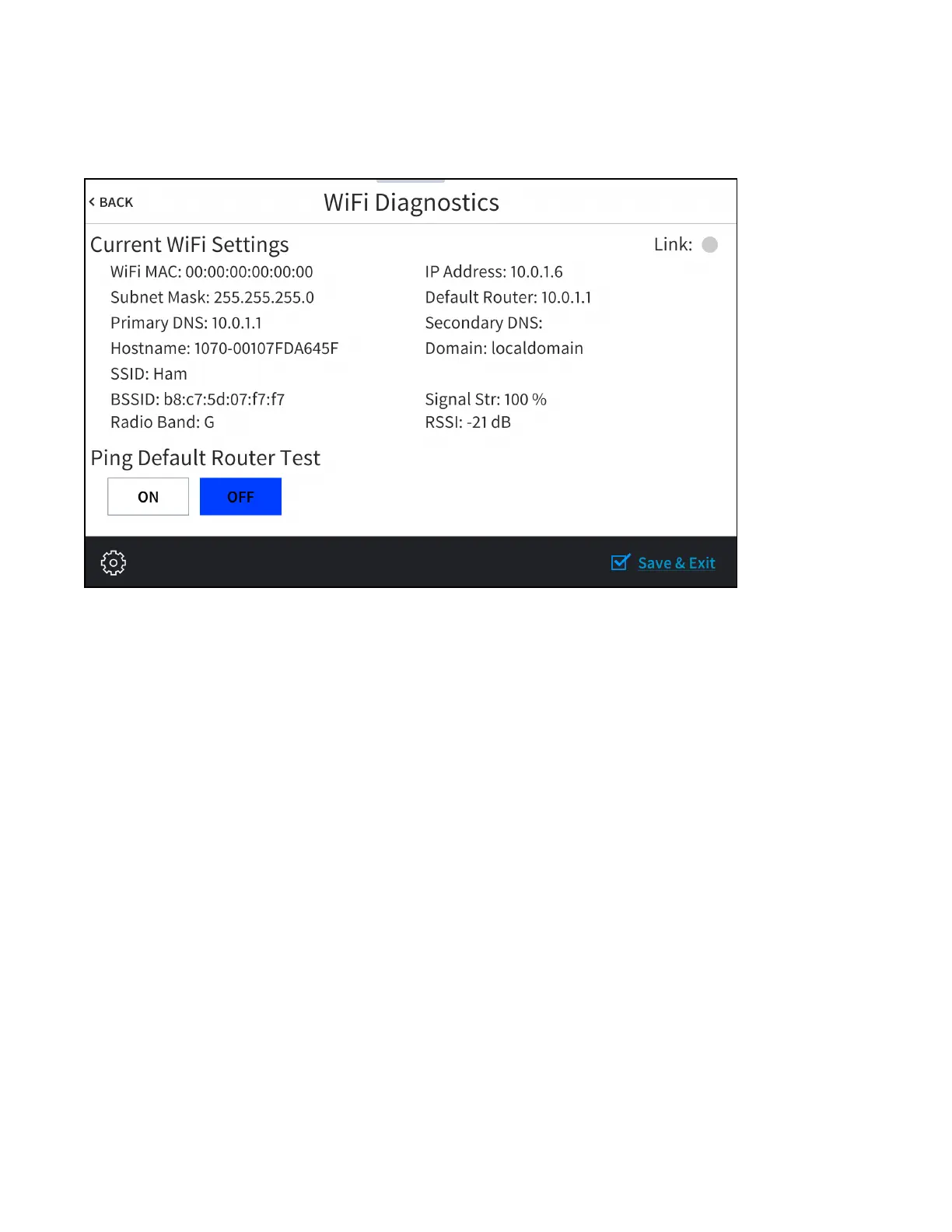
Tap Wi-FiTest on the Diagnostics & Advanced screen to display the Wi-FiDiagnostics screen.
Wi-Fi Diagnostics Screen
Use the Wi-Fi Diagnostics screen to view and test the Wi-Fi network connection. The Wi-Fi Diagnostics
screen displays the Wi-Fi network MAC and IP addresses, subnet mask address, default router address,
primary and secondary DNS addresses, host name, and domain name. A Link indicator is provided to
indicate the status of the Wi-Fi network connection. (Green indicates that the Wi-Fi network connection
is active.)
The Wi-Fi Diagnostics screen also provides controls to test the connection to the default router. Tap On
to begin the test and Off to end the test.
During the router test, the touch screen pings the default router. If the router is communicating with the
touch screen, connection data is displayed below the ping test controls within five seconds. The
connection data updates after every successive ping.
Tap < BACK to return to the Diagnostics & Advanced screen.



 To Next Page