Deployment Guide – DOC. 7693K AirMedia Presentation Gateway • 33
3. Click Connect. If prompted, enter the passcode as shown on the connected
display.
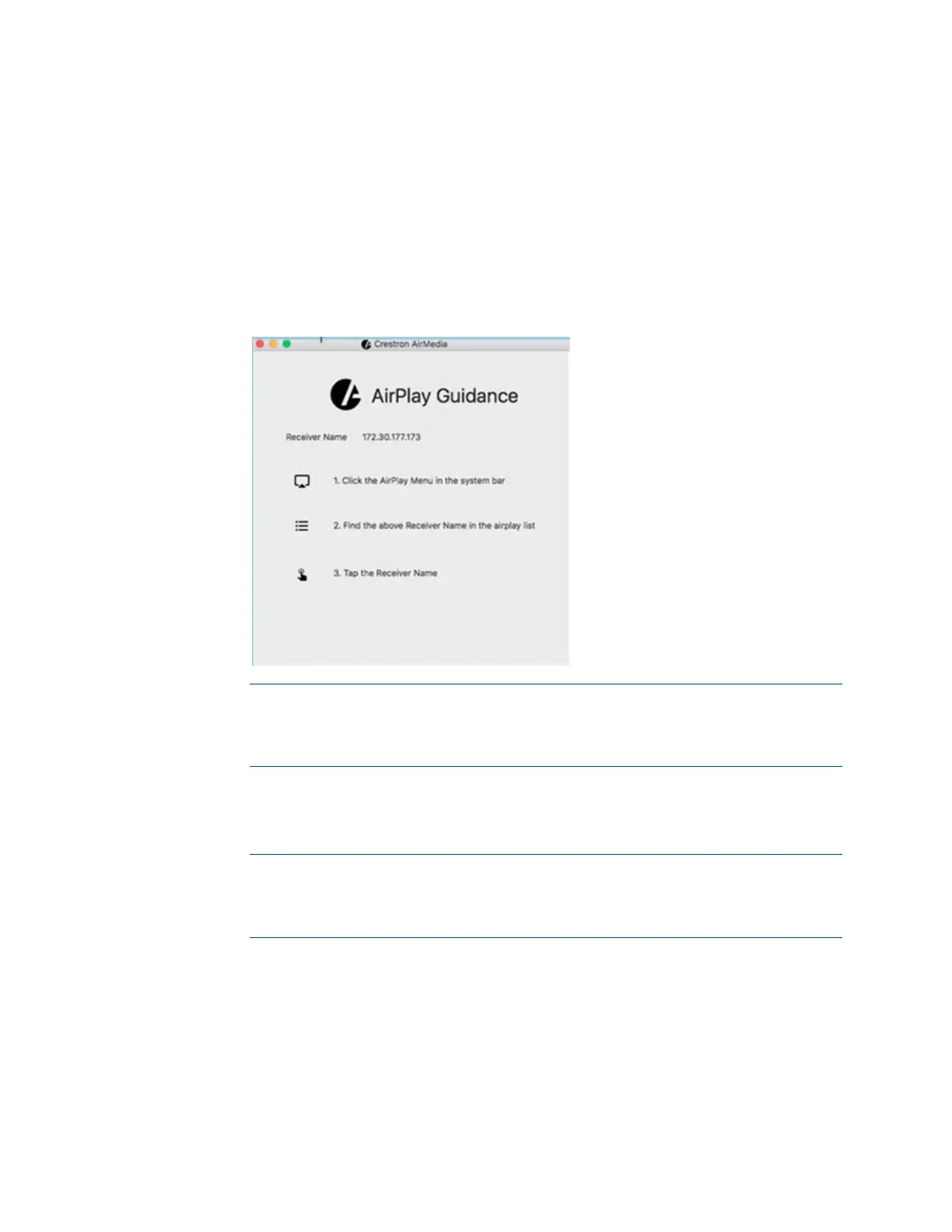
- If the device is an AirMedia 2.0 device, or an AM-101 in mirroring mode, a
dialog box is displayed, showing guidance on using the native mirroring
function that is built into macOS. Follow the directions to begin the
presentation session. If a Crestron Connected display is connected and
configured for operation, the display turns on automatically during the
process.
Crestron AirMedia AirPlay Guidance Dialog Box
NOTE: Only one macOS or iOS device using the native mirroring function can
be connected at a time to an AirMedia device. If any other sender connects to
the AirMedia device, the last connected device will be disconnected and the
connection procedure will need to be repeated.
- If connecting to an AM-100 that is connected to a configured Crestron
Connected display, the display will turn on automatically, and the
presentation session begins.
NOTE: When using the moderator functions of an AM-100 or AM-101, the
user name that appears to the moderator can be set in the Preferences
menu. The default username is the same username as the active user logged
into macOS.






 To Next Page