DIN Rail 2 Channel DALI Interface Crestron DIN-DALI-2
8
DIN Rail 2 Channel DALI Interface: DIN-DALI-2 Programming Guide – DOC. 7365A
Resolve this by running Setup—Addressing (of unassigned ballasts) in
software tool or by using the DALITEACHBYRND command.
Viewing the DIN-DALI-2’s Stored Memory
The DIN-DALI-2 unit stores a copy of the information that is stored in the ballast. It
also stores records related to whether a ballast is connecting and reporting on the
network and whether a ballast was ever commissioned. This data is used to populate
the status table in the software tool assigning ballasts as new or missing.
The data can be viewed using the LISTBALCFG command. Note that this only
displays the data stored in the DIN-DALI-2 and not necessarily the actual data in the
ballasts. Under normal operation they should match.
Syntax: LISTBALCFG [LOOP] [Address] [Parameter]
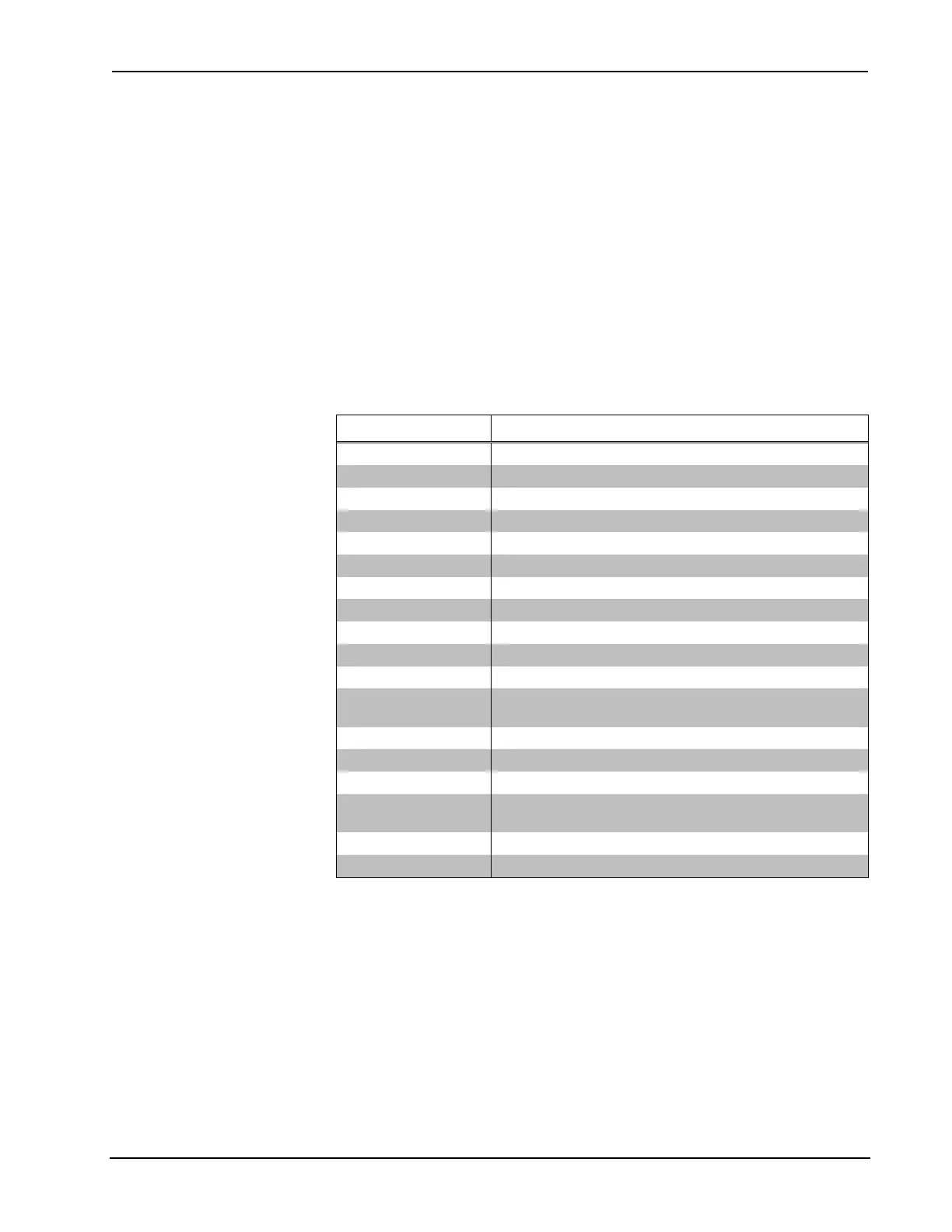
Possible Values for [Parameter]
VALUE DATA DISPLAYED
POWERON Level to which that ballast powers on
SYSFAIL Level ballast goes to when DALI loop voltage disappears
MIN Ballast minimum level
MAX Ballast maximum level
PHYMIN Ballast physical minimum level
FADETIME Fade time (refer to DALI Fadetime lookup table)
FADERATE Fade rate (refer to DALI Faderate lookup table)
SCENE0 – SCENE15 Scene levels
GROUP* The groups of which that ballast is a part
STATUS* STATUS byte—contains info about lamp failure
LEVEL Current level
CONNECTED* Displays whether ballast is showing up on Network during
normal polling
TARGET Level to which ballast is ramping
TYPE Ballast type – no relevance
VERSION Version – no relevance
COMMISSIONED* Displays whether ballast was commissioned from this unit
to determine whether the data possessed is correct
RANDOM The long address or random address of ballast (24 bits)
NAME The name of the ballast if programmed by tool
* Command is useful for debugging.
Refer to the following paragraphs for details on several useful commands and their
proper syntax.
• LISTBALCFG [LOOP] ALL CONNECTED
The CONNECTED flag is a number from 0–5 that represents the number of
consecutive polls to which the ballast has responded.
⇒ 5: Ballast has responded successfully to the last five poll requests and is
communicating well.
⇒ 0: Ballast has not responded to any of the last five poll requests and is
likely not connected.



 To Next Page