DIN Rail 2 Channel DALI Interface Crestron DIN-DALI-2
10
DIN Rail 2 Channel DALI Interface: DIN-DALI-2 Programming Guide – DOC. 7365A
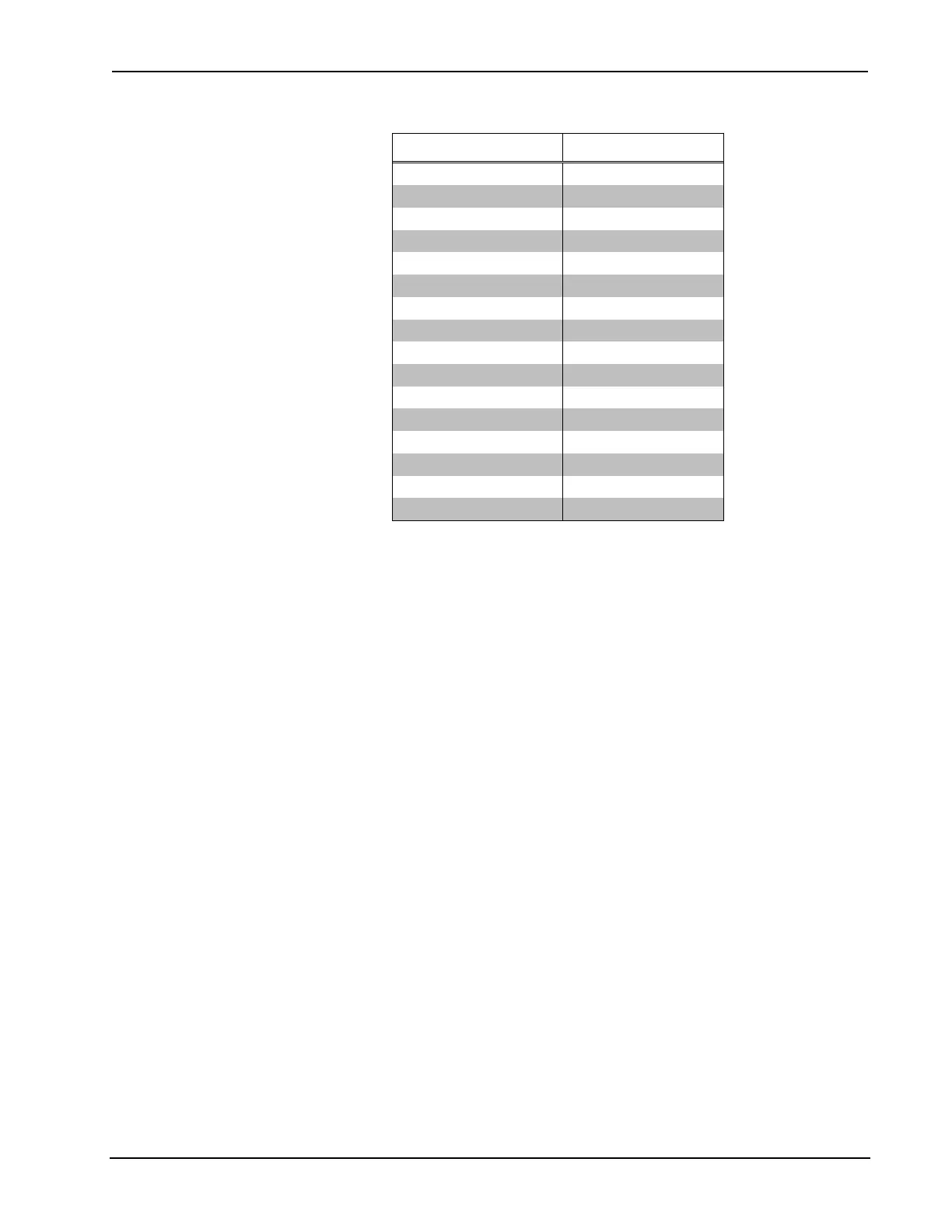
Ballast Settings and Fade Rates
BALLAST SETTING FADE RATE
0 N/A
1 357 steps/s
2 253 steps/s
3 178 steps/s
4 126 steps/s
5 89 steps/s
6 63 steps/s
7 45 steps/s (Default)
8 32 steps/s
9 22 steps/s
10 16 steps/s
11 11 steps/s
12 8 steps/s
13 6 steps/s
14 4 steps/s
15 3 steps/s
The effective dimming range is on 128 steps so the time required to
raise/lower from min to max is approximately 128/fade rate.
The default setting of 7 (45 steps/s) provides a fade rate of ~2.8 s.
• LISTBALCFG [LOOP] ALL GROUP
This displays the groups to which each ballast is assigned.
• LISTBALCFG [LOOP] ALL MIN
This displays the minimum dim level that the ballasts can dim to. Note that
the DIN-DALI-2 does not allow min to be set to a value less than 128. Even
though this is half the useable dimming range it corresponds to a light level
of ~3% based on logarithmic curve specified by DALI standards.
• READBALCFG [LOOP] ALL
(Read Ballast Configuration data from the ballast)
This retrieves all ballast information and overwrites internal memory. Note
that this does not clear the COMMISSIONED flag. It simply reads all group
levels, scene levels, fade time, and so on.
The LISTBALCFG command must be used to view the data once it has
been read.
• SETBALCFG [LOOP] ALL
(Set Ballast Configuration data within the ballast)
This sets parameters within the ballast. It should be performed through the
software tool, not over the console.



 To Next Page