FlipTop Touch Screen Crestron FT-TS600
10 • FlipTop Touch Screen: FT-TS600 Operations & Installation Guide – DOC. 7585B
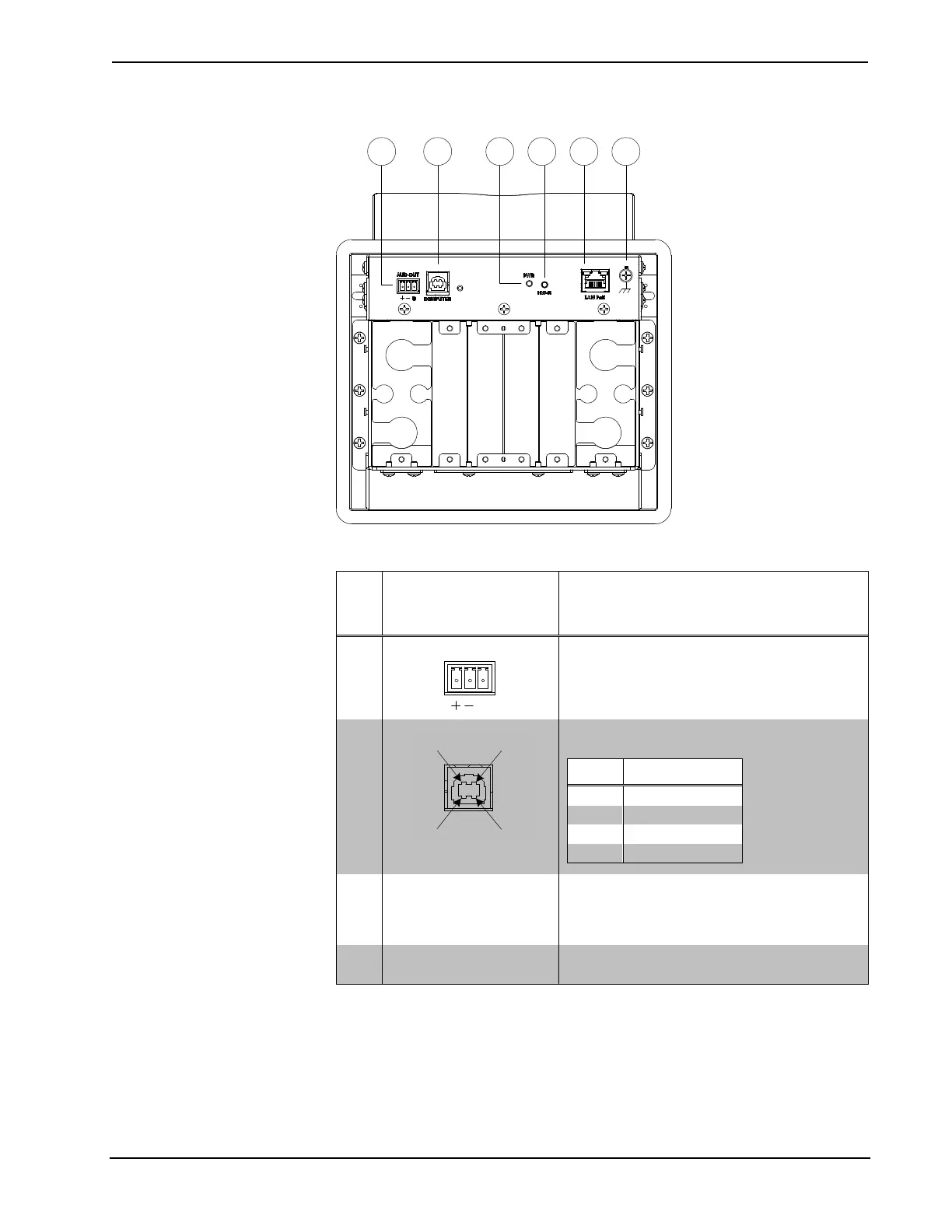
FT-TS600 (Bottom View)
Connectors, Controls, and Indicators
# CONNECTORS
1
,
CONTROLS, AND
INDICATORS
DESCRIPTION
1 AUD OUT
(1) 3-pin 3.5 mm detachable terminal block;
Balanced mono line level audio output;
Output impedance: 100 Ω;
Maximum output level: 4 Vrms
2 COMPUTER
(1) USB Type B female;
USB computer console port (cable included)
PIN DESCRIPTION
1 +5 Vdc
3 PWR LED (1) Dual color LED;
Yellow indicates operating power supplied
via PoE;
Green indicates device is ready
4 HW-R Button (1) Recessed miniature push button for
hardware reset
(Continued on following page)











 To Next Page