FlipTop Touch Screen Crestron FT-TS600
22 • FlipTop Touch Screen: FT-TS600 Operations & Installation Guide – DOC. 7585B
Rava Test
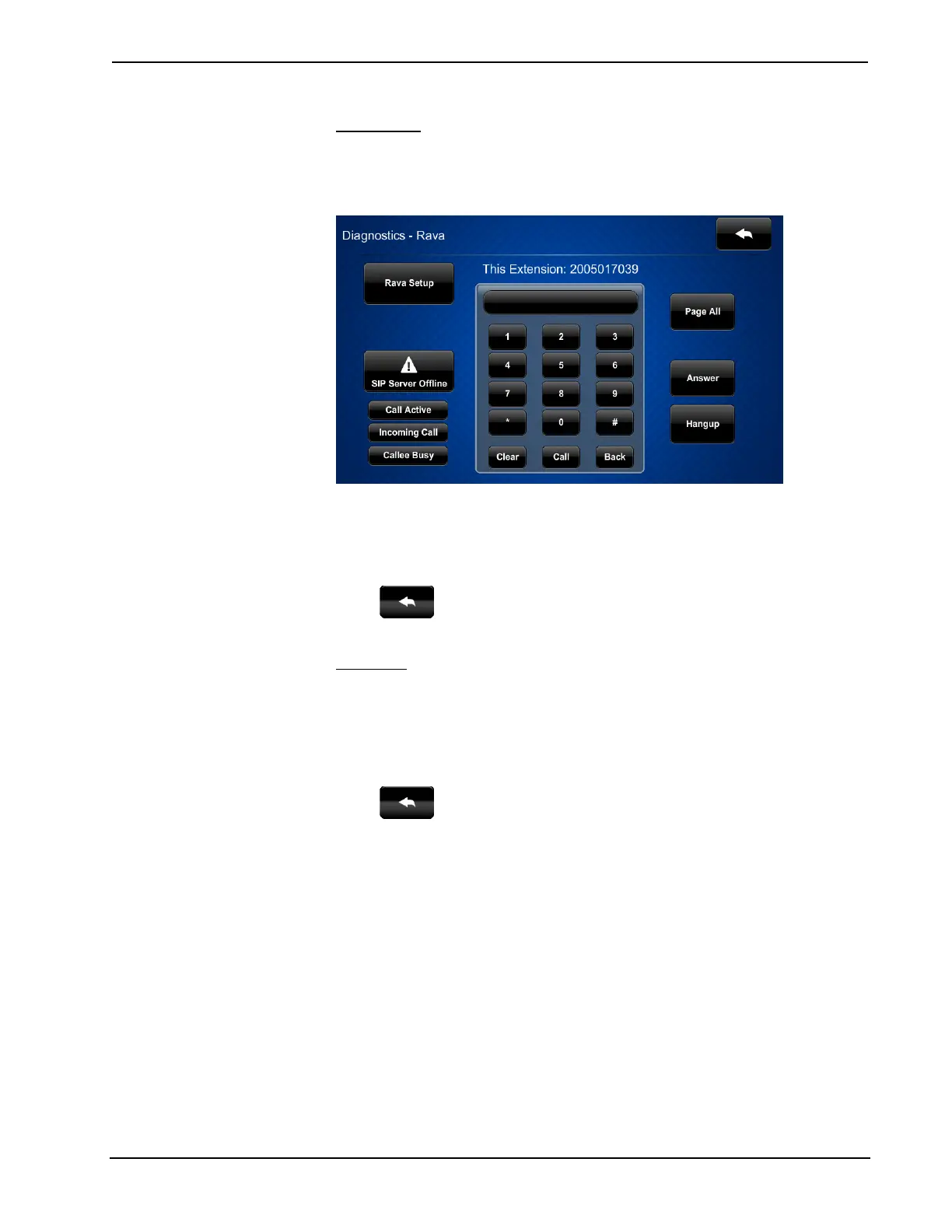
On the “Diagnostics” menu, touch Rava Test to display the “Diagnostics – Rava”
screen.
“Diagnostics - Rava” Screen
The “Diagnostics - Rava” screen provides controls for testing the use of Crestron’s
Rava™ SIP Intercom with the FT-TS600. It can be used to test projects and settings.
If the intercom works but the project does not, there is an issue with the project; if
the intercom does not work, there is an issue with the settings.
Touch
to return to the “Diagnostics” menu.
Mic Test
On the “Diagnostics” menu, touch Mic Test to begin a microphone test. The touch
screen records audio for five seconds and then plays back the recorded sound.
The built-in microphone (located above the touch screen display) will be used to
record your voice and play it back to confirm the microphone is functioning. When
playback is finished, the display returns to the “Diagnostics” menu.
Touch
to return to the “Setup” menu.
About
On the “Setup” menu, touch About to display the “About” screen.











 To Next Page