
 Need help?
Do you have a question about the Crestron TSW-1060-B-S and is the answer not in the manual?
Lists included accessories for the UC-C160-T system, such as PoE injectors and cables.
Details the Ethernet connection between the TSW-1060-B-S touch screen and the UC-ENGINE.
Explains network connection for touch screen control via Crestron XIO Cloud service.
Guides connecting display devices and the USB camera to the UC-ENGINE as shown.
Steps to configure the TSW-1060-B-S touch screen, including application selection and settings.
Use TSW-1060-B-S and Microsoft Teams/Skype credentials to configure the UC-ENGINE.
The Crestron Flex UC Video Conference System Integrator Solution for Microsoft Teams® Rooms (UC-C160-T) is a professional conferencing system designed for small to midsize meeting and conference rooms. This solution provides a robust platform for knowledge workers to leverage the Microsoft Teams software experience, integrating seamlessly into existing IT infrastructures. The UC-C160-T is an integrator solution, meaning it allows for flexibility in selecting specific audio and camera hardware, which are not included with the base system, to best suit the unique requirements and acoustics of a given room. This adaptability ensures optimal performance and a tailored conferencing experience.
The core function of the UC-C160-T is to facilitate high-quality video conferencing through Microsoft Teams. It acts as the central processing unit and control interface for the room's conferencing setup. The system is designed to be user-friendly, providing intuitive control over meetings, presentations, and collaborations. It supports both direct and network connection methods for its components, offering installers the flexibility to choose the most appropriate setup for ease of installation or advanced network management.
Key usage features of the UC-C160-T revolve around its integration with Microsoft Teams and its flexible component architecture. The system requires a Microsoft Teams or Skype for Business software account to function, emphasizing its role as a dedicated platform for these communication services. It also necessitates an environment running Microsoft Exchange Server software (2013 SP1 or later for on-premises or Microsoft 365 for Cloud) for scheduling, and Skype for Business 2015 (on-premises or Microsoft 365 for Cloud) for communication. This ensures full compatibility and access to the scheduling and communication features inherent in the Microsoft ecosystem.
The system's flexibility extends to its display capabilities, supporting a single video display connected to the UC-ENGINE, with an option for a second display to enhance the viewing experience, particularly in larger rooms or for dual-content presentations. For audio and video capture, the UC-C160-T requires a USB camera and an AEC-enabled USB speakerphone or DSP device. This allows integrators to select cameras and audio solutions that best fit the room's size, lighting conditions, and acoustic properties, ensuring clear video and crisp audio for all participants.
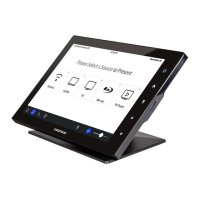
The UC-C160-T includes a 10.1-inch touch screen (TSW-1060-B-S) as the primary control interface. This touch screen provides a centralized point for managing meetings, initiating calls, sharing content, and controlling room functions. The touch screen can communicate with the UC-ENGINE either directly or over a network. A direct connection simplifies installation and setup, making it ideal for straightforward deployments. A network connection, on the other hand, allows the touch screen to be managed by the Crestron XIO Cloud™ service, offering advanced remote management and monitoring capabilities for IT administrators. This choice between direct and network connection provides significant operational flexibility, catering to different IT policies and management preferences.
Content sharing is a crucial aspect of modern conferencing, and the UC-C160-T supports this through its connectivity options. Laptops can be easily connected to the system, allowing users to share presentations, documents, and other media directly to the room displays. The system's robust connectivity, including HDMI, Ethernet, and USB ports, ensures broad compatibility with various devices and network configurations.
Maintenance features for the UC-C160-T are designed to ensure system security and ease of management. The physical installation includes securing connector covers with screws after making connections to the UC-ENGINE, with an option to use spanner screws for additional security. This physical protection helps prevent tampering and ensures the longevity of the connections.
From a software perspective, the system's configuration process is streamlined. Initial setup involves enabling a specific application (Teams Video) on the touch screen, followed by configuring network settings and login credentials for the UC-ENGINE. The touch screen can be configured via a web browser, allowing administrators to enter necessary information such as the UC-ENGINE's IP address or hostname, port number, username, and password. This web-based configuration simplifies the setup process and allows for remote adjustments if the touch screen is on the same network and VLAN as the configuring computer.
For ongoing management, the option to connect the touch screen to the network and leverage Crestron XIO Cloud service is a significant maintenance advantage. This cloud-based management platform enables IT professionals to remotely monitor, troubleshoot, and update the system, reducing the need for on-site visits and ensuring the system remains optimized and secure. Regular software updates for both the UC-ENGINE and the touch screen can be deployed efficiently through network management, ensuring access to the latest features and security patches from Microsoft Teams and Crestron.
The UC-C160-T is built with an understanding of the need for reliable and secure operation in corporate environments. The requirement for a pre-prepared Microsoft Teams account two to three weeks in advance of hardware installation highlights the importance of proper planning and integration into the corporate IT infrastructure. This proactive approach helps ensure a smooth deployment and minimizes potential issues during the go-live phase.
In summary, the Crestron Flex UC Video Conference System Integrator Solution for Microsoft Teams Rooms (UC-C160-T) is a highly adaptable and powerful conferencing system. Its function is to provide a seamless Microsoft Teams experience in meeting rooms, characterized by flexible hardware integration, intuitive touch screen control, robust connectivity for content sharing, and comprehensive management options. Its usage features emphasize ease of deployment and operation within the Microsoft ecosystem, while its maintenance features focus on physical security, simplified configuration, and remote management capabilities, ensuring a reliable and future-proof conferencing solution.
 General
| Display Size | 10.1 inches |
|---|---|
| Resolution | 1280 x 800 pixels |
| Touchscreen | Yes |
| Brightness | 350 cd/m² |
| Contrast Ratio | 1000:1 |
| Backlight | LED |
| Wi-Fi | 802.11 a/b/g/n/ac |
| Bluetooth | Yes |
| PoE | Yes |
| RAM | 2 GB |
| Storage | 8 GB |
| Mounting Options | VESA |
| Power Supply | PoE |
| Weight | 2.2 lbs |
| Processor | Quad-core ARM |













 To Next Page