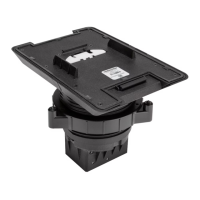
5. Attach the TSW-770/1070 mounting bracket (provided with the
touch screen)to the angled bracket using the two provided
6-32x3/8in. screws. Ensure the bracket is level after installation.
NOTE:If installing a TSW-770-LB or TSW-1070-LB light bar as
part of the MSMKinstallation, the light bar must be placed in
between the TSW-770/1070 mounting bracket and the
MSMKangled bracket during this stage of the installation. The
two provided 6-32 x 3/4in. screws must also be used in place of
the 6-32 x 3/8in. screws. For more information on installing the
light bar, refer to the TSW-770-LB and TSW-1070-LB Quick
Start.
6. Route all cables out of the center openings in the faceplates and
brackets and connect them to the rear of the touch screen.
7. After all connections have been made, hold the touch screen over the
mounting plate and place it gently in position so that it attaches
securely to the plate.
For more information on connecting the touch screen, refer to the
TSW-570,TSW-770, and TSW-1070 Product Manual or the TSS-770
and TSS-1070 Product Manual.
Drywall Mounting
1. Create a cutout in the drywall where the touch screen will be installed
for routing cables.
2. Route all necessary cables through the drywall cutout.
3. Attach the angled bracket to the drywall surface using four standard
drywall anchors and 6-AB x 1 in. drywall screws (not included).
NOTE:Ensure the angled bracket is level after installation.
4. Attach the TSW-770/1070 mounting bracket (provided with the
touch screen)to the angled bracket using the two provided
6-32x3/8in. screws. Ensure the bracket is level after installation.
NOTE:If installing a TSW-770-LB or TSW-1070-LB light bar as
part of the MSMKinstallation, the light bar must be placed in
between the TSW-770/1070 mounting bracket and the
MSMKangled bracket during this stage of the installation. The
two provided 6-32 x 3/4in. screws must also be used in place of
the 6-32 x 3/8in. screws. For more information on installing the
light bar, refer to the TSW-770-LB and TSW-1070-LB Quick
Start.
5. Route all cables out of the center opening in the angled bracket and
connect them to the rear of the touch screen.
6. After all connections have been made, hold the touch screen over the
mounting plate and place it gently in position so that it attaches
securely to the plate.
4
TSW-770/1070-MSMK-ANG
QuickStart
Multisurface Mount Kit for TSW-770 and TSW-1070 Series, Angled



 To Next Page
 Loading...