K SIZE:144X210MM
TV-3589 Eng IB 0211-12481-20
16
3589
Once you have connected your TV to an antenna or cable system, plugged the TV in, and put bat-
teries in the remote, you are ready to use the TV. The thing you should do is program your TV to
memorize all of the available channels in you area.
Turning Your TV On
To turn your TV ON, press the “
” button on the remote control or press the “ ” button on the front
panel. (The LED light is red when the TV is in the standby mode and blue when powered up.)
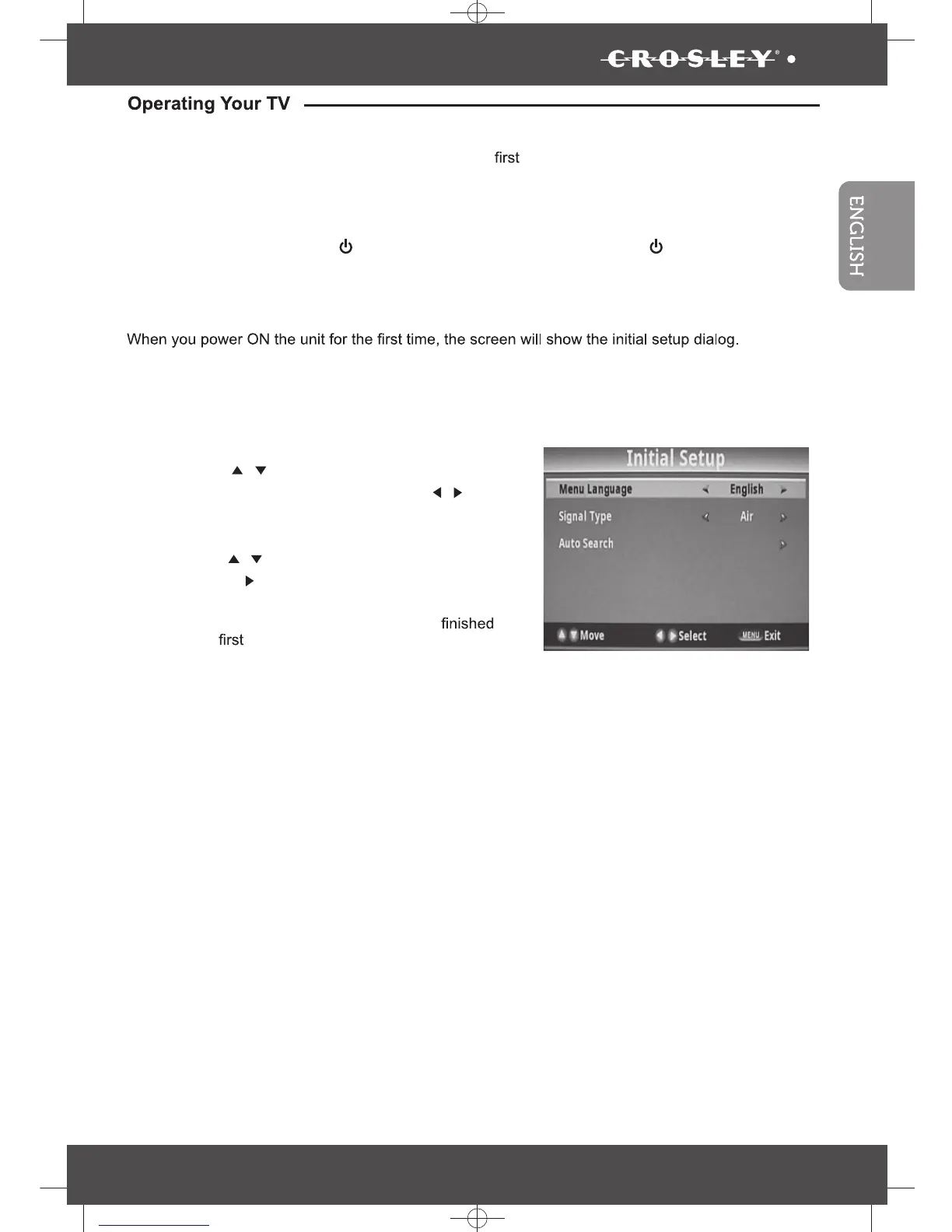
There are 3 option in initial setup menu:
• Menu Language: English, Francais or Espanol
• Signal type: Air or Cable
•
Auto Search
• Press the “
/
” button to highlight desired menu
language or signal type and press the “
/
” but-
ton to select desired menu language and signal
type.
• Press the “
/
” button to highlight Auto
Search
and press “ ” button to perform
auto channel
scan, the Auto scan process will take about 30
minutes, while the auto scan
process is
then the memorized channel will appear on
the screen.
You can Scan for channels at any time using the
following instructions:
First time installation


 To Next Page