3589
K SIZE:144X210MM
TV-3589 Eng IB 0211-12481-20
17
•
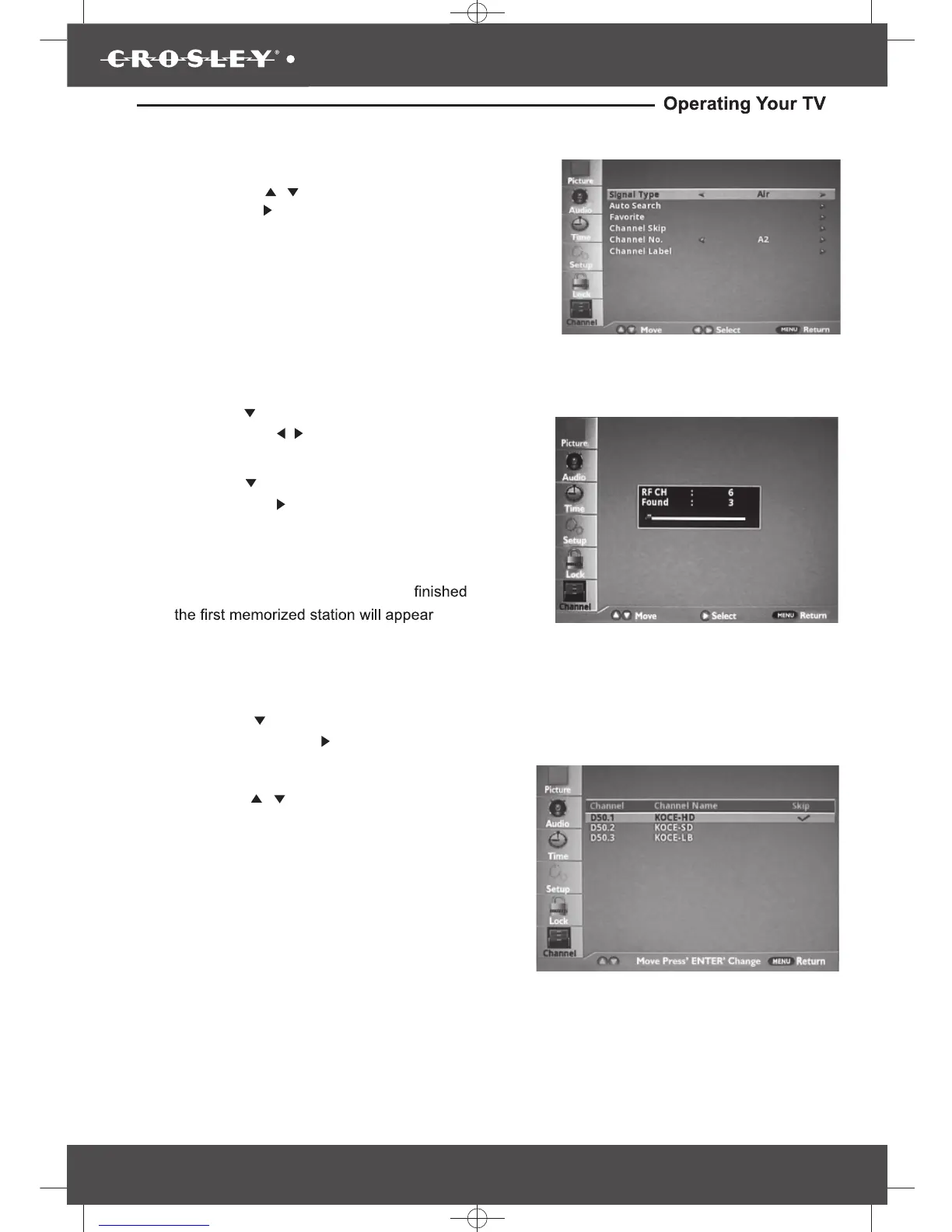
Channel Programming
Press the “MENU” button on the remote control,
then press the “
/
” button to highlight Channel
and press the“ ” button to access to the menu.
• Signal Type:Air or Cable
• Auto Search
• Favorite
• Channel Skip
• Channel No.
• Channel Label
Channel Skip
• Press the “
Press the “ / ”buttons to select a channel
you want to hide, then press “ ENTER” button.
The check mark appears to the channel
disappears and the screen turns black.
” button to highlight the lennahC
Skip, then press the“ ”button to enter to the sub-
menu.
•
Press the “ ENTER” button again to sho w
the channel. The check mark Disappear s
and the screen shows the channel.
•
Press the “
” button to highlight Signal Type,
then press the “ ” button to select desired
Air or
/
Cable.
•
•
Press the “
” button to highlight Auto search
and press the“ ” button to
launch the Auto
channels scanning. The
scanning process
will take about 30 minutes or m ore (depends on
how many TV stations are in
when the auto scanning process is
your area),
screen.on the


 To Next Page