K SIZE:144X210MM
TV-3589 Eng IB 0211-12481-20
22
3589
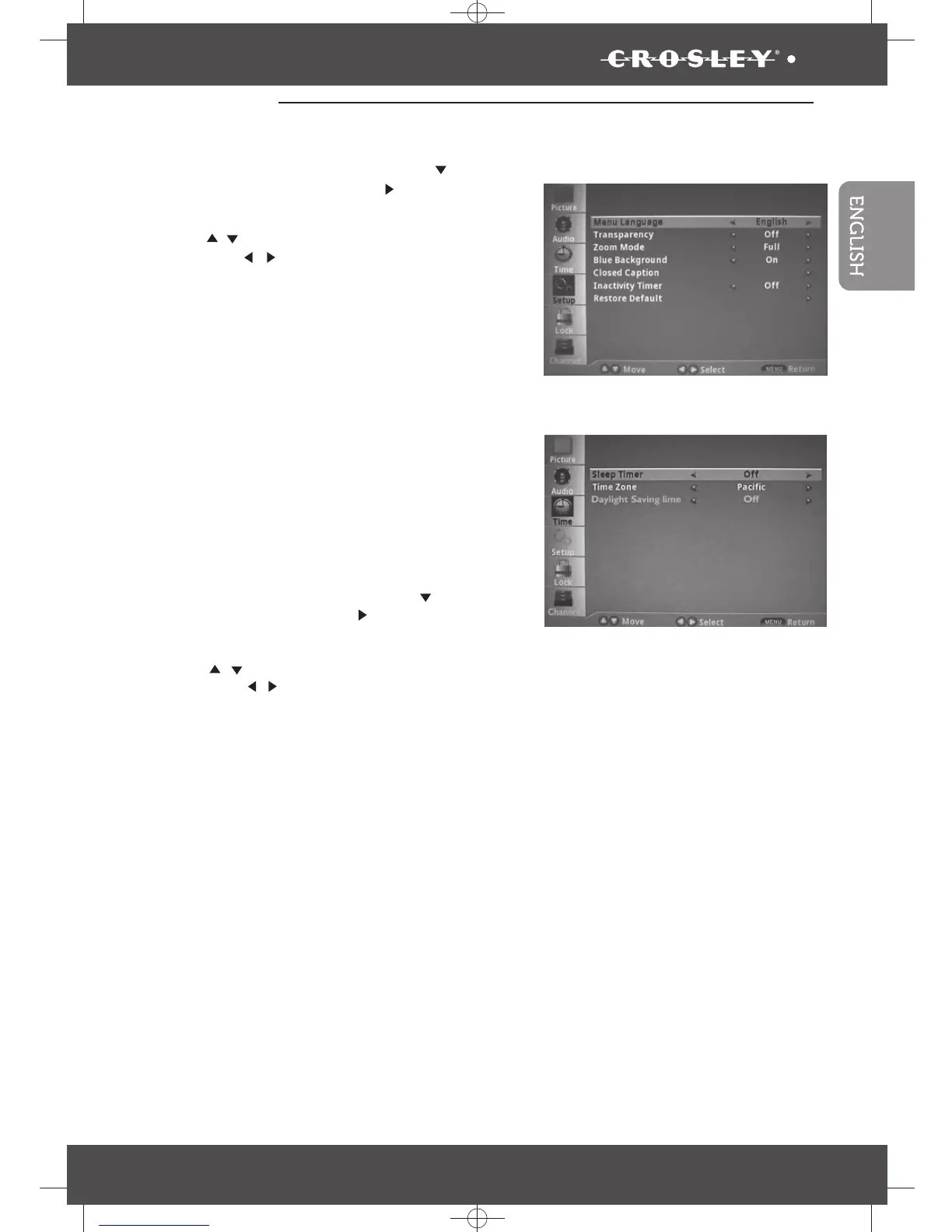
Time
Press the “
MENU
” button then
press the “ ” button to
highlight the Time and press “ ” button
to access to the menu.
Select the sleep time you want
.
Sleep Timer –
Time Zone: Pacific, Alaska, Hawaii,
Eastern, Central or Mountain
Daylight Saving Time: On or Off
Setup
Press the “
Press the “ / ”button to select one off following settings,
then press the“ / ” button to change the setting.
MENU
” button then
press the “
Press the “ / ”button to select one off following settings,
then press the“ / ” button to change the setting.
” button
to highlight the Setup and press “ ” button to access
to the menu.
• Menu Language:English , French or Spanish
Cinema or Normal
•
•
•
•
•
•
Transparency: On or Off
Zoom Mode: Full ,Zoom,
• Closed Caption -
on-screen text in conjunction with the audio
program for those who are deaf or hard of hearing.
•
•
•
Blue Background:On or Off
•
Reset all settings back to factory
Inactivity Timer:4 hours, 6 hours, 8 hours or Off
•
•
Restore Default -
defaults.
Operating Your TV
Closed caption provides


 To Next Page