EasyManua.ls Logo

Crosley CR3039A - User Manual

Crosley CR3039A
8 pages
Print Icon
To Next Page IconTo Next Page
Loading...
RONDO STYLE BLUETOOTH SPEAKER
USER MANUAL
CR3039A

Other manuals for Crosley CR3039A

Question and Answer IconNeed help?

Do you have a question about the Crosley CR3039A and is the answer not in the manual?

Summary

Buyer Recommendations

Device Unpacking and Inspection

Carefully unpack the device, check for accessories, and inspect for any damage during transit.

Shipping and Transportation

Shipping and transportation are permitted only in the original container.

Storage and Disposal

Does not require special storage conditions; dispose according to regulations.

Product Contents and Features

Packing Contents

Includes 50cm USB power cable and User's Manual.

Special Features

Bluetooth transmission, USB/SD playback, 3.5-hour battery, 10m operating range.

Speaker System Description and Controls

Power, Play;Pause, and Mode Button

Controls power, playback, and mode switching (Bluetooth, USB, SD).

Volume and Track Control Buttons

Buttons for adjusting volume and navigating audio tracks.

Microphone

Captures audio input for calls and voice commands.

Connection and Operation Modes

Battery Charging

Procedure for charging the device's built-in battery using a USB connection.

Bluetooth Mode Operation

Instructions for connecting and operating the speaker via Bluetooth.

MP3 Player Mode

Details on inserting media, playback controls, and file system requirements.

Bluetooth Calling

Functionality for answering, speaking, and hanging up calls via Bluetooth.

Standby Function

Automatic shut down feature when not connected to Bluetooth.

Technical Specifications and Compliance

Technical Specifications

Details on power output, battery capacity, power supply, and cable length.

FCC Statements

Compliance information regarding radio frequency interference and operation.

Summary

Buyer Recommendations

Device Unpacking and Inspection

Carefully unpack the device, check for accessories, and inspect for any damage during transit.

Shipping and Transportation

Shipping and transportation are permitted only in the original container.

Storage and Disposal

Does not require special storage conditions; dispose according to regulations.

Product Contents and Features

Packing Contents

Includes 50cm USB power cable and User's Manual.

Special Features

Bluetooth transmission, USB/SD playback, 3.5-hour battery, 10m operating range.

Speaker System Description and Controls

Power, Play;Pause, and Mode Button

Controls power, playback, and mode switching (Bluetooth, USB, SD).

Volume and Track Control Buttons

Buttons for adjusting volume and navigating audio tracks.

Microphone

Captures audio input for calls and voice commands.

Connection and Operation Modes

Battery Charging

Procedure for charging the device's built-in battery using a USB connection.

Bluetooth Mode Operation

Instructions for connecting and operating the speaker via Bluetooth.

MP3 Player Mode

Details on inserting media, playback controls, and file system requirements.

Bluetooth Calling

Functionality for answering, speaking, and hanging up calls via Bluetooth.

Standby Function

Automatic shut down feature when not connected to Bluetooth.

Technical Specifications and Compliance

Technical Specifications

Details on power output, battery capacity, power supply, and cable length.

FCC Statements

Compliance information regarding radio frequency interference and operation.

Overview

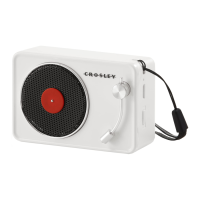
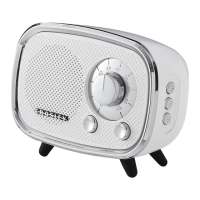
The RONDO STYLE BLUETOOTH SPEAKER, model CR3039A, is a portable audio device designed for wireless music playback and hands-free calling. It features a retro-inspired design with a compact form factor, making it suitable for various environments.

Function Description:

The primary function of the CR3039A is to serve as a Bluetooth wireless speaker, allowing users to stream audio from compatible devices such as smartphones, tablets, and computers. In addition to Bluetooth connectivity, it includes a built-in player that supports USB flash drives and micro SD memory cards, offering versatile playback options for stored music files. The device also incorporates a microphone, enabling it to function as a speakerphone for answering incoming calls when paired with a smartphone.

Important Technical Specifications:

  • Out power: 3W
  • Battery capacity: 1200 mA/h
  • Power supply: USB/DC 5V
  • Cable length: 0.5 m (for USB power cable)
  • Weight: 223 g
  • Dimensions: 120x62x87 mm
  • Radius of operation: Up to 10 m (for Bluetooth)
  • Battery operation time: Up to 3.5 hours
  • Supported file system for micro SD/USB flash: FAT32
  • Maximum volume for micro SD/USB flash: 64 GB

Usage Features:

The speaker system features a user-friendly interface with clearly defined controls:

  • Power button (1): Long press to turn ON/OFF. Short press for Play/Pause. Two short presses to switch modes (Bluetooth, USB, SD).
  • Volume decrease button (2): Long press to decrease volume. Short press for the last song.
  • Volume increase button (3): Long press to increase volume. Short press for the next song.
  • Microphone (4): For hands-free calling.
  • Micro SD card slot (5): For inserting micro SD memory cards.
  • LED indicator (6): Displays the current mode (Bluetooth, Micro SD card, USB) and battery charging status (red during charging, blue for Bluetooth pairing).
  • USB driver socket (7): For inserting USB flash drives.
  • Battery charge indicator (8): Indicates battery charging status.
  • USB charging socket (9): For connecting the USB power cable to charge the device.

Bluetooth Mode:

To use the Bluetooth mode, long press the Power/Play/Pause button to turn the speaker ON. The LED indicator will flash blue, indicating it's in pairing mode. On your audio device, search for "CROSLEY CR3039A" and pair. A short confirmation sound will be heard from the unit upon successful pairing. Music can then be streamed from your device. If the device has been previously registered, re-pairing might not be necessary. Some devices may require a "0000" code for connection.

Bluetooth Calling:

When a smartphone is paired, the speaker will ring for incoming calls. Press the Power/Play/Pause button to answer. Speak through the built-in microphone. To hang up, press and hold the Power/Play/Pause button.

MP3 Player Mode:

Insert a USB flash drive or micro SD card (formatted to FAT32, max 64GB) into the appropriate slot. If the speaker is on, playback will start automatically. The Play/Pause button controls playback, while the volume decrease (2) and volume increase (3) buttons control track selection (previous/next song).

Standby Function:

The unit will automatically shut down after five minutes if it is not connected to Bluetooth, conserving battery life.

Maintenance Features:

  • Battery Charging: The built-in battery must be fully charged before initial use. Connect the speaker to a PC's USB port or a USB charger using the included micro USB to USB cable. The LED indicator will be red during charging.
  • Battery Care: The battery is an integral part of the device and should not be extracted or replaced by the user, as this can void the warranty and damage the device.
  • Disposal: Dispose of the device in accordance with regulations for the disposal of household and computer equipment.
  • Shipping: For shipping and transportation, always use the original container to protect the device.

Buyer Recommendations:

Upon receiving the device, carefully unpack it and ensure all accessories (50cm USB power cable, User's Manual) are present. Inspect the device for any damage. If damage occurred during transportation, contact the delivery firm. If the product functions incorrectly, contact the dealer immediately.

FCC Statements:

The device complies with Part 15 of the FCC Rules. Operation is subject to two conditions: (1) it may not cause harmful interference, and (2) it must accept any interference received, including interference that may cause undesired operation. Any changes or modifications not expressly approved by the responsible party could void the user's authority to operate the equipment. If interference occurs, users are encouraged to try corrective measures such as reorienting the antenna, increasing separation between equipment and receiver, connecting the equipment to a different circuit, or consulting a dealer/technician.
Crosley CR3039A Specifications

General IconGeneral
BrandCrosley
ModelCR3039A
CategorySpeakers
LanguageEnglish

Related product manuals