GasMaster Adding an input module
37
The 4-channel version of Gasmaster may be sup-
plied pre-fitted with between one and four input
modules of the following types:
•4-20mA/Firemodulefor4-20mAtype
detectors, conventional smoke/heat detec-
tors or ESU.
•mVPellistormoduleformVbridgetype
flammable gas detectors.
Systems ordered with fewer than four input
modules can be extended at a later date by fitting
additional modules. The input modules simply
plug-in, it is not necessary to remove power
from the system providing the channel is set as
‘Unused’ prior to insertion.
Once the module has been added the channel
can be configured as appropriate to the detector
using the Supervisor menu.
5. Adding an input module
+
s
PWR (+)
SIG (S)
0V (-)
SCRN
-
CHANNEL 1
MODULE
CHANNEL 2
MODULE
CHANNEL 3
MODULE
CHANNEL 4
MODULE
Gasmaster
Detector Input
Terminals
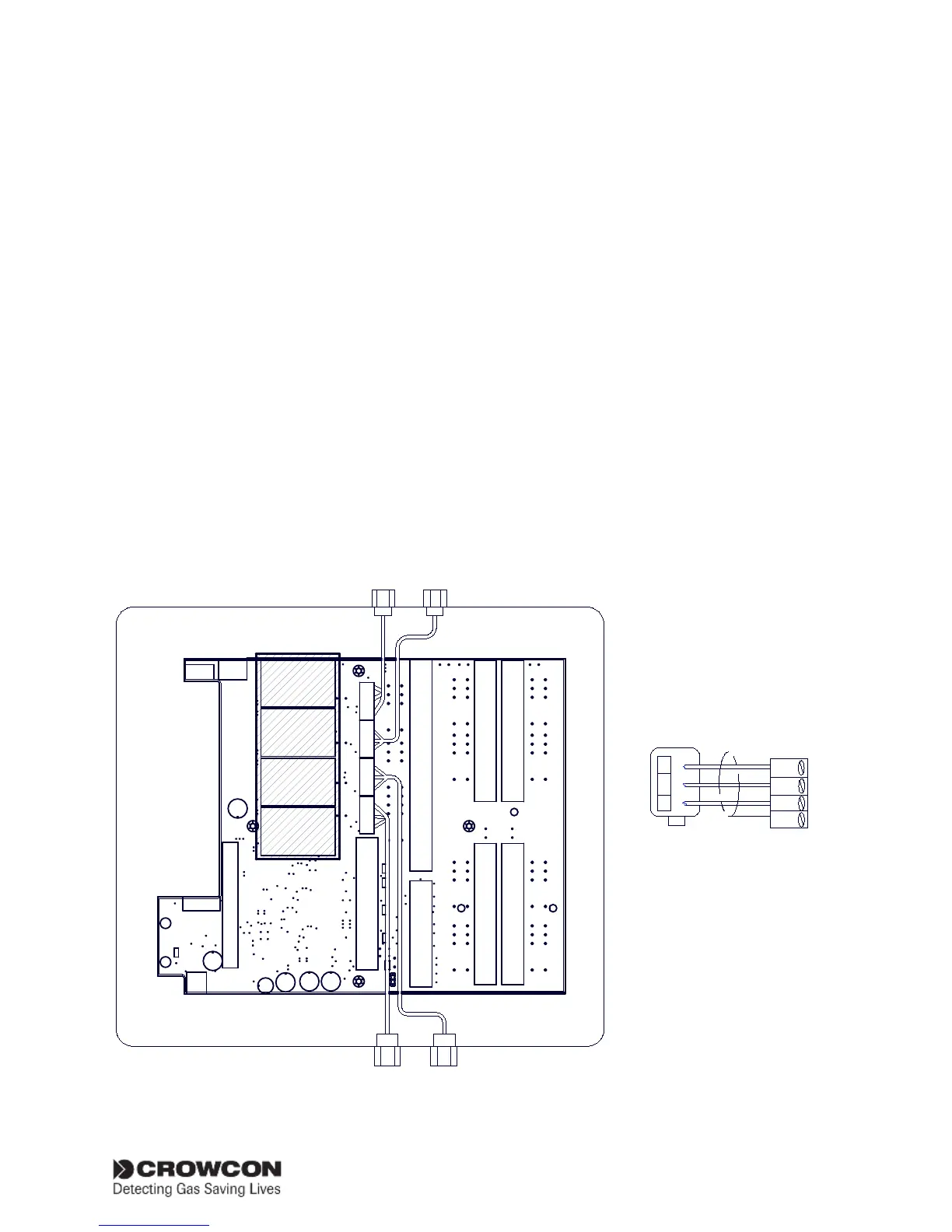
Figure 5.1 Connections for mV pellistor type detectors. mV Pellistor input module
Important: to avoid signal
interference, it is essential
that detector cables do
not cover mV pellistor
input modules (hatched
area on diagram).
mV pellistor gas detector


 To Next Page