EasyManua.ls Logo

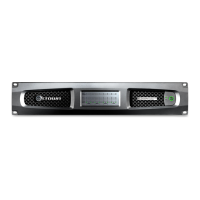
Crown DCi 8|600N - User Manual

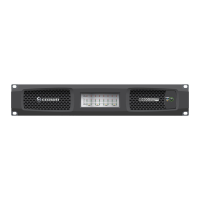
Crown DCi 8|600N
72 pages
Print Icon
To Next Page IconTo Next Page
Loading...
Product Registration: Register your new product at http://warranty.harmanpro.com.
Obtaining Other Language Versions: To obtain information in another language about the use of this product, please contact your local Crown Distributor. If you need
assistance locating your local distributor, please contact Crown at 574-294-8000 or visit www.crownaudio.com.
This manual does not include all of the details of design, production, or variations of the equipment. Nor does it cover every possible situation which may arise during
installation, operation or maintenance.
The information provided in this manual was deemed accurate as of the publication date. However, updates to this information may have occurred. To obtain the latest
version of this manual, please visit the Crown website at www.crownaudio.com.
Trademark Notice: Com-Tech, BCA, Crown, Crown Audio, Amcron and Multi-Mode are registered trademarks of Crown International. DriveCore, DriveCore Install,
IQwic, PIP and PIP2 are trademarks of Crown International. Other trademarks are the property of their respective owners.
Some models may be exported under the name Amcron
®
© 2016 by HARMAN International
®
, Inc. 1718 W. Mishawaka Rd., Elkhart, Indiana 46517-9439 U.S.A. Telephone: 574-294-8000
DCi 2|300N
DCi 4|1250N
DCi 2|1250N
DCi 4|2400N
DCi 2|2400N
DCi 4|300N
DCi 8|300N
DCi 2|600N
DCi 4|600N
DCi 8|600N
DCi Series – Network Models
Operation Manual
5040450 - 04/16

Questions and Answers

  • J
    Joseph DelgadoAug 20, 2025
    Why is the sound distorted on my Crown Amplifier?
    • K
      Kelly HamiltonAug 20, 2025
      If the sound from your Crown Amplifier is distorted, it might be due to incorrect loading settings or a wrongly set Stereo/Bridge mode switch. Verify that both the loading and mode switch are properly configured. Alternatively, the input signal might be too high, causing an overload. In this case, reduce the amplifier level controls or the input signal until the clip light turns off.
  • D
    Daniel HayesAug 22, 2025
    What to do if the power indicator is off and mains indicator is off on Crown Amplifier?
    • M
      melissa03Aug 22, 2025
      If the power and mains indicators are off on your Crown Amplifier, it could be due to several reasons. First, the power supply fuse might have tripped, requiring you to check and replace it. Second, the amplifier might have lost AC power, so verify the AC power source. Lastly, ensure the amplifier is properly plugged into the power receptacle.
  • L
    Laura RodriguezAug 25, 2025
    Why is the thermal indicator on my Crown DCi 8|600N?
    • V
      Victoria RossAug 25, 2025
      If the thermal indicator is on, it means your Crown Amplifier is overheating and is becoming too hot for safe operation. Allow the amplifier to cool down. Then, check for loads less than 2 ohms and excessive input levels. Also, ensure that there is proper ventilation and the mode-switch is correctly set.
  • D
    Dawn ValenzuelaAug 26, 2025
    What to do if my Crown DCi 8|600N has power but no sound?
    • J
      James NguyenAug 26, 2025
      If your Crown Amplifier has power, the power LED is on, the amp is receiving a signal, and the signal indicator is flashing, but there is no sound, consider these possibilities: * Speakers might not be connected: Connect the speakers. * There may be an open circuit due to speaker failure: Check the speaker for failure. * The channel might be set to Sleep mode or Power Save mode: Disable Sleep mode or Power Save mode.
  • C
    Christopher BridgesAug 28, 2025
    What does it mean if the fault indicator is flashing on my Crown DCi 8|600N?
    • C
      Charles RoseAug 28, 2025
      If the fault indicator is flashing on your Crown Amplifier, it indicates a problem such as a temperature above 98C, DC/LF protection engaged, HF detect, or an output short circuit detected. Check these conditions and attempt to resolve them before sending the amp for service.
  • E
    elizabethandersonAug 30, 2025
    Why is the power indicator flashing on my Crown DCi 8|600N Amplifier?
    • L
      Lisa DennisAug 30, 2025
      If the power indicator is flashing on your Crown Amplifier, it means the AC line voltage has dropped below 10% or risen above 10% of the nominal line voltage of the power supply. Stabilize the AC line voltage to resolve this issue.
  • L
    Lisa WaltersSep 1, 2025
    What to do if there is no input signal on Crown DCi 8|600N Amplifier?
    • L
      Lauren JacksonSep 1, 2025
      If the signal indicator is not flashing on your Crown Amplifier, even though audio is applied and the channel is ready, it may be because the input signal level is very low. Try increasing the input signal level.
  • E
    Elizabeth JohnsonSep 3, 2025
    How to turn on Crown DCi 8|600N if the power indicator is off?
    • R
      Robert WellsSep 3, 2025
      If the power indicator is off, but the mains indicator is on for your Crown Amplifier, the amplifier’s power switch is likely turned off. Turn the amplifier’s power switch on.
  • D
    Dr. Lori LopezSep 5, 2025
    Why is the bridge LED lit on my Crown Amplifier?
    • A
      Austin ThomasSep 5, 2025
      If the Bridge LED is lit on your Crown Amplifier, the amplifier is in bridge-mono mode. Verify that the amplifier is intentionally set to bridge-mono mode.
  • U
    umaxwellSep 7, 2025
    Why is my Crown Amplifier sound distorted?
    • C
      Cathy LittleSep 7, 2025
      Distorted sound from your Crown Amplifier can occur due to several reasons. The load might be wired incorrectly, or the Stereo/Bridge mode switch might be set wrong; in that case, check the wiring and switch setting. The input may also be overloaded by a signal level that is too high. Try turning down your amplifier level controls or the input signal until the clip light goes out. If the distortion persists even with the Clip LED off, the input signal may be distorted before reaching the amplifier; in that case, check the gain staging and output levels of the mixer or preamp.

Summary

Important Safety Instructions

Installation

Amplifier Installation and Cooling

Guidance on rack mounting the amplifier, ensuring proper cooling, and maintaining adequate air flow.

Hardware Setup and Configuration

Software Setup

Network Configuration with Audio Architect

Explains how to connect amplifiers to a network and use HiQnet Audio Architect for setup and configuration.

Amplifier Configuration

Advanced Operation - Digital Signal Processing (DSP)

Amplifier Presets and Speaker Tunings

Introduces amplifier presets and speaker tunings, explaining user-created and downloadable presets for specific applications.

Advanced Operation - Speaker Tuning Libraries

Speaker Tuning Features and Benefits

Discusses the benefits of Crown/JBL speaker tunings, including unlimited libraries, fast recall, and channel-specific settings.

Advanced Speaker Tuning Panel Functions

Details the advanced functions available in the Speaker Tuning Panel, including IIR Crossover Filters, EQ Filters, Limiter Suite, and Delay.

Advanced Operation - Onboard DSP Control

Software-Controlled Digital Signal Processing (DSP)

Introduces the onboard DSP capabilities and how Audio Architect software is used to control them for setup and monitoring.

Advanced Operation - DSP Control Interface

Input and Output Signal Level Monitoring

Explains the Input and Output Signal Level Meters and their function in monitoring audio levels and clip status.

Advanced Operation - Signal Routing

Input Signal Router Functionality

Describes the Input Signal Router, allowing selection of analog, BLU link, or backup analog sources for each channel.

Source Routing Configuration Options

Explains the configuration options for source routing, including priority input routing and quick start selections.

Advanced Operation - Audio Processing

Input and Output Delay Settings

Details input delay (up to 2 seconds) and output delay (up to 0.1 seconds) for driver alignment.

Crossover Filter Configuration

Describes the use of IIR Crossover filters, including available filter types, slopes, and gain settings.

Input;Output Equalization Adjustment

Explains how to adjust channel equalization for up to 8 frequencies using filter type, frequency, gain, and bandwidth.

Advanced Operation - Limiter Suite

LevelMax Suite Overview

Introduces the LevelMax™ suite, including peak voltage limiter, RMS power limiter, clip limiter, and transducer thermal limiter.

Signal Path Overview

DCi Network Signal Flow Diagram

Provides a detailed block diagram illustrating the signal path through the amplifier, including inputs, DSP, and outputs.

Protection System

Thermal and Fault Protection

Explains the amplifier's thermal protection and fault detection mechanisms, including indicator lights and shutdown conditions.

Troubleshooting - Power and Thermal Issues

Power Indicator Troubleshooting

Guides users through diagnosing power indicator issues, including when it's off or flashing.

Thermal Indicator and Fault Conditions

Explains troubleshooting steps for thermal indicators and flashing fault indicators, identifying possible causes.

Troubleshooting - Audio Output Issues

Distorted Sound Diagnosis

Provides reasons and solutions for distorted audio output, including incorrect wiring and input overload.

No Sound Troubleshooting

Offers steps to diagnose and resolve issues when there is no sound output, such as checking speaker connections and sleep mode.

Troubleshooting - Signal and Mode Issues

DCi Amplifier Specifications

Detailed Performance Specifications

Lists comprehensive performance specifications including Voltage Gain, Frequency Response, Signal-to-Noise Ratio, THD, IMD, Damping Factor, Crosstalk, CMR, and offsets.

AC Power Draw and Thermal Dissipation - DCi 2|300 N

DCi 2|300 N Power Consumption and Heat

Provides detailed tables for AC power draw and thermal dissipation for the DCi 2|300N model in Bridge and Dual modes under various conditions.

AC Power Draw and Thermal Dissipation - DCi 2|600 N

DCi 2|600 N Power Consumption and Heat

Details AC power draw and thermal dissipation for the DCi 2|600N model in Bridge and Dual modes under various load and signal conditions.

AC Power Draw and Thermal Dissipation - DCi 2|1250 N

DCi 2|1250 N Power Consumption and Heat

Presents data on AC power draw and thermal dissipation for the DCi 2|1250N model in Bridge and Dual modes.

AC Power Draw and Thermal Dissipation - DCi 4|2400 N

DCi 4|2400 N Power Consumption and Heat

Provides AC power draw and thermal dissipation figures for the DCi 4|2400N model in Bridge and Dual modes.

AC Power Draw and Thermal Dissipation - DCi 4|300 N

DCi 4|300 N Power Consumption and Heat

Details AC power draw and thermal dissipation for the DCi 4|300N model across different loads and voltages.

AC Power Draw and Thermal Dissipation - DCi 4|600 N

DCi 4|600 N Power Consumption and Heat

Presents AC power draw and thermal dissipation data for the DCi 4|600N model in Bridge and Dual modes.

AC Power Draw and Thermal Dissipation - DCi 4|1250 N

DCi 4|1250 N Power Consumption and Heat

Details AC power draw and thermal dissipation for the DCi 4|1250N model, covering Bridge and Dual configurations.

AC Power Draw and Thermal Dissipation - DCi 8|300 N

DCi 8|300 N Power Consumption and Heat

Details AC power draw and thermal dissipation for the DCi 8|300N model in Bridge and Dual configurations.

AC Power Draw and Thermal Dissipation - DCi 8|600 N

DCi 8|600 N Power Consumption and Heat

Presents AC power draw and thermal dissipation data for the DCi 8|600N model in Bridge and Dual modes.

Service and Support

Warranty Information (United States Only)

Warranty Summary and Exclusions

Summarizes the 3-year no-fault warranty, lists excluded items, and details what the warrantor will do to remedy defects.

Service Return Authorization (SRA) Form

Crown DCi 8|600N Specifications

General IconGeneral
Channels8
Power per channel @ 2 ohms600 W
Power per channel @ 4 ohms600W
Power per channel @ 8 ohms300 W
70V Power per channel600 W
100V Power per channel600 W
Signal to Noise Ratio> 100 dB
Input Sensitivity1.4 V
Damping Factor> 500
Frequency Response20 Hz - 20 kHz
Power Requirements100-240V, 50/60Hz
Input Impedance20k ohms

Related product manuals