CANedge2 Docs, Release FW 01.04.02
Size [GB] TBW Lifetime @ 1MB/sec [years]
2
Lifetime @ 1MB/min [years]
8 24 0.8 47.9
32 96 3.2 191.5
0.3.5 LED
0.3.5.1 Location
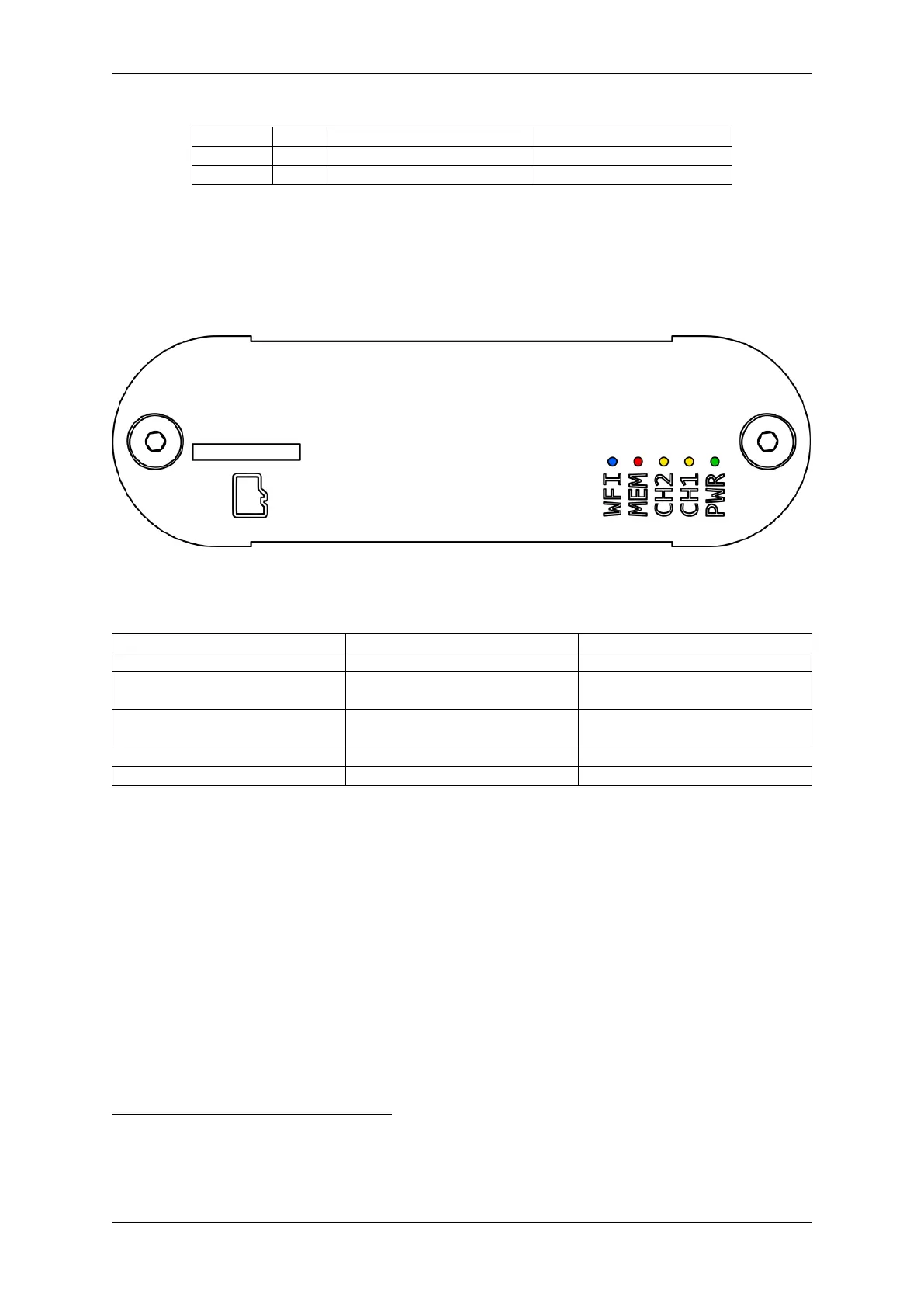
The LEDs are located at the back of the device as illustrated below.
0.3.5.2 Overview
LED Short Name LED Color Main Function
PWR Green Power
CH1 Yellow Bus activity on connector 1
(CH1)
CH2 Yellow Bus activity on connector 2
(CH2)
MEM Red Memory card activity
WFI Blue WiFi connected
PWR
The Power LED is constantly on when the device is in normal operation. An exception is when the
firmware is being updated (for more information go to the Firmware section).
CH1 / CH2
The Channel 1 / Channel 2 LEDs indicate bus activity on Channel 1 and 2 respectively.
MEM
The Memory LED indicates activity on the memory card. Config file parsing, message logging, file
upload etc. all generate activity on the memory card.
2
A constant logging rate of 1 MB/sec is likely much much higher than in any practical logging use-case
12 CONTENTS



 To Next Page