20.5 Inputting codes
Point or ID codes may be entered in the memory of the instrument in advance. When
recording instrument station or observation data, these codes can be recalled and read
in. Codes should be unique point descriptions. Also, it is suggested that one code be
called NOTE. This will remind you that you have a note in your field book that has to
be referenced.
O
eratin
Ke
s Dis
la
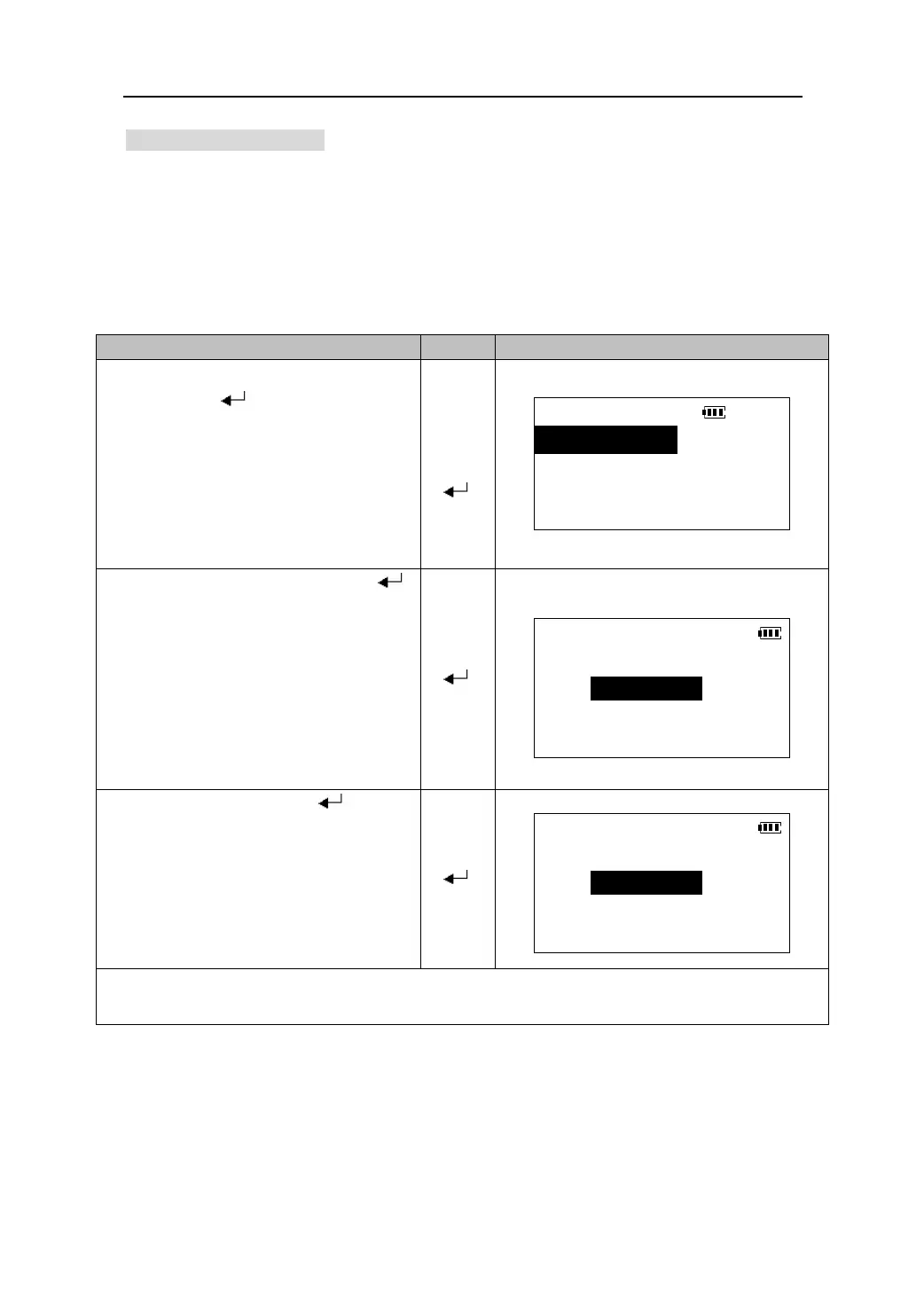
1. Select “3. Code” in the Memory Mode,
and press 【
】 to come in <CODE>
CODE
menu screen.
【】
1.Key in code
【】
【
】
2.List
3.Del all
2. Select “1. Key in code” and press【 】
to be ready to input codes.
Input code
【 】
Code:
3. Enter the code and press 【 】 to store
it in the memory and the inputting code
screen is restored. Press 【ESC】to stop
Input code
to abort and return to <CODE> menu
screen.
【 】
Code:
z Maximum code size:8
z Maximum number of codes stored: 64
78





 To Next Page