Laser Air Plus | User Manual Laser Air Plus | User Manual
2423
NETWORK SETTINGSNETWORK SETTINGS
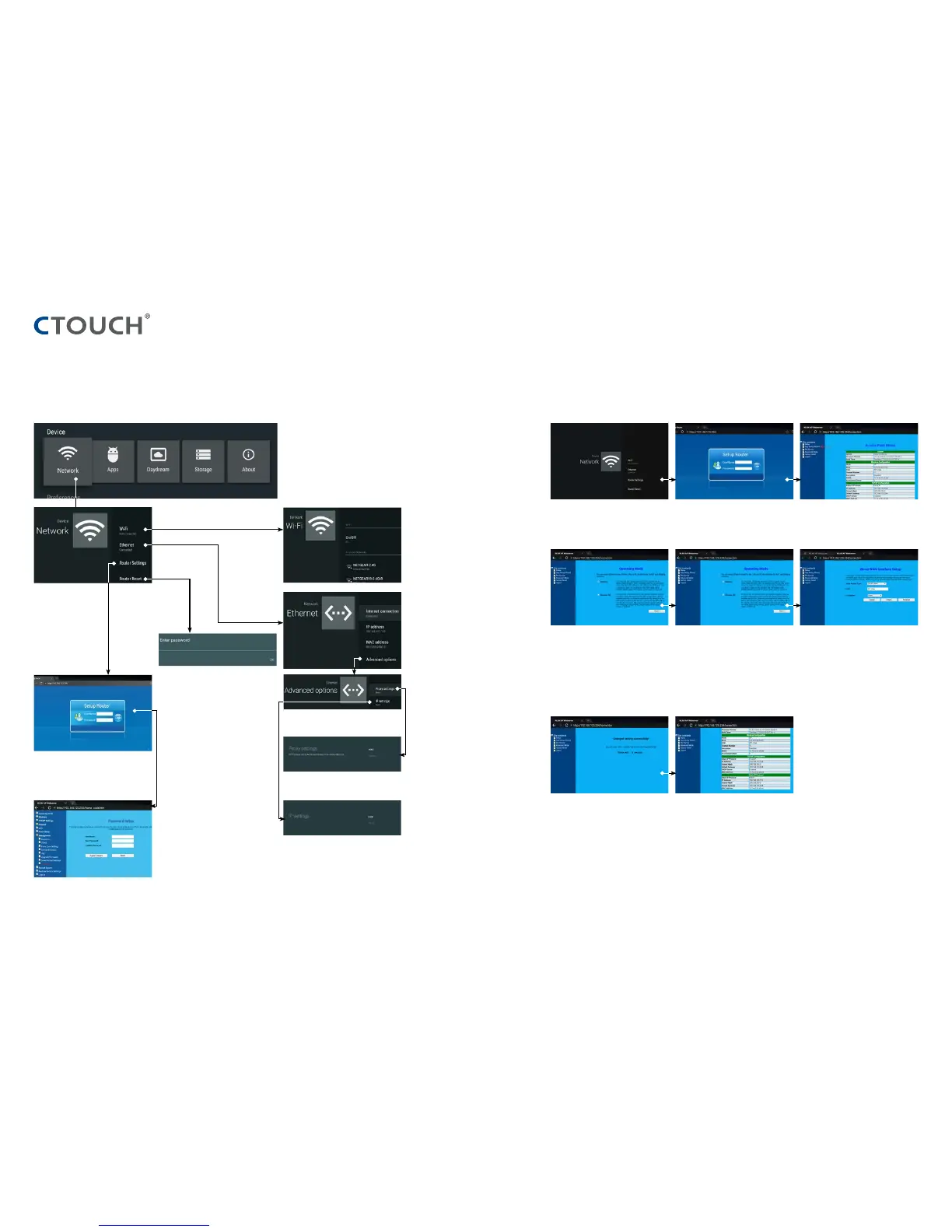
Set the built-in WiFi Touch ‘Router Settings’. Select ‘Easy Setup Wizard’.
Select ‘Gateway’.
Wait until the router is finished rebooting. If your network is connected to the
screen WAN-port, you should see an IP-
address here.
Touch ‘Next’.
Fill in the credentials and then touch the
‘login-button’.
Default UserName: admin.
Default password: no default password is set.
Touch ‘finished’.
WAN Access Type: DHCP-client by default.
For the other options, please refer to our
Router Manual at our website.
SSID: If required, the name of the screens
Wireless Network can be changed here.
Encryption: If you want to set a password,
you can select a required encryption by
pressing the pull-down menu at ‘Encryption’.
Wired Network Setting (Internal router)
Method 1: Easy Setup Wizard
Ethernet setting
Reset internal router by hardware.
Password is required for this operation
and is the same password as to access
the Lock menu. (the default password is
0000)
Internal routing setting
IP settings
Proxy settings
Input the default UserName: admin. Skip
the default password setting as there is
no default password and then press the
login button.
Change the UserName and Password:
Select Management and then Password.



 To Next Page