③ Open the CTRONICS APP and add the camera according to the
following steps:
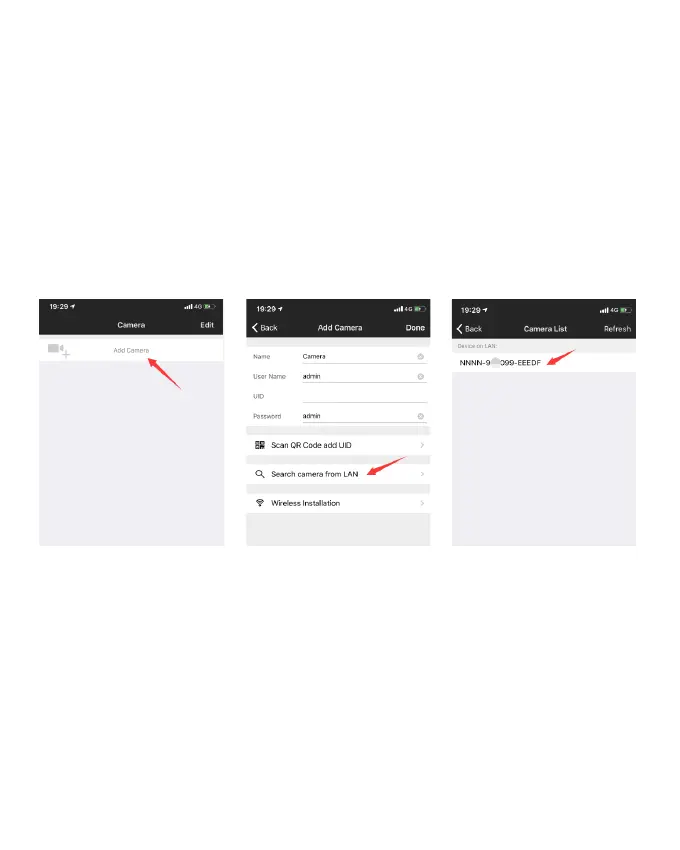
1.Click Add Camera; (Picture 11)
2.Click Search camera from LAN; (Picture 12)
3. Find device ID on LAN; (Picture 13)
4. Find camera online, click the tool icon; (Picture 14)
5.Click WI-FI Setting; (Picture 15)
6.Find your home network SSID and input password(ctronics888 is
just for reference, please input your own password for your home SSID);
(Picture 16 to Picture 17)
7.Camera is online from WAN. (Picture 18)
-www.ctronics.com-
-06-
Picture 11
Picture 12 Picture 13


 To Next Page
 Loading...