1. Appearance and Keypad Operations
Short press this button to return home from any application or interface.
Long press it to open Google search.
Short press this button toopen therecent items.
Press it to return to the previous interface,or to close dialog box ,options’
menu ,notification panel or the keypad.
Short press this button tolock or unlock the screen.
Long press it to open the Tablet’s menu,then you could choose to Power off,
Restart, Airplane mode, Screenshot and Emergency.
Press it to increase the volume.
Press it to decrease the volume.
2. Using Memory Card as U Disk
If you want to send music, pictures or other files to the Tablet’s memory card from the computer,you
should set memory card as u disk first.
Set memory card as u disk
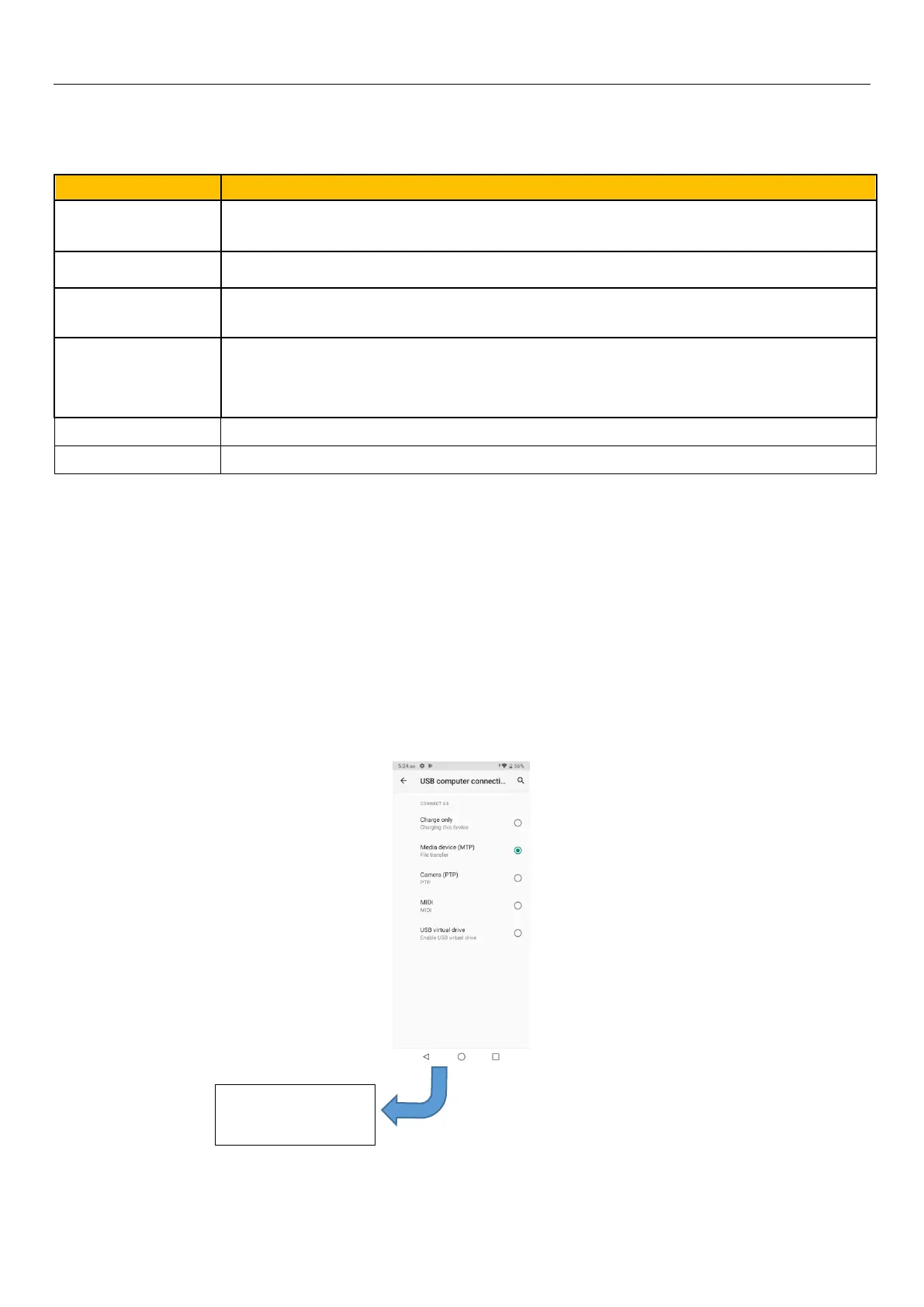
1) Connect the Tablet to the computer with USB cable. The notification icon will appear in the status
box.
2) Use USB mobile transmission line will connected to the computer
3) In the notification panel, touch USB is connected,And then touch the USB connected as a media
device
Notice: On the PC operation assistant tool such as mobile Tablet, Must be open the USB debugging.


 To Next Page