1
2
Charging with alternating current
(AC)
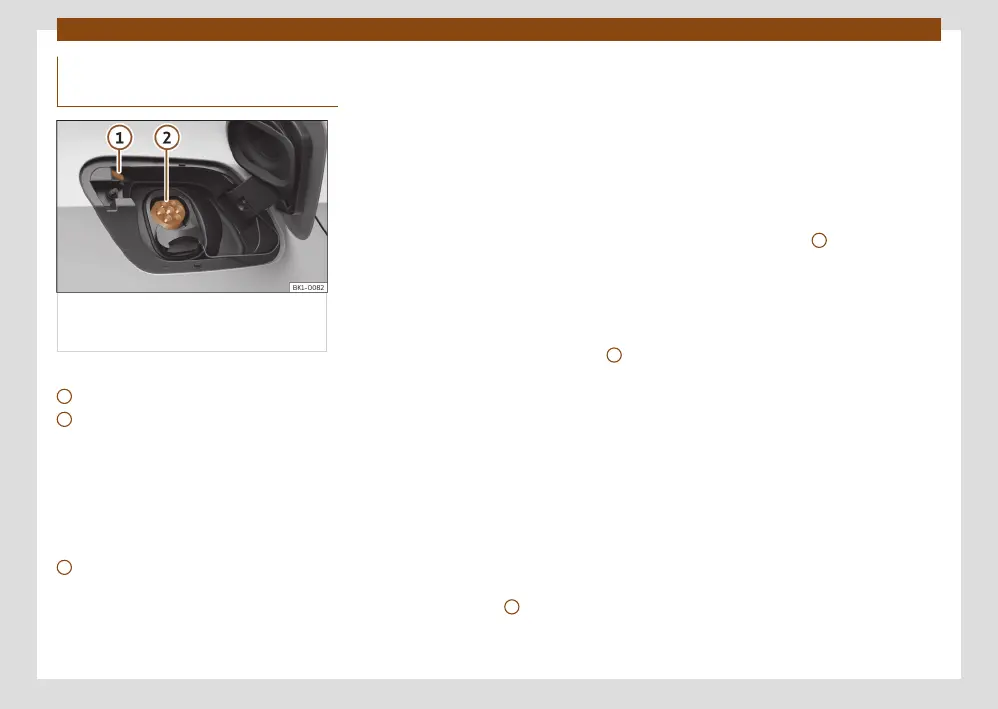
Fig. 72 Behind the battery charging cover
on the rear right-hand side: Charging
socket.
››› Fig. 72
Charging process display
Charging socket
The battery charger installed in the vehicle
converts alternating current from the public
supply into direct current.
AC charging station, wallbox or power socket
cable: The vehicle’s high-voltage battery can
be charged using alternating current (AC)
through the corresponding charging socket
2
.
Connecting the charging cable
•
Firstly, connect the charging cable to the
electrical socket, charging station or Wallbox.
Next, fully unwind it.
•
Charging cable for domestic power sockets:
The protection device performs a self-test
››› page 87.
•
With the vehicle unlocked, the battery
charging cover opens when it is pressed
››› Fig. 72.
•
Plug the charging connector into the charg-
ing socket. Check that the charging connector
is fully plugged in.
The connector locks automatically. The LED
(charging process indicator) of the charging
socket ashes or ashes white ››› Fig. 72
1
›››
page 82.
You can set the charging as required in the
infotainment system ››› page 74.
Automatic start of the charging process
If programmed charging is not activated,
the charging process starts immediately
››› page 77. The external charging infrastruc-
ture must be active.
During the charging
The charging process indicator on the charg-
ing socket ashes green
1
. The charging con-
nector is locked.
If the charging process indicator lights up red,
there is a fault ››› page 82.
Interrupt the charging process
The charging process can be interrupted:
•
Unlock the vehicle.
•
Press the Stop charging function but-
ton of the infotainment system. The charging
process indicator located next to the charg-
ing socket lights up white
1
. If you want the
charging connector to unlock automatically,
the Release connector automatically set-
ting must be selected in the charging settings
›››
page 36.
•
Press the
Continue
button to restart the
process. The charging connector locks. In
some cases you make need to authenticate
yourself again in the charging station.
To restart the charging process just press the
function button to start the charging process.
After charging
When the high-voltage battery is fully charged,
the charging process display on the charging
socket lights up green.
•
Unlock the vehicle.
•
Unplug the charging connector from the
charging socket within 30 seconds.



 To Next Page