2. Presentation
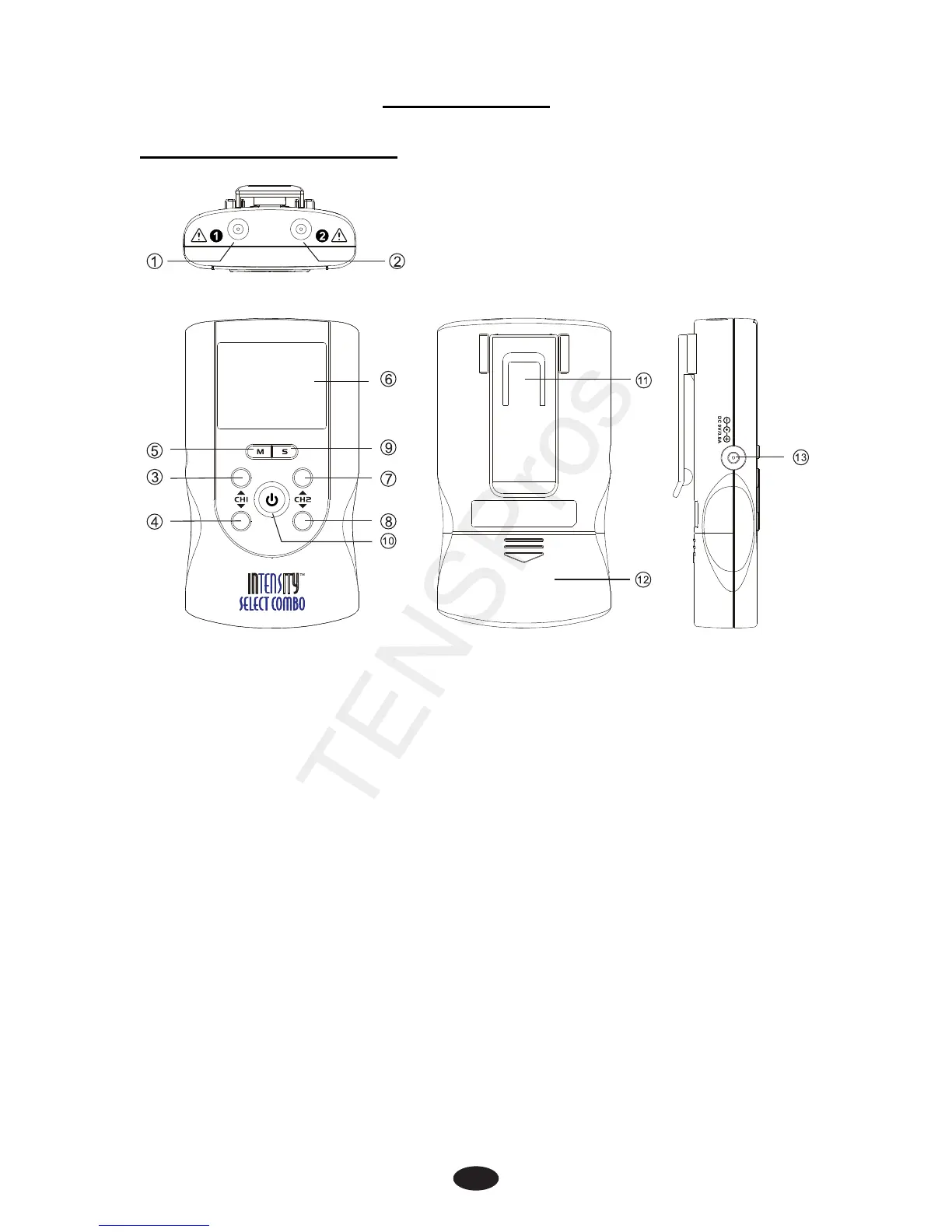
2.1 Front and Rear Panel
1) Output socket: electric signal output after connection of the
cable with adhesive electrodes on channel 1.
2) Output socket: electric signal output after connection of the
cable with adhesive electrodes on channel 2.
3) Increasing the output intensity of channel 1 [▲]. Use to set
the application program and the parameter of the waveform in
the setting state.
4) Decreasing the output intensity of channel 1 [▼]. Use to set
the application program and the parameter of the waveform
in the setting state and to unlock the current treatment
program.
5) Therapeutic mode selection. Stop the treatment. Exit setting
mode to return to the user interface.
6) LCD display: Shows the operating state of the device.
7) Increasing the output intensity of channel 2 [▲]. Use to set
the application program and the parameter of the waveform in
the setting state.


 To Next Page