8) Decreasing the output intensity of channel 2 [▼]. Use to set
the application program and the parameter of the waveform
in the setting state. Use to unlock the current treatment
program.
9) Parameter Selection: press the button to enter setting state;
you can select the different parameters in conjunction with
[▲] and [▼].
10) Press [ ] to turn ON. Press [ ] button and hold for
approximately 3 seconds to turn off the device.
11) Belt Clip.
12) The battery compartment cover for user access.
13) Adapter Receptacle.
2.2 LCD display
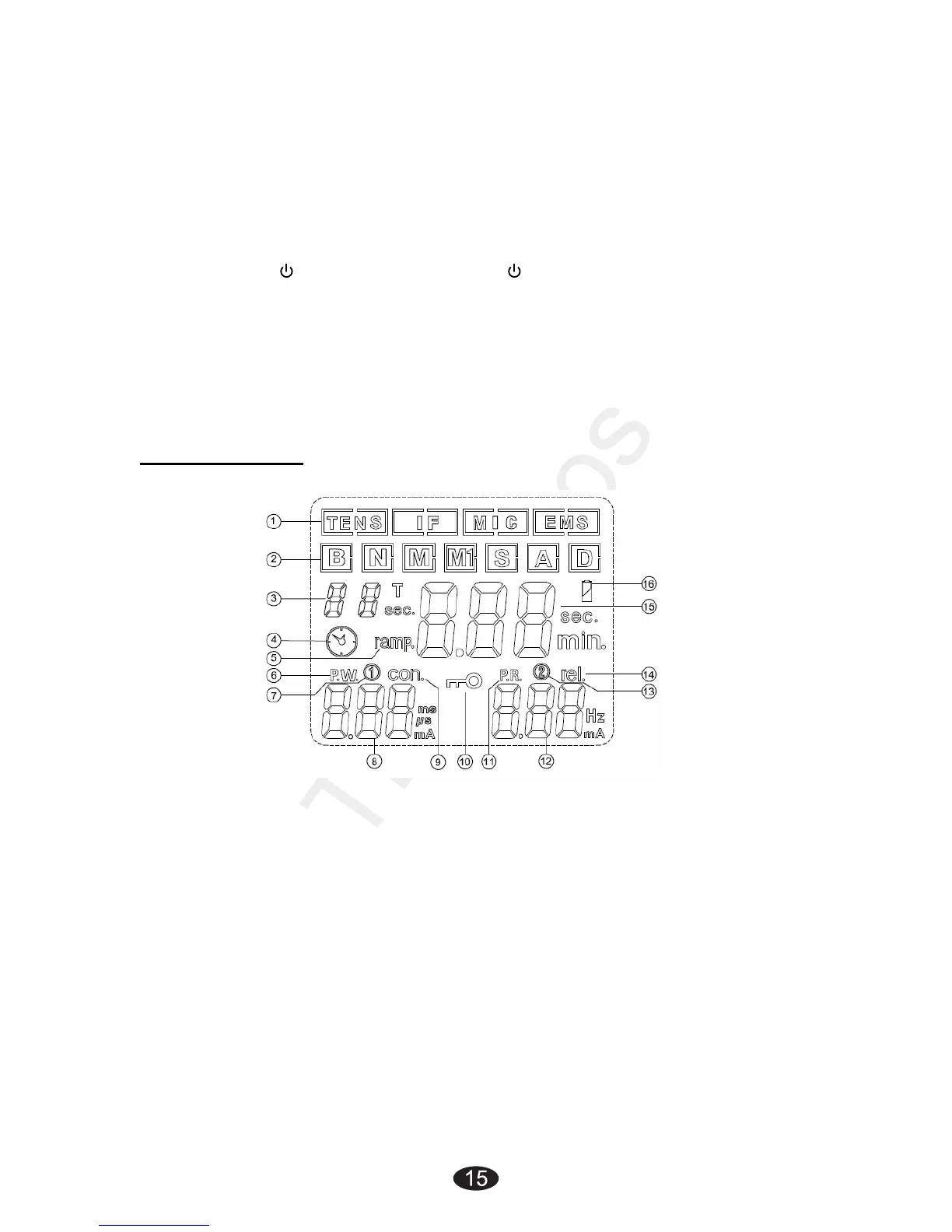
1) Displays therapeutic mode.
2) Displays therapeutic program for TENS and EMS therapeutic
mode.
3) Displays therapeutic program for IF and MIC therapeutic mode
or displays the cycle time for TENS, IF and MIC therapeutic
mode in setting state.
4) Timer symbol.
5) EMS waveform of ramp up and ramp down time.
6) Display of waveform pulse width.
7) Displays channel 1.
8) Display of the output intensity for channel 1 (CH1); Display of
waveform pulse width or EMS waveform of contraction
(working) time in setting state.


 To Next Page