15
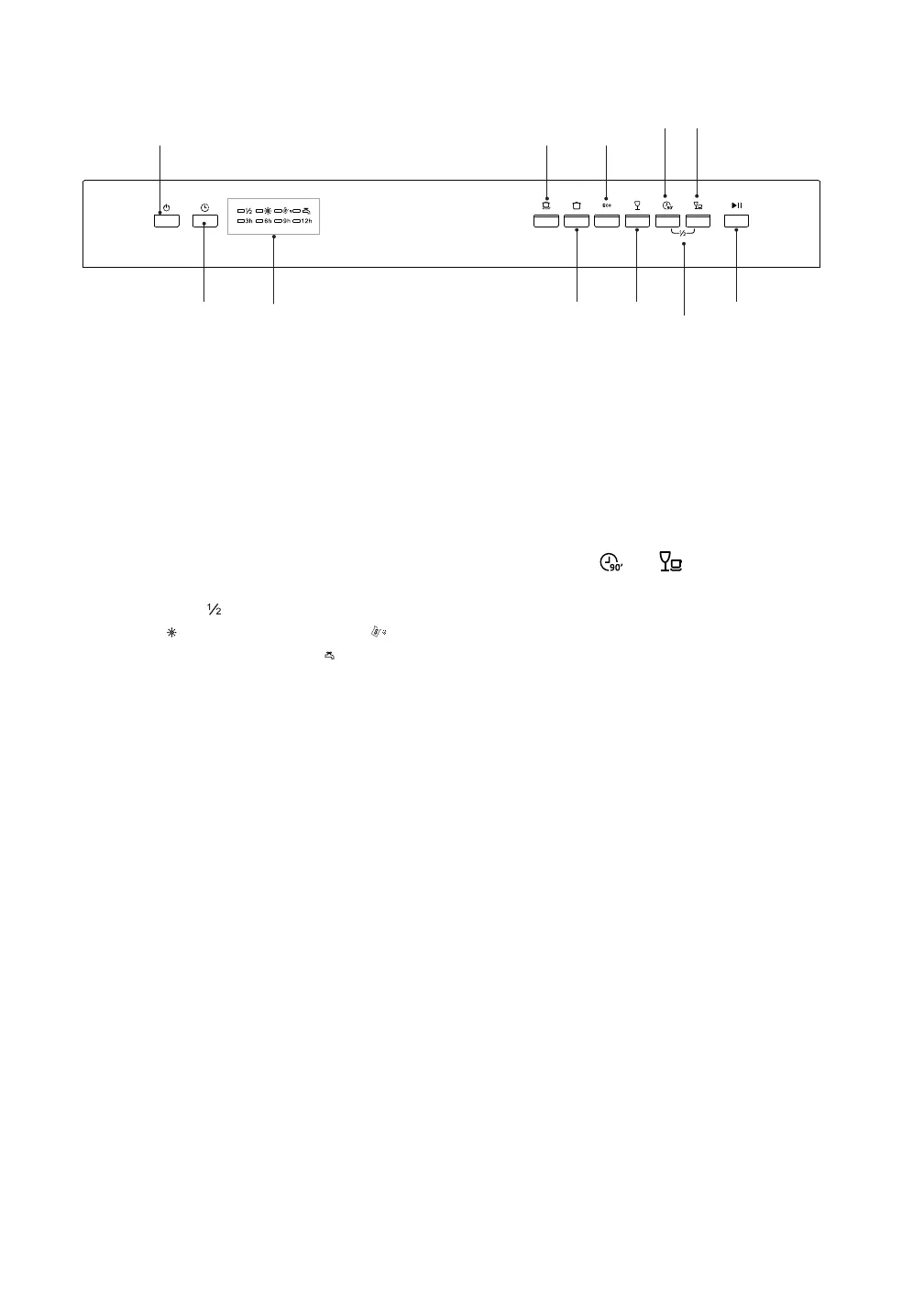
1. On / O Button
• Turn the dishwasher on and o.
2. Delay Button
• Press to preset the wash timer and delay
the starting time by up to 12 hours.
3. Indicator Lights
• Illuminate when half load washing is
selected (
); when need to rell rinse
aid ( ); when need to rell salt ( ); when
water tap is not opened ( ); and when
delay wash is selected (3h, 6h, 9h, 12h).
4. Intensive Programme
• For heaviest soiled crockery and dishes.
5. Normal Programme
• For normally soiled dishes.
6. ECO Programme
• For normally soiled dishes. The most
ecient programme in terms of water
and energy consumption.
Control Panel
1 4 6
8
7. Glass Programme
• For lightly soiled glass and crockery.
8. 90-min Programme
• For lightly soiled dishes.
9. Half Load Programme
• Press both
and buttons at the
same time to select the half load
washing cycle.
10. Rapid Programme
• A quick wash for lightly soiled dishes.
11. Start / Pause button
• Conrm and start the selected washing
programme.
• Pause the washing programme.
2 3
5
7
9
11
10
CDW60W_B_S16/A_IB_RC_171116_grace.indd 15 16/11/17 6:08 pm


 To Next Page