EasyManua.ls Logo

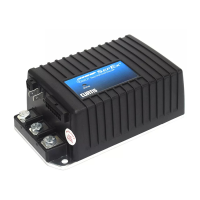
Curtis Instruments 1212 - User Manual

Curtis Instruments 1212
52 pages
Print Icon
To Next Page IconTo Next Page
Loading...
Manual
Electronic Motor Controllers
Read Instructions Carefully!
Specications are subject to change without notice.
© 2019 Curtis Instruments, Inc. ® Curtis is a registered trademark of Curtis Instruments, Inc.
© The design and appearance of the products depicted herein are the copyright of Curtis Instruments, Inc. 53112 Rev F Sep 2019
Curtis Instruments, Inc.
200 Kisco Avenue
Mt. Kisco, NY 10549
www.curtisinstruments.com
Models 1212 & 1212P

Table of Contents

Questions and Answers

  • B
    Bradley WilliamsSep 6, 2025
    What to do if Curtis Instruments Controller shows MAIN FAULT?
    • R
      Rebecca BergerSep 6, 2025
      If the Curtis Instruments Controller displays a MAIN FAULT, it could be due to a main contactor that is welded or stuck open, so replace the main contactor. Another possible cause is a fault in the main contactor driver, so inspect and repair or replace the main contactor driver.
  • S
    stonemichaelAug 22, 2025
    What to do if Curtis Instruments Controller shows a THERMAL FAULT?
    • R
      Rachel MorrisAug 22, 2025
      If the Curtis Instruments Controller displays a THERMAL FAULT, it could be due to several reasons. First, check the environment temperature to ensure it is between -10°C and 80°C. Second, reduce the load on the vehicle to prevent overheating. Third, avoid operating the vehicle in extreme environments. Finally, inspect and repair the electromagnetic brake if it is not releasing properly.
  • E
    Emma MitchellSep 4, 2025
    How to fix Curtis Instruments Controller BRAKE ON FAULT?
    • R
      rclineSep 4, 2025
      To resolve a BRAKE ON FAULT on the Curtis Instruments Controller, first inspect and repair the electromagnetic brake driver if it is shorted. Also, inspect and replace the electromagnetic brake coil if it is open.
  • L
    Lindsay WarrenSep 2, 2025
    What to do if Curtis Instruments Controller shows SPEED POT FAULT?
    • M
      Michael PerezSep 2, 2025
      If the Curtis Instruments Controller is showing a SPEED POT FAULT, inspect and repair the speed limit pot wiring if it's broken or shorted. If the wiring is fine, the speed limit pot itself might be broken and needs replacement.
  • A
    Amber ReedSep 1, 2025
    What causes Curtis Instruments Controller HARDWARE FAILSAFE?
    • K
      Karen JacksonSep 1, 2025
      A HARDWARE FAILSAFE on the Curtis Instruments Controller can be caused if the motor voltage does not correspond to the throttle request, so ensure motor voltage corresponds to throttle request. It can also be caused by a short in the motor or motor wiring, so inspect for shorts in motor or wiring. In some cases, this fault indicates a controller failure, so replace the controller if faulty.
  • D
    Douglas ShepardAug 30, 2025
    How to troubleshoot Curtis Instruments Controller HPD FAULT?
    • F
      Frank JonesAug 31, 2025
      To troubleshoot an HPD FAULT on a Curtis Instruments Controller, ensure the correct sequence of throttle and KSI inputs. Also, check for a misadjusted throttle pot and adjust it properly.
  • E
    Elizabeth RoseAug 29, 2025
    What to do if Curtis Instruments Controller has WIRING FAULT?
    • H
      heatherheathAug 29, 2025
      If your Curtis Instruments Controller is showing a WIRING FAULT, you should first check if the throttle is misadjusted and adjust it properly. Also, the throttle pot or throttle mechanism might be broken, so replace them if necessary.
  • P
    pquinnAug 27, 2025
    What causes Curtis Instruments Controller CURRENT SENSE FAULT?
    • S
      Sherry VasquezAug 27, 2025
      A CURRENT SENSE FAULT in the Curtis Instruments Controller can be triggered by a short in the motor or motor wiring, so inspect for shorts in the motor or wiring. In some cases, this fault indicates a controller failure, so replace the controller if faulty.
  • E
    Eric GrimesAug 27, 2025
    What to do if Curtis Instruments Controller shows THROTTLE FAULT?
    • T
      tonya37Aug 27, 2025
      If a Curtis Instruments Controller displays a THROTTLE FAULT, first inspect the throttle input wiring for any opens or shorts. Next, if the wiring is intact, the throttle pot may be defective and require replacement. Lastly, ensure that the correct throttle type is selected for the controller.
  • V
    vbrownAug 25, 2025
    Why Curtis Instruments Controller shows UNDERVOLTAGE FAULT?
    • T
      troylopezAug 26, 2025
      An UNDERVOLTAGE FAULT on the Curtis Instruments Controller typically occurs when the battery voltage drops below 17 volts, so charge the battery. It can also be caused by a bad connection at the battery or controller, so inspect and repair these connections.

Summary

1 - OVERVIEW

Smooth and Secure Control

Advanced speed regulation, linear cutback, optional speed limit, and proprietary algorithms for smooth operation.

Easy Installation and Setup

Industry standard footprint, programming ease, versatile throttle acceptance, and simplified troubleshooting.

Valuable Additional Features

Features like push switch brake release, push-too-fast restriction, automatic compensation, multi-mode, power saver, and IP54 sealing.

Robust Safety and Reliability

High RF immunity, continuous monitoring, automatic power-up checks, and adherence to regulations.

1212 P Pallet Truck Features

Specific features for pallet trucks like BDI meter input, emergency reverse, and lift lockout output.

2 - INSTALLATION AND WIRING

Controller Mounting

Guidance on selecting a clean, dry location and using M4 screws for mounting the controller.

High Current Connections

Details on the four 1/4" Faston terminals for high current motor and battery connections.

Low Current Connections

Information on the 14-pin Molex connector for low current logic control connections.

1212 Standard Wiring Configuration

Wiring diagram for a typical DME application using a 3-wire potentiometer throttle.

1212 P Standard Wiring Configuration

Wiring diagram for a typical pallet truck application using a Curtis electronic throttle.

Throttle Wiring Overview

Description of throttle wiring options for the controller.

5 kΩ, 3-Wire Potentiometer Throttle

Wiring and programming for a 5kΩ, 3-wire potentiometer throttle, including fault protection.

Voltage Throttle Wiring

Wiring for a voltage throttle and its programming for Throttle Type 5-9 input signals.

Speed Limit Pot and Lift Lockout Input

Functionality of a speed limit pot and its dual use as a lift lockout input on 1212P models.

SWITCHES AND OTHER HARDWARE

Keyswitch Operation

Requirements for the master on/off switch, providing logic power and driving control inputs.

Push Switch; Emergency Reverse

Using a push switch for brake release, driving inhibition, and emergency reverse on 1212P.

Brake Release Switch

Using a switch to disable the electromagnetic brake coil when mechanically released.

Mode Switch Operation

Selecting between two operating modes (Mode 1 and Mode 2) for different driving conditions.

Emergency Stop Switch

Function of the emergency stop switch for immediate brake engagement and system shutdown on 1212P.

3 - PROGRAMMABLE PARAMETERS

Drive Menu Parameters

Parameters controlling acceleration, deceleration, speed limits, and soft start functions.

Throttle Menu Parameters

Parameters for setting throttle type, deadband, maximum throttle, and HPD.

Speed Menu Parameters

Parameters for setting independent forward and reverse speeds in two distinct modes.

Current Menu Parameters

Parameters for main current limit, braking current limit, and boost current.

Inhibit Menu Parameters

Parameters for controlling speed inhibit functionality based on input type and speed limits.

Brake Menu Parameters

Parameters for brake delay, fault check, hold voltage, and brake light activation.

Horn Menu Parameters

Parameters for fault beeps, reverse beeps, and beep tone constants.

Motor Menu Parameters

Parameters for system resistance, speed scaling, current rating, and cutback gain.

Stall Menu Parameters

Parameters for detecting motor stalled faults, including stall speed, PWM, and timeout.

BDI Menu Parameters

Parameters for configuring the Battery Discharge Indicator (BDI) for battery status.

Compensation Menu Parameters

Parameters for IR compensation and anti-rollback compensation for load and stopping.

Emergency Reverse Menu

Parameters for emergency reverse speed, deceleration, acceleration, and interlock features.

Miscellaneous Menu Parameters

Parameters for sleep mode, reset drive time, emergency stop, and pump SRO.

4 - MONITOR MENU

Monitor Menu Functionality

Access real-time vehicle data for diagnostics, troubleshooting, and parameter adjustment.

5 - INITIAL SETUP

Begin Setup Procedures

Initial steps for setup, including controller power-up and switch checks.

Throttle Setup and Tuning

Setting throttle type, neutral deadband, and throttle max for optimal response.

Basic Vehicle Checkout

Verifying switch statuses, throttle inputs, and charger inhibit functionality.

System Resistance Setting

Procedure for accurately setting the System Resistance parameter for load compensation.

6 - VEHICLE PERFORMANCE ADJUSTMENT

Setting Maximum Speeds

Programming maximum speeds for forward and reverse in different modes using speed limit pot positions.

Acceleration and Deceleration Rates

Defining acceleration/deceleration rates at speed limit pot endpoints for smooth control.

Load Compensation and Smoothness Tuning

Tuning IR compensation, anti-rollback, and response smoothness for better vehicle handling.

7 - DIAGNOSTICS AND TROUBLESHOOTING

Diagnostic Methods

Using programmer displays and status LED flashes to diagnose and troubleshoot faults.

Fault Handling

Controller's safe response to detected faults, ranging from current reduction to complete shutdown.

8 - MAINTENANCE

Diagnostic History Maintenance

Accessing and clearing the controller's fault history file as part of routine maintenance.

APPENDIX A: VEHICLE DESIGN CONSIDERATIONS

Electromagnetic Compatibility (EMC)

Guidelines for managing emissions and immunity for EMC in vehicle design.

APPENDIX B: EN 13849 COMPLIANCE

1212 P Safety Compliance

Overview of 1212P controller compliance with EN 13849 safety standards for machinery.

APPENDIX C: BDI SETUP

Battery Discharge Indicator Setup

Procedure for configuring BDI parameters based on battery and charger specifications.

APPENDIX D: PROGRAMMING DEVICES

Curtis Programming Devices

Information on PC Programming Station and handheld programmer capabilities and functions.

APPENDIX E: SPECIFICATIONS

1212 Controller Specifications

Technical data for the 1212 controller, including electrical, environmental, and performance parameters.

Curtis Instruments 1212 Specifications

General IconGeneral
BrandCurtis Instruments
Model1212
CategoryController
LanguageEnglish

Related product manuals