14
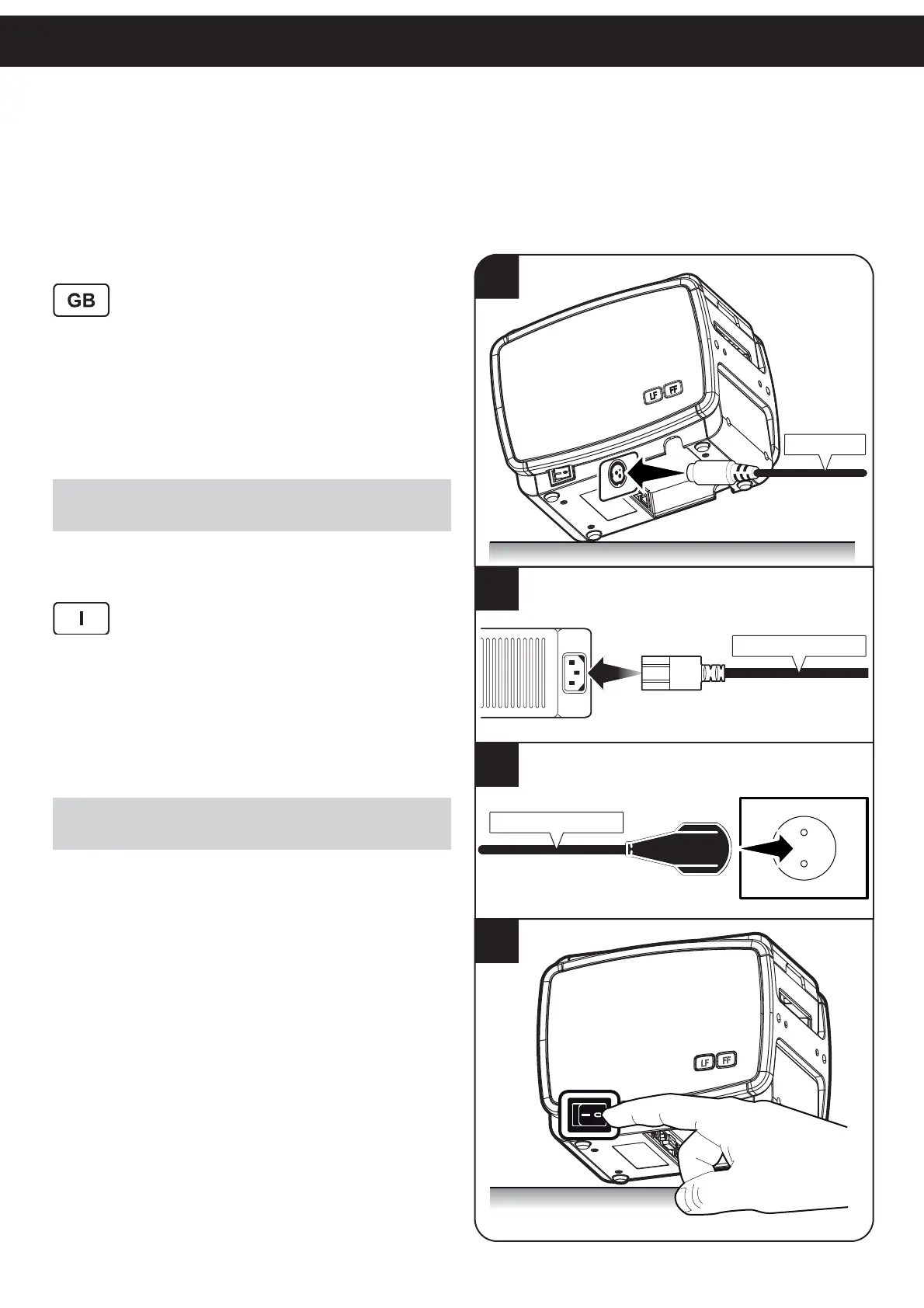
SWITCH PRINTER ON/OFF
Accendere / Spegnere la stampante
Brancher / Éteindre l’imprimante
Den Drucker einwieden / ausschlaten
Encender / Apagar la impresora
1. Connect power supply to the power supply
connector on printer.
2. Connect the power supply cable to power
supply.
3. Connect power supply to outlet.
4. Press the ON/OFF key.
NOTE:
Use the type of electrical power supply indicated on the printer label
and/or the power supply.
1. Collegare l’alimentatore al connettore di
alimentazione della stampante.
2. Collegare il cavo di alimentazione all’alimen-
tatore
3. Collegare l’alimentatore alla presa di rete.
4. Premere il tasto ON/OFF.
NOTA:
Utilizzare il tipo di alimentazione elettrica indicato sull’etichetta della
stampante e/o alimentatore.
4
ON/OFF
LF
FF
2
Power Supply cable
1
LF
FF
VIn 24Vdc
Power Supply
3
Power Supply cable



 To Next Page