3. Installation
3.1 Unpacking and Inspection
Before installation, please inspect the unit. Be sure that nothing inside the package is damaged. You should have
received the following items in the package:
The unit x 1
User manual x 1
Communication cable x 1
Software CD x 1
Current sharing cable (CPS5000ECH48A-P available)
Parallel communication cable (CPS5000ECH48A-P available)
3.2 Preparation
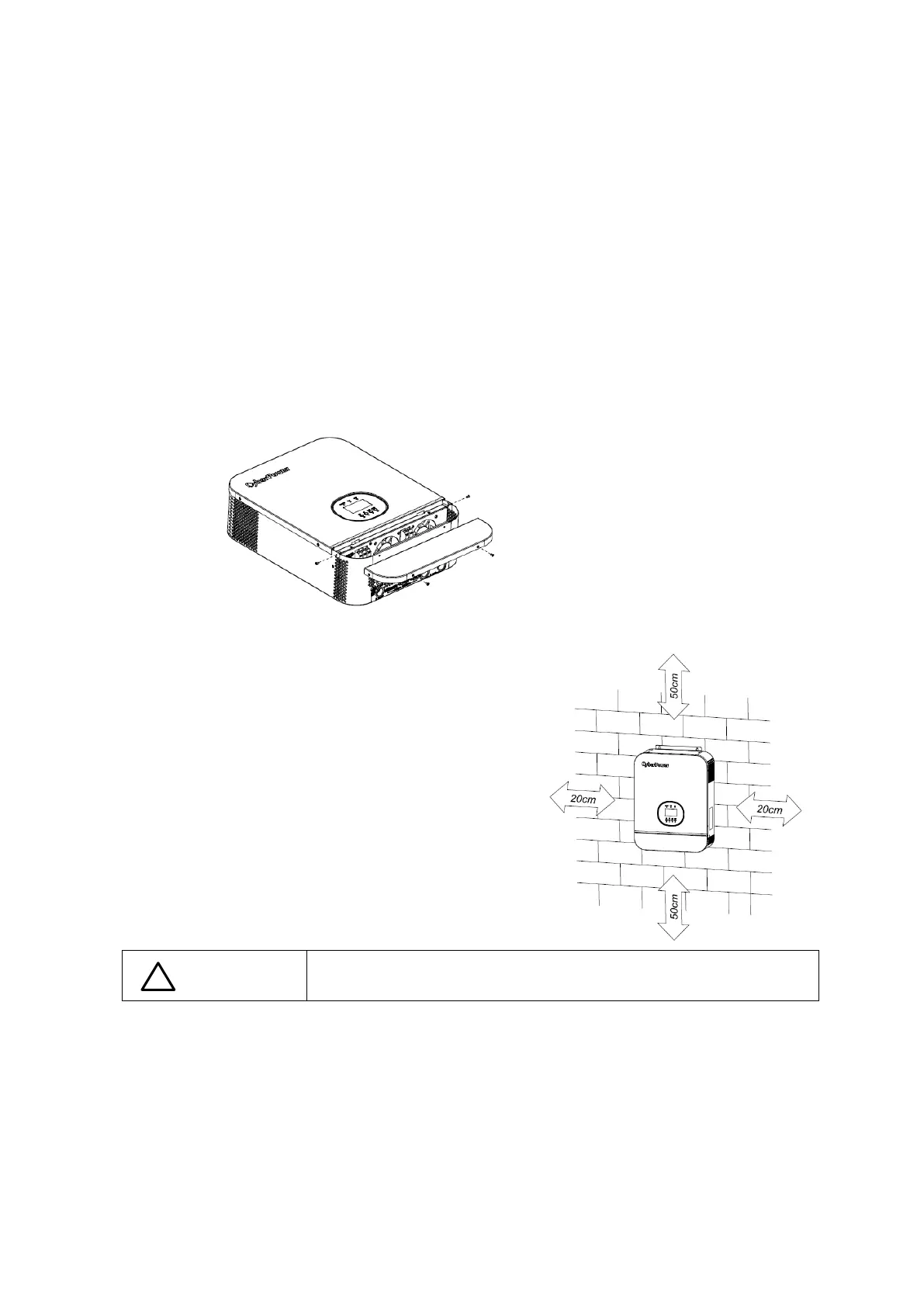
Before connecting all wiring, please take off bottom cover by removing four screws as shown below.
3.3 Mounting the Unit
Consider the following points before selecting where to install:
Do not mount the inverter on flammable construction
materials.
Mount on a solid surface
Install this inverter at eye level in order to allow the LCD
display to be read at all times.
The ambient temperature should be between 0°C and 55°C to
ensure optimal operation.
The recommended installation position is to be adhered to the
wall vertically.
Be sure to keep other objects and surfaces as shown in the right
diagram to guarantee sufficient heat dissipation and to have
enough space for removing wires.
Suitable for mounting on concrete or other non-combustible surface
only.


 To Next Page