Yellow Wire to (+)Red Connector
Black Wire to (-)Black Connector
Red Wire to (+)Red Connector
Yellow Wire to (-)Black Connector
1 2 3 4 5
(+)Red
(-)Black
(+)Red
(-)Black
6 7 8
SERIALUSB
OUTIN
W IRINGFAULT
1
4 5
6
7
11 11
3
2
10
9
8
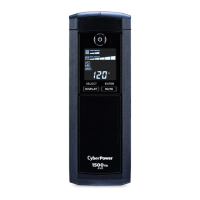
CP1500AVRL
User’s Manual
K01-0000860-00
Thank you for purchasing a CyberPower product. Please take a few minutes to register your product at: www.cyberpowersystems.com/
registration. Registration certifies your product's warranty, confirms your ownership in the event of a product loss or theft and entitles you to
free technical support. Register your product now to receive the benefits of CyberPower ownership.
OVERVIEW
The CP1500AVRL provides complete power protection from utility power that is not always consistent.
The CP1500AVRL features 1500 Joules of surge protection. The unit provides long lasting battery
backup during power outages with maintenance free batteries. The CP1500AVRL ensures consistent
power to your computer system and includes software that will automatically save your open files and
shutdown your computer system during a utility power loss.
AUTOMATIC VOLTAGE REGULATOR
The CP1500AVRL stabilizes inconsistent utility power voltage to nominal levels that are safe for
equipment. Inconsistent incoming utility power may be damaging to important data files and hardware,
but with Automatic Voltage Regulation (AVR), damaging voltage levels are corrected to safe levels.
AVR automatically increases low utility power or decreases high utility power to a consistent and safe 110/120 volts.
HOW TO DETERMINE THE POWER REQUIREMENTS OF YOUR EQUIPMENT
1. Ensure that the equipment plugged into the outlet does not exceed the UPS’s rated capacity (1500VA/900W for CP1500AVRL). If the rated
capacity of the unit is exceeded, an overload condition may occur and cause the UPS to shut down or the circuit breaker to trip.
2. There are many factors that can affect the amount of power that your computer system will require. It is suggested that the load placed on the
battery outlets not exceed 80% of the unit’s capacity.
HARDWARE INSTALLATION GUIDE
1. Your new UPS may be used immediately upon receipt. However, after receiving a new UPS, to ensure the
battery’s maximum charge capacity, it is recommended that you charge the battery for at least 8 hours. Your
UPS is equipped with an auto-charge feature. When the UPS is plugged into an AC outlet, the battery will
automatically charge whether the UPS is turned on or off.
2. Note: This UPS is designed with a safety feature to keep the system from being turned on during shipment.
The first time you turn the UPS on, you will need to have it connected to AC power or it will not power up.
3. With the UPS unit turned off and unplugged, connect your computer, monitor, and any other peripherals requiring battery backup into the
battery power supplied outlets. DO NOT plug a laser printer, paper shredder, copier, space heater, vacuum, sump pump or other large
electrical devices into the “Battery and Surge Protected Outlets”. The power demands of these devices may overload and damage
the UPS.
4. Plug the UPS into a 2 pole, 3 wire grounded receptacle (wall outlet). Make sure the wall branch outlet is
protected by a fuse or circuit breaker and does not service equipment with large electrical demands (e.g.
air conditioner, copier, etc.). The warranty prohibits the use of extension cords, outlet strips, and surge
strips.
5. Press the power switch to turn the unit on. The Power On indicator light will illuminate and the unit will
“beep”. If an overload is detected, an audible alarm will sound and the unit will emit one long beep. To correct this, turn the UPS off and
unplug at least one piece of equipment from the battery power supplied outlets. Make sure the circuit breaker is depressed and then turn the
UPS on.
6. To maintain optimal battery charge, leave the UPS plugged into an AC outlet at all times.
7. To store the UPS for an extended period, cover it and store with the battery fully charged. While in storage, recharge the battery every three
months to ensure battery life.
8. Ensure the wall outlet and UPS are located near the equipment being attached for proper accessibility.
DESCRIPTION
1
Power Switch
Used as the master on/off switch for equipment connected to the battery power supplied outlets.
2 MUTE button
The button can be used to mute battery mode alerts and to set up the sensitivity. For more information, please refer to the” Function Setup
Guide” section.
Pressing the button will turn off / on the battery mode alarm, including on battery / low battery warnings.
To turn the alarm off, press the MUTE button. You will
hear two short beeps when the alarm is turned off.
To turn the alarm back on, press the MUTE button. You will hear a short beep when the alarm is turned on.
3 LED Indicators
The LEDs indicators show the UPS status, including On Line / On Battery / AVR and Overload.
4 Battery and Surge Protected Outlets
The UPS has five battery powered/surge suppression outlets for connected equipment to ensure temporary uninterrupted operation of your
equipment during a power failure. (DO NOT plug a laser printer, paper shredder, copier, space heater, vacuum, sump pump or other
large electrical devices into the “Battery and Surge Protected Outlets”. The power demands of these devices may overload and
damage the unit.)
5 Full-Time Surge Protection Outlets
The UPS has five surge suppression outlets.
6 Circuit Breaker
Located on the back of the UPS, the circuit breaker serves to provide overload and fault protection.
7 Wiring Fault Indicator (red)
This LED indicator will illuminate to warn the user that a wiring problem exists, such as bad ground, missing ground or reversed wiring. If
this is illuminated, disconnect all electrical equipment from the outlet and have an electrician verify the outlet is properly wired. The UPS will
not provide surge protection without being plugged into a grounded and properly wired wall outlet.
8 Serial/USB Ports to PC
The USB port allows connection and communication between the USB port on the computer and the UPS unit.
9 Coax/Cable/DSS Surge Protection
The Coax/Cable/DSS protection ports will protect any cable modem, CATV converter, or DSS receiver.
10 Communication Protection Ports
Communication protection ports, bi-directional, will protect a 10/100/1000 Ethernet connection (RJ45).
11 Outlets Designed for AC Adapters
The unit has two outlets spaced to allow AC power adapter blocks to be plugged into the UPS without blocking adjacent outlets.
REPLACING THE BATTERY
Replacement of batteries located in an OPERATOR ACCESS AREA.
1. When replacing batteries, replace with the same number of the following battery: CyberPower / RB1290X2 for CP1500AVRL.
2. CAUTION! Risk of Energy Hazard, 24 V, maximum 9 Ampere-hour battery for CP1500AVRL. Before replacing batteries, remove
conductive jewelry such as chains, wrist watches, and rings. High energy conducted through these materials could cause severe burns.
3. CAUTION! Do not dispose of batteries in a fire. The batteries may explode.
4. CAUTION! Do not open or mutilate batteries. Released material is harmful to the skin and eyes. It may be toxic.
5. CAUTION: A battery can present a risk of electrical shock and high short circuit current. The following precautions should be observed
when working on batteries:
1) Remove watches rings, or other metal objects.
2) Use tools with insulated handles.
CAUTION - RISK OF EXPLOSION IF BATTERY IS REPLACED BY AN INCORRECT TYPE. DISPOSE OF USED BATTERIES ACCORDING
TO LOCAL REGULATIONS.
BATTERY REPLACEMENT PROCEDURE:
1. Turn off and unplug all connected equipment.
2. Turn the UPS off and unplug it from the AC power source.
3. Turn the UPS on its side.
4. Remove two retaining screws located on the bottom of the UPS.
5. Slide the battery compartment cover completely off of the unit.
6. Remove the battery which is located on the right side from the compartment.
7. Disconnect the battery wires from the right side of the battery.
8. Slide the remaining battery from left to right and remove it from the compartment.
9. Disconnect the battery wires from the remaining battery.
10. Install the "left side" replacement battery by connecting the yellow wire (+) to the red connector from the battery and the black wire (-) to
the black connector from the battery. Place the battery into the left side of the compartment.
11. Install the "right side" replacement battery by connecting the red wire (+) to the red connector from the battery and yellow wire (-) to the
black connector from the battery. Place the battery into the right side of the compartment. Note: Only new batteries should be used for
replacement and both batteries should be replaced at the same time to insure maximum life span.
12. Slide back the battery compartment cover and tighten the retaining screws.
13. Recharge the UPS for 8-16 hours to fully charge the battery.
REMINDER: Batteries are considered HAZARDOUS WASTE and must be disposed of properly. Most retailers that sell lead-acid batteries
collect used batteries for recycling, as required by local regulations.
On Line
On Battery
AVR
Overload
Alarm
CONDITION
On Off Off Off Off Normal
Off
Flashes
while
beeping
Off Off
Beep twice
every 30
seconds
Utility Failure-
The UPS is providing power to battery protected
outlets from its battery.
Off
Flashes
while
beeping
Off Off
Rapid Beeping
every 1/2
second
Utility Failure - The UPS is providing battery
power. Rapid beeping indicates the unit will run
out of power shortly.
On/Off Off/On Off On Constant tone
Overload Fault - Occurs when connected
equipment exceeds the listed capacity of the
UPS. Turn the UPS off, unplug at least one piece
of equipment from battery outlets, wait 10
seconds, reset the circuit breaker and turn the
unit on.
On/Off Off/On Off Off Constant tone
Short Fault-
Unplug at least one piece of equipment from
battery outlets and turn the UPS on again.
UPS Fault –
Contact CyberPower Systems for support.
On/Off Off/On Off Off
Beep every 2
seconds
Charger Fault - Contact CyberPower Systems
for support.
BASIC OPERATION
(SAVE THESE INSTRUCTIONS)
This Manual Contains Important Instructions
that should be followed during Installation and Maintenance of the UPS and batteries.
CAUTION! To prevent the risk of fire or electric shock, install in a temperature and humidity controlled indoor area free of conductive
contaminants. (Please see specifications for acceptable temperature and humidity range).
CAUTION! To reduce the risk of electric shock, do not remove the cover except to service the battery. Turn off and unplug the unit before
servicing the batteries. There are no user serviceable parts inside except for the battery.
CAUTION! Hazardous live parts inside can be energized by the battery even when the AC input power is disconnected.
CAUTION! The UPS must be connected to an AC power outlet with fuse or circuit breaker protection. Do not plug into an outlet that is not
grounded. If you need to de-energize this equipment, turn off and unplug the unit.
CAUTION! To avoid electric shock, turn off the unit and unplug it from the AC power source before servicing the battery.
CAUTION! To reduce the risk of fire, connect only to a circuit provided with 20 amperes maximum branch circuit over current protection in
accordance with the National Electric Code, ANSI/NFPA 70.
DO NOT USE FOR MEDICAL OR LIFE SUPPORT EQUIPMENT! CyberPower Systems does not sell products for life support or medical
applications. DO NOT use in any circumstance that would affect the operation and safety of life support equipment, medical applications, or
patient care.
DO NOT USE WITH OR NEAR AQUARIUMS! To reduce the risk of fire or electric shock, do not use with or near an aquarium. Condensation
from the aquarium can cause the unit to short out.
DO NOT USE THE UPS ON ANY TRANSPORTATION! To reduce the risk of fire or electric shock, do not use the unit on any transportation
such as airplanes or ships. The effect of shock or vibration caused during transit and the damp environment can cause the unit to short out.
INSTALLING YOUR UPS SYSTEM
INTRODUCTION
Thank you for selecting a CyberPower Systems UPS product. This UPS is designed to provide unsurpassed power protection, operation and
performance during the lifetime of the product.
UNPACKING
Inspect the UPS upon receipt. The box should contain the following:
(a) UPS (b) User’s manual (c) USB A+B type cable
*PowerPanel® Personal software is available on our website. Please visit www.cyberpowersystems.com and go to the Software
Section for free download.
IMPORTANT SAFETY INSTRUCTIONS
DEFINITIONS FOR ILLUMINATED LED INDICATORS
PRODUCT REGISTRATION

 Need help?
 General




 To Next Page