ENGLISH
35
ENGLISH
34
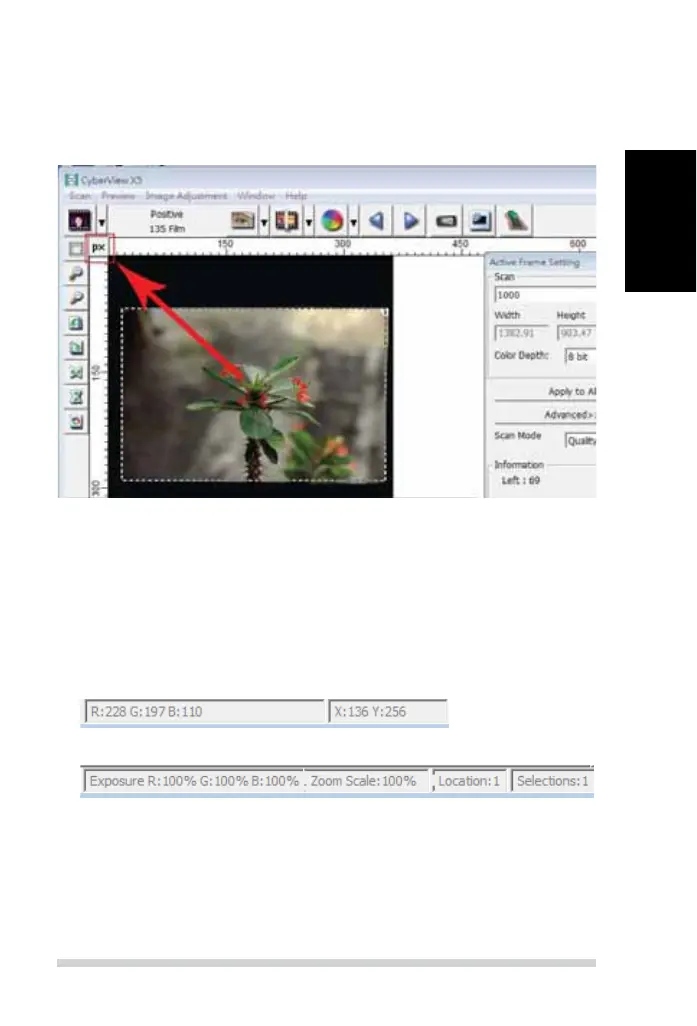
Preview Window
Preview the pre-scan image by selecting the measurement unit “in“- inches,
“cm“- centimeters, “px“ - pixels by clicking the upper-left corner.
Status Line
In the lower left hand corner, the color level (RGB: red, green, blue) and
coordinates of the location [ex: I] are displayed. The zoom scale, the current slide
magazine location and how many areas selected to scan (2 or or higher indicates:
Multiple scan areas on one slide [ex: II].
I.
II.
III. Active Frame Setting Area
A comprehensive advanced mode is available to allow for more user de ned
adjustments.
Normal mode [ex: I] to input the basic parameter to scan (including scan
resolution, lm size, color depth).
Advanced mode [ex: II]to input the parameter of scan and output (including
scan resolution, size, color depth and output resolution,
size, scan mode).
The “Active Frame Setting” only applies to the current preview image, click
“Apply to All” to set parameters in all previewed images. This will not apply
to direct scanning to le.
27
ENGLISH
26
USER INTERFACE
There are three major parts of the CyberView user interface:
I. Menu Commands [Overview + Full]
II. Function Bar Diagram / Toolbar Diagram
III. Active Frame Settings Area
I. Menu Commands [Overview]
Menu Commands - Scan
(overview)
a. Prescan
b. Scan
c. Revert
d. Preference
e. Exit / Quit
Zoom, Rotate & Flip features.
Menu Commands - Preview (overview)



 To Next Page