RIDE CONTROL APP USER GUIDE
29
CYC RIDE CONTROL
04
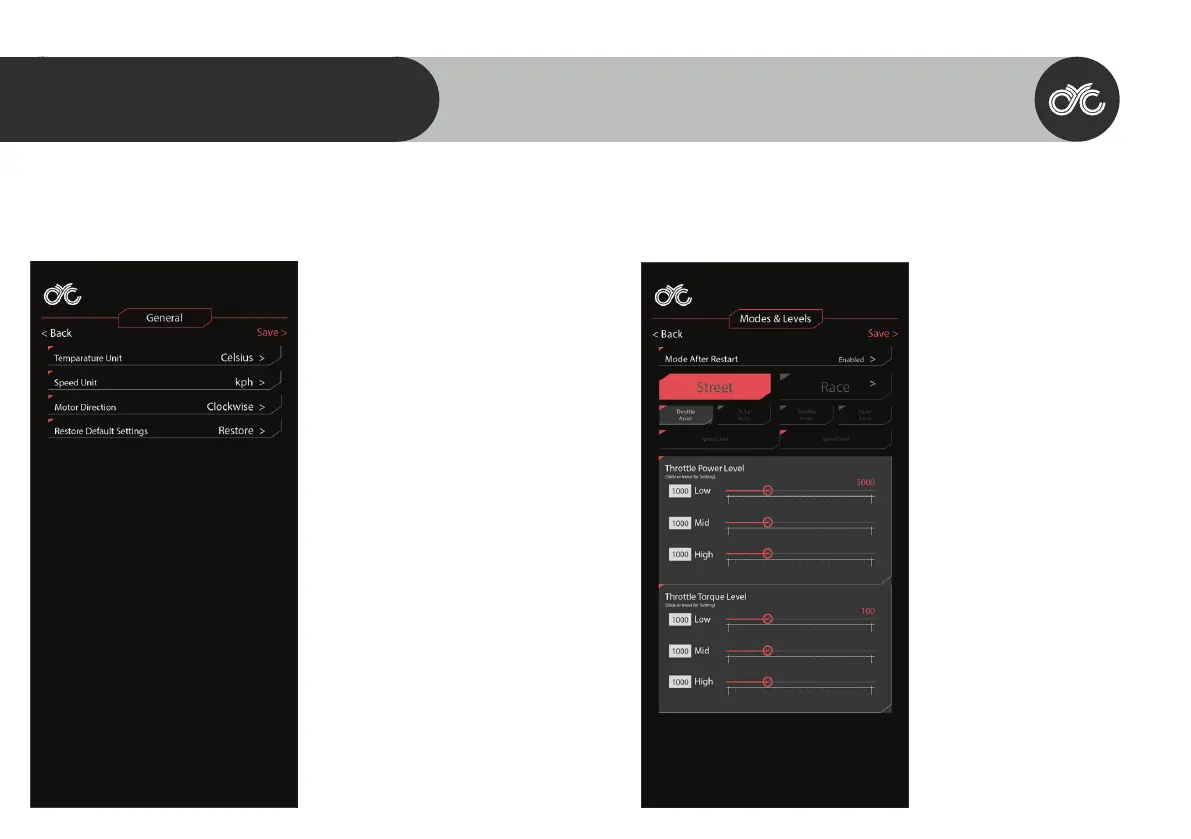
GENERAL
TEMPERATURE UNIT
Set your units to display in degrees Celsius (°C)
or Fahrenheit (°F)
SPEED UNIT
Set the speed unit to miles or kilometers.
MOTOR DIRECTION
This setting is for users who’d want to switch
the direction to where the motor is facing.
Note that this is reserved for specic uses only.
WARNING: Do not change this setting if using
the motor in its default position. Contact CYC
for assistance.
RESTORE DEFAULT SETTINGS
Restore to factory/default settings.
MODES & LEVELS
RACE & STREET MODE
You can set the throttle & PAS output
independently for both modes.
RACE MODE THROTTLE & PAS
Race Mode is your “boost” or “full power” mode
and has parameters set for reaching closer to
the system’s full capabilities. You can adjust
these to your own preference within the
capabilities of your controller. The default
setting in Race Mode is 1200W & 32kph.
STREET MODE THROTTLE & PAS
Street Mode is intended to be set to your
region’s legal limits. You can adjust these to
your own preference or to your region’s legal
limits. You can adjust these to your own
preference or to your region’s legal limits. The
default setting in Street Mode is 750W &
25Km/hr.



 To Next Page