SW102 DISPLAY GUIDE
05
Product Details
Product Name
Intellegent OLED display, model : SW102
Firmware: CYCMotor Ltd specic rmware
Features
• Minimalist design and process
• High brightness, high contrast 1.3-inch monochromatic OLED screen
• Excellent outdoor design with IP65 waterproof rating
Dimensions & Materials
Materials
Product shell - ABS + PC plastic
Transparent window - 2.5D Tempered glass
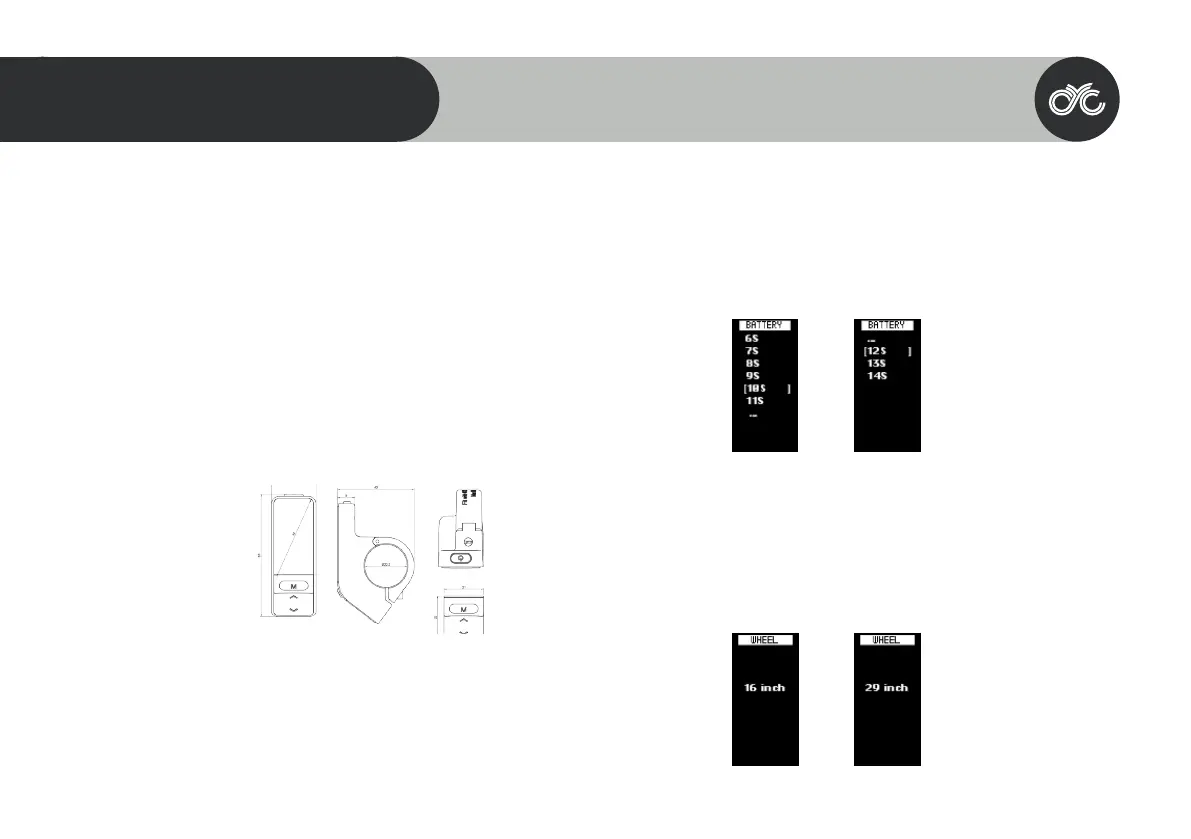
Dimensions
L 23mm x W 40mm x H 63mm
Electrical Specications
• Power supply:DC 36V/48V/ 52V
• Rated current:12mA
• Shutdown leakage current:<1uA
• Screen specication: 1.3” OLED(64*128 dots)
• Communication method:UART (default)
• Operating temperature:-20°C ~ 60°C
• Storage temperature:-30°C ~ 80°C
• Waterproof level: IP65
Quick Start Guide
After unboxing and installing your CYC motor system, there are two main things you need to set up.
1. Change your Battery No. setting according to your rated voltage.
Within 15 seconds of turning on your display, long press the MENU button to enter the settings functions.
Press UP/ DOWN to navigate the settings page & MENU to select.
*Please note that 6s to 9s is not compatible with the CYC systems. This will be removed in future batches. Our
apologies for the confusion.
2. Change your Wheel setting according to your bike’s wheel size.
3. Now, you can set things up like your temperature and speed unit as well as your brightness level.
Otherwise, you’re good to go!
6s = 22.2V
7s = 25.9V
8s = 29.6V
9s = 33.3V
10s = 36V
11s = 40.7V
12s = 44.4V
13s = 48V
14s = 52V
33



 To Next Page