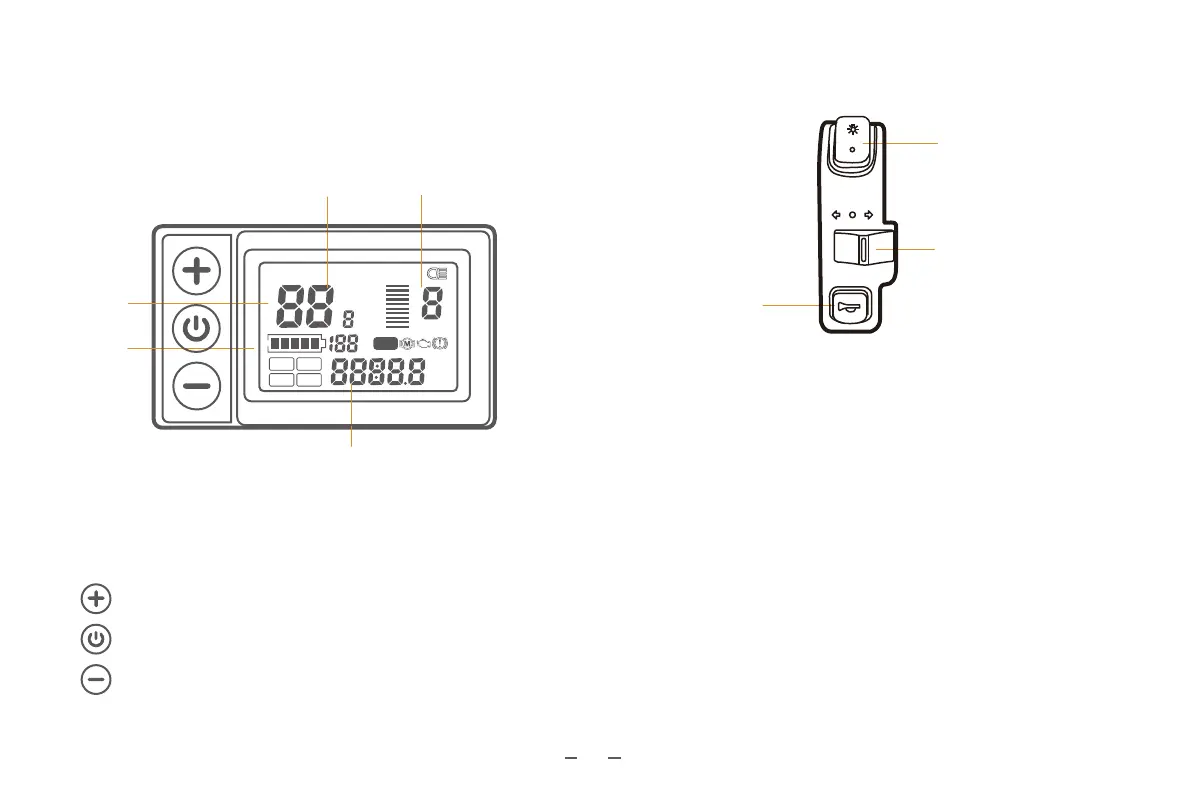
Press to switch speed modes from 1 to 5.
Press to switch speed modes from 5 to 1.
Hold for about 2 seconds to power on/off the e-bike.
Power/+/- Buttons
10
AVG MAX SPEED DST
mph
mile
km
H
L
M
km/h
%
ASSIST
BMS
ODO
TRIP TIME
VOL
Speed Unit
Metric: KM/H
Imperial: MPH
Battery
Level
Value & Units
Current
Speed
PAS Level
Front view
Turn Signal
Horn
Front & Rear Lights
Front & Rear Lights/Turn Signals/Horn
Buttons
lights.
turn on right turn signal. Turn off turn signals when in the middle.
Press or hold to activate the horn.
III. Function Description
Functions:
1. On the screen
Speed, Battery Level, Error Code, Total Distance, and Trip
Distance
2. Controls and settings
Power on/off, set wheel diameter, set auto sleep time, set
backlight brightness, set power on method, set drive mode, set
voltage level, set controller current limit
S866



 To Next Page